umu-launcher
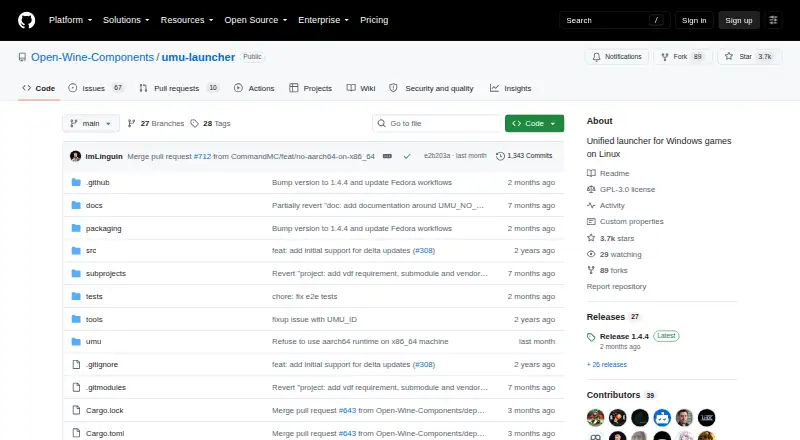
umu-launcher: A focused open-source Proton backend for non-Steam Windows games on Linux. Ranked #15 of 27 in Game Compatibility Layers by our editors (5.9/10); pricing: Open source; best for linux users running non-Steam Windows games with Proton.
At a glance
- Editor score5.9 / 10
- PricingOpen source
- Best forLinux users running non-Steam Windows games with Proton
- Paid fromNone
- Runtime modelTranslation + runtime
- Facts checked20 Sep 2026
Where it wins
- Runs Windows executables outside Steam through Proton and Steam Linux Runtime
- Automates Proton, runtime component updates, and game-specific protonfixes
- Works with Lutris, Heroic, Bottles, and Rare as a Proton backend
Where it doesn't
- Linux-only, with no native Steam-client integration
- Command-line operation may require more technical configuration
- Proton and runtime workflows are narrower than a full game launcher
Our verdict on umu-launcher
umu-launcher is an open-source Linux launcher and backend for running Windows games through Valve’s Proton and the Steam Linux Runtime outside the Steam client. It is aimed at Linux users who want to run non-Steam Windows executables while retaining Proton’s runtime model. The command-line launcher accepts executables, configurable WINE prefixes, Proton versions, storefront identifiers, and game-specific configuration. Steam and Steam binaries are not required, making umu-launcher suitable for workflows that sit outside the Steam client.
Its strongest area is runtime and compatibility management. umu-launcher uses the Steam Linux Runtime container required by Proton and automatically downloads and updates UMU-Proton and runtime components. It can apply game-specific protonfixes from a unified database, support winetricks verbs, and accept configuration-file settings. Storefront and game identifiers also give other tools a consistent way to describe and launch titles. These features make it more than a basic executable wrapper, particularly for users who want repeatable Proton-based setups.
Ecosystem fit is another clear advantage. Lutris, Heroic Games Launcher, Bottles, and Rare can use umu-launcher as a standardized Proton backend, extending its role across several Linux game-management tools. The trade-off is a focused scope: Linux is the host platform, Steam-client integration is not part of the product, and the workflow centers on Proton, prefixes, runtime components, and command-line configuration rather than an all-in-one launcher experience. Choose umu-launcher for non-Steam Windows games managed through Proton and compatible game tools; choose a broader launcher when native Steam-client workflows or a more general interface are the priority.
umu-launcher pricing
umu-launcher fact sheet
| Free plan | Not verified |
|---|---|
| Paid from | None |
| Host platforms | Linux |
| Runtime model | Translation + runtime |
| DirectX support | Not stated |
| Vulkan support | Not verified |
| Steam integration | No |
| Anti-cheat status | Not stated |
| Deployment | Desktop |
| Platforms | Linux |
| Support | Community, Docs |
| Built for | Solo, Small business (editorial estimate) |
| Integrations | 4 integrations: Lutris, Heroic Games Launcher, Bottles, Rare |
| Pricing | Open source |
| Website | github.com |
| Facts checked | 20 Sep 2026 |
umu-launcher integrations
umu-launcher lists 4 integrations on its own site.
- Lutris
- Heroic Games Launcher
- Bottles
- Rare
Alternatives to umu-launcher
- CrossOverA mature paid compatibility layer with broad Windows app support for Mac and Linux.9.2
- WineA mature, free compatibility layer for running many Windows apps across Linux and macOS.8.2
- OpenNativeA flexible Android game container with broad runtime controls and unsupported anti-cheat.7.7


See all umu-launcher alternatives →
Used umu-launcher? Be the first to review it
The editor score above is our own research. What this page doesn't have yet is a reader's view — what you used umu-launcher for, what worked and what didn't. No stars are seeded and no review is paid for; an editor reads every one before it appears.
Write a reviewTwo minutes · verified accounts only · read by an editor before it appears
Featured on iTechGuides

umu-launcher is listed in our Game Compatibility Layers directory. Add the badge to your site — it links back to this page.
<a href="https://www.itechguides.com/products/umu-launcher/"><img src="https://www.itechguides.com/best/badge/umu-launcher.svg" alt="Featured on iTechGuides" width="230" height="46"></a>
Reviewed by iTechGuides Editors · Editorial team · Updated Sep 2026
Advertiser disclosure: iTechGuides is reader-supported. We may earn a commission when you click some links. How we rank.
Last updated · How we research and update