UltraISO
UltraISO: A focused Windows ISO editor with broad image tools and command-line automation. Ranked #5 of 32 in ISO Creation Software by our editors (8.8/10); pricing: Paid; best for paid Windows ISO editing.
At a glance
- Editor score8.8 / 10
- PricingPaid
- Best forPaid Windows ISO editing
- Free planNo
- Paid from$29.95 one-time
- Disc burningYes
- Facts checked20 Sep 2026
Where it wins
- Edits, extracts, converts, and creates ISO images
- Preserves bootable images and burns CD/DVD media
- Includes checksums and command-line automation
Where it doesn't
- Windows-only platform support
- No free plan
- Focused on CD/DVD disc-image workflows
Our verdict on UltraISO
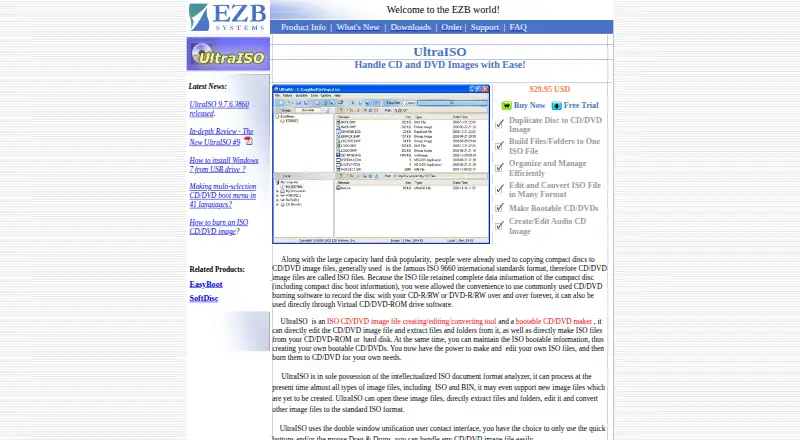
UltraISO is Windows desktop software for creating, organizing, viewing, editing, extracting, converting, and burning CD/DVD disc images. It can create ISO files from files, folders, or optical discs; edit contents by adding, deleting, renaming, and creating directories; and extract files from image files. It is suited to Windows users who need more than basic ISO creation, particularly those managing bootable media, multiple disc-image formats, or repeatable command-line workflows.
Its feature depth is the main reason to choose it. UltraISO can create and preserve bootable CD/DVD images, burn disc images to CD/DVD media, and create or edit audio CD images. It supports image conversion and works with formats including ISO, BIN, IMG, CIF, NRG, MDS, CCD, BWI, ISZ, DMG, DAA, UIF, and HFS. Checksum tools for MD5, CRC-32, and CRC-16 add a way to generate and verify image integrity, while command-line operations cover image creation, extraction, conversion, compression, and checksum work.
The pricing is straightforward: one UltraISO plan costs $29.95 USD as a one-time payment. It includes lifetime free software updates and unlimited email technical support. There is no free plan, so it is aimed at buyers who want a paid desktop utility rather than a no-cost option. Choose UltraISO if you need detailed Windows-based ISO editing, bootable-image handling, disc burning, or automation. Users who need support beyond Windows or a broader platform choice should consider an alternative.
Your product? Our editors can test UltraISO in depth and publish a review, labelled as paid · from $149/mo →
UltraISO pricing
All 1 UltraISO plans and prices →
UltraISO fact sheet
| Free plan | No |
|---|---|
| Paid from | $29.95 one-time |
| Disc burning | Yes |
| Image editing | Yes |
| Image conversion | Yes |
| Bootable media | Yes |
| Image formats | ISO, BIN, IMG, CIF, NRG, MDS, CCD, BWI, ISZ, DMG, DAA, UIF, HFS |
| Operating systems | Windows |
| Checksum verification | Yes |
| Deployment | Desktop |
| Platforms | Windows |
| Support | Email, Docs |
| Built for | Solo, Small business (editorial estimate) |
| Pricing | Paid (source) |
| Website | ezbsystems.com |
| Facts checked | 20 Sep 2026 |
Alternatives to UltraISO
- Open Burning SuiteA broad, free toolkit for creating, converting, burning, and verifying disc images.9.4
- Disc StudioA broad free ISO utility for Windows users who need local image and boot-media control.9.2
- AnyBurnA broad free Windows toolkit for ISO creation, editing, conversion, and burning.9.0


See all UltraISO alternatives →
UltraISO vs the competition
- UltraISO vs Open Burning Suite
- UltraISO vs Disc Studio
- UltraISO vs AnyBurn
- UltraISO vs GNU xorriso
- UltraISO vs AnyToISO
- UltraISO vs SysTools ISO Creator


Compare UltraISO with any tool side by side →
Used UltraISO? Be the first to review it
The editor score above is our own research. What this page doesn't have yet is a reader's view — what you used UltraISO for, what worked and what didn't. No stars are seeded and no review is paid for; an editor reads every one before it appears.
Write a reviewTwo minutes · verified accounts only · read by an editor before it appears
Featured on iTechGuides

UltraISO is listed in our ISO Creation Software directory. Add the badge to your site — it links back to this page.
<a href="https://www.itechguides.com/products/ultraiso/"><img src="https://www.itechguides.com/best/badge/ultraiso.svg" alt="Featured on iTechGuides" width="230" height="46"></a>
Reviewed by iTechGuides Editors · Editorial team · Updated Oct 2026
Advertiser disclosure: iTechGuides is reader-supported. Vendors can pay for top positions in our rankings and for a place on other products' pages, and we may earn a commission when you click some links. Bought places stand at the number bought; this page and our disclosure say so. Paying vendors may get a fuller, more detailed review from our editors, and that review can change their score. How we rank.
Last updated · How we research and update