UAssetGUI
UAssetGUI: A free, open-source choice for detailed Unreal asset inspection and modification. Ranked #15 of 25 in Game Modding Tools by our editors (7.5/10); pricing: Free plan; best for low-level Unreal asset modification.
At a glance
- Editor score7.5 / 10
- PricingFree plan
- Best forLow-level Unreal asset modification
- Free planYes
- Paid fromFree
- Facts checked20 Sep 2026
Where it wins
- Modifies and saves Unreal assets, including .uasset and .umap files
- Works with .utoc and .ucas containers and supports raw bytecode editing
- Adds CLI JSON exchange, custom C# scripts, and portable mode
Where it doesn't
- Windows is the primary platform; Linux use requires Wine
- Low-level editing may require Unreal asset and bytecode knowledge
- Focused on Unreal assets rather than broader game modding workflows
Our verdict on UAssetGUI
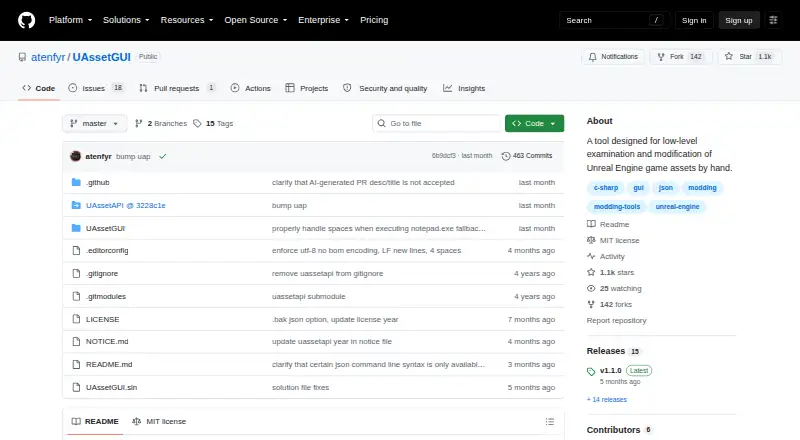
UAssetGUI is an open-source Windows desktop tool for examining, modifying, and saving Unreal Engine game assets. It is aimed at game modders and developers who need direct access to asset data through a graphical interface, with additional command-line and scripting options. Supported formats include .uasset, .umap, .usmap, .utoc, .ucas, and JSON. The tool is free, and its open-source model makes it suitable for users who want to inspect or extend the software as well as edit assets directly.
Its strongest capability is the combination of low-level access and multiple editing paths. Users can open specific asset files graphically, edit raw bytecode, and directly open or save .utoc and .ucas containers. Command-line export to and import from UAssetAPI JSON adds a route for repeatable or externally managed changes, while custom C# scripts can extend program behavior. Portable mode, which uses an adjacent Data folder, also fits workflows where the tool is kept with project files or moved between locations.
Platform fit is the main practical consideration. Windows is the primary environment, while Linux use is documented through Wine, and the project file targets Windows Forms on Windows. UAssetGUI is therefore a focused choice for users working specifically with Unreal asset structures and comfortable with low-level data editing. Those seeking broad, engine-agnostic mod management or a workflow centered on higher-level game content tools should look elsewhere. For Unreal-focused work involving containers, JSON exchange, bytecode, or custom scripts, its free and open-source approach offers considerable scope without a paid tier.
Your product? Our editors can test UAssetGUI in depth and publish a review, labelled as paid · from $149/mo →
UAssetGUI pricing
UAssetGUI fact sheet
| Free plan | Yes |
|---|---|
| Paid from | Free |
| Archive extraction | Not verified |
| Mod packaging | Not verified |
| Plugin editing | Not verified |
| Script editing | Yes |
| Supported formats | .uasset, .umap, .usmap, .utoc, .ucas, JSON |
| Supported platforms | Windows; Linux through Wine |
| Deployment | Desktop |
| Platforms | Windows, Linux |
| Support | Docs, Community |
| Built for | Solo, Small business (editorial estimate) |
| Pricing | Free plan |
| Website | github.com |
| Facts checked | 20 Sep 2026 |
Alternatives to UAssetGUI
- StarCraft II EditorA broad free toolkit for building, scripting, testing, and publishing StarCraft II content.9.4
- Dota 2 Workshop ToolsA complete free toolkit for building, testing, and publishing Dota 2 mods.9.2
- OpenMW-CSA free, open-source editor for deep OpenMW mod and game authoring.9.0


See all UAssetGUI alternatives →
Used UAssetGUI? Be the first to review it
The editor score above is our own research. What this page doesn't have yet is a reader's view — what you used UAssetGUI for, what worked and what didn't. No stars are seeded and no review is paid for; an editor reads every one before it appears.
Write a reviewTwo minutes · verified accounts only · read by an editor before it appears
Featured on iTechGuides

UAssetGUI is listed in our Game Modding Tools directory. Add the badge to your site — it links back to this page.
<a href="https://www.itechguides.com/products/uassetgui/"><img src="https://www.itechguides.com/best/badge/uassetgui.svg" alt="Featured on iTechGuides" width="230" height="46"></a>
Reviewed by iTechGuides Editors · Editorial team · Updated Oct 2026
Advertiser disclosure: iTechGuides is reader-supported. Vendors can pay for top positions in our rankings and for a place on other products' pages, and we may earn a commission when you click some links. Bought places stand at the number bought; this page and our disclosure say so. Paying vendors may get a fuller, more detailed review from our editors, and that review can change their score. How we rank.
Last updated · How we research and update