
Tutorial AI
Tutorial AI: A broad screen-recording suite that turns tutorials into narrated videos and documentation. Ranked #24 of 39 in AI Screen Recorders by our editors (6.5/10); pricing: Paid; best for training teams needing documentation exports.
At a glance
- Editor score6.5 / 10
- PricingPaid
- Best forTraining teams needing documentation exports
- Free planNo
- Paid from$18/seat/mo
- AI transcriptionYes
- Facts checked20 Sep 2026
Where it wins
- Records across Windows, macOS, Chrome, iOS, and Android workflows
- Converts videos into articles with screenshots and exportable captions
- Publishes to YouTube, Notion, SharePoint, WordPress, and learning platforms
Where it doesn't
- No free plan is available
- The starting Solo plan includes only 1 editor seat
- Advanced tiers carry substantially higher monthly pricing
Our verdict on Tutorial AI
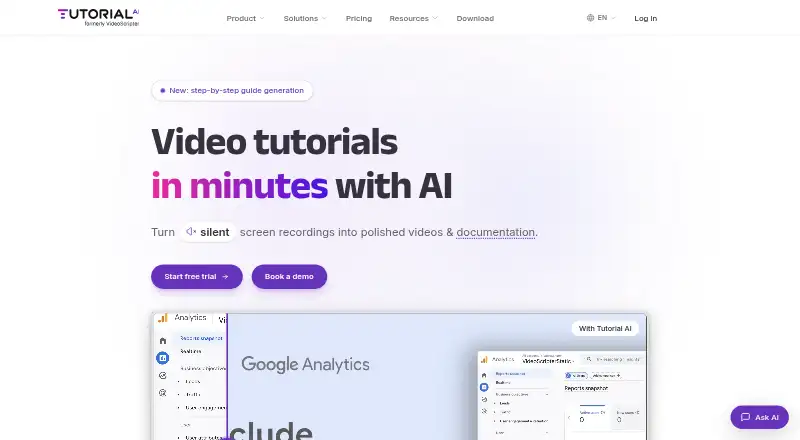
Tutorial AI is an AI screen-recording and tutorial creation platform for individual creators, professional users, support teams, sales enablement, learning and development, product marketing, and software training teams. It records desktop workflows on Windows and macOS, browser activity through a Chrome extension, and supported mobile workflows from iPhone, iPad, and Android uploads. Its core workflow combines screen capture with AI-generated narration scripts, transcription, voice narration, smart zoom and cursor effects, captions, video sharing, and video-to-article documentation with screenshots.
Pricing is structured around four tiers. Solo costs $18 per seat per month and includes 1 editor seat, 3 guest seats, unlimited projects, Windows and macOS recording, AI script generation, and AI voice narration. Growth costs $64 per seat per month and adds 4K export, a translation workflow, a multilingual embed player, animated slides, and 5 guest seats. Team costs $108 per month and adds 2 editor seats, 10 guest seats, a brand kit, a pronunciation lexicon, and custom fonts. Enterprise adds unlimited workspaces, multiple editors, custom AI voices, voice cloning, SCORM packages, and priority support. The published plans show no free plan, although the product page describes a three-project free trial.
Its platform and publishing breadth are notable for teams working across documentation, video, websites, and learning systems. Export formats include MP4, SRT, SBV, VTT, RTF, Markdown, and HTML, while integrations include YouTube, Microsoft Stream, HubSpot, Vimeo, Articulate 360, Monday.com, Notion, Microsoft SharePoint, WordPress, Udemy, Litmos, Squarespace, Shopify, and 360Learning. Tutorial AI fits teams that need one workflow for narrated tutorials and written documentation across multiple channels. It is less suited to buyers seeking a free plan or a low-cost collaborative setup, since editor access and advanced presentation features require higher-priced tiers.
Your product? Our editors can test Tutorial AI in depth and publish a review, labelled as paid · from $149/mo →
Tutorial AI pricing
All 4 Tutorial AI plans and prices →
Tutorial AI fact sheet
| Free plan | No |
|---|---|
| Paid from | $18/seat/mo |
| AI transcription | Yes |
| AI summaries | Not verified |
| Documentation output | Yes |
| Speaker identification | Not verified |
| Recording limit | Not verified |
| Platform support | Browser+desktop |
| Export formats | MP4, SRT, SBV, VTT, RTF, Markdown, HTML |
| Deployment | Cloud, Desktop, Mobile, Browser extension |
| Platforms | Web, Windows, macOS, iOS, Android, Chrome extension |
| Support | Email, Docs |
| Built for | Solo, Small business, Mid-market, Enterprise (editorial estimate) |
| Integrations | 14 integrations: YouTube, Microsoft Stream, HubSpot, Vimeo, Articulate 360, Monday.com … See all → |
| Pricing | Paid (source) |
| Website | tutorial.ai |
| Facts checked | 20 Sep 2026 |
Tutorial AI integrations
Tutorial AI lists 14 integrations on its own site.
- YouTube
- Microsoft Stream
- HubSpot
- Vimeo
- Articulate 360
- Monday.com
- Notion
- Microsoft SharePoint
- WordPress
- Udemy
- Litmos
- Squarespace
- Shopify
- 360Learning
See all Tutorial AI integrations →
Alternatives to Tutorial AI
- LoomA polished screen recorder with broad integrations, AI options, and a higher paid entry point.9.2
- ZightA broad AI capture and administration tool with a useful free tier.9.0
- ScreenPalA feature-rich freemium recorder with 4K capture, AI tools, and broad device coverage.8.8



See all Tutorial AI alternatives →
Also Ranked In
Tutorial AI is ranked in 2 of our directories.
Used Tutorial AI? Be the first to review it
The editor score above is our own research. What this page doesn't have yet is a reader's view — what you used Tutorial AI for, what worked and what didn't. No stars are seeded and no review is paid for; an editor reads every one before it appears.
Write a reviewTwo minutes · verified accounts only · read by an editor before it appears
Featured on iTechGuides

Tutorial AI is listed in our AI Screen Recorders directory. Add the badge to your site — it links back to this page.
<a href="https://www.itechguides.com/products/tutorial-ai/"><img src="https://www.itechguides.com/best/badge/tutorial-ai.svg" alt="Featured on iTechGuides" width="230" height="46"></a>
Reviewed by iTechGuides Editors · Editorial team · Updated Oct 2026
Advertiser disclosure: iTechGuides is reader-supported. Vendors can pay for top positions in our rankings and for a place on other products' pages, and we may earn a commission when you click some links. Bought places stand at the number bought; this page and our disclosure say so. Paying vendors may get a fuller, more detailed review from our editors, and that review can change their score. How we rank.
Last updated · How we research and update