
Turbo Excel Cleaner
Turbo Excel Cleaner: A focused Windows tool for repeatable, local spreadsheet cleanup across batches. Ranked #18 of 26 in Data Preparation Software by our editors (6.5/10); pricing: Paid; best for batch spreadsheet standardization.
At a glance
- Editor score6.5 / 10
- PricingPaid
- Best forBatch spreadsheet standardization
- Free planNo
- DeploymentDesktop
- Facts checked20 Sep 2026
Where it wins
- 43 selectable cleaning features cover common spreadsheet cleanup tasks
- Batch processing handles multiple files or folders in one workflow
- Local processing keeps spreadsheet files on the Windows desktop
Where it doesn't
- Windows-only availability limits cross-platform use
- Requires a paid license and has no free plan
- Focused on spreadsheet files rather than broader data pipelines
Our verdict on Turbo Excel Cleaner
Turbo Excel Cleaner is a Windows desktop application for cleaning and standardizing spreadsheet files. It is aimed at people who need to process individual files or folders in batches, remove duplicate or blank content, normalize inconsistent values, and save cleaned copies without uploading source files. Its supported formats include XLSX, XLSM, XLTX, XLTM, XLS, XLSB, ODS, CSV, TSV, and TXT, giving it a practical fit for mixed spreadsheet collections.
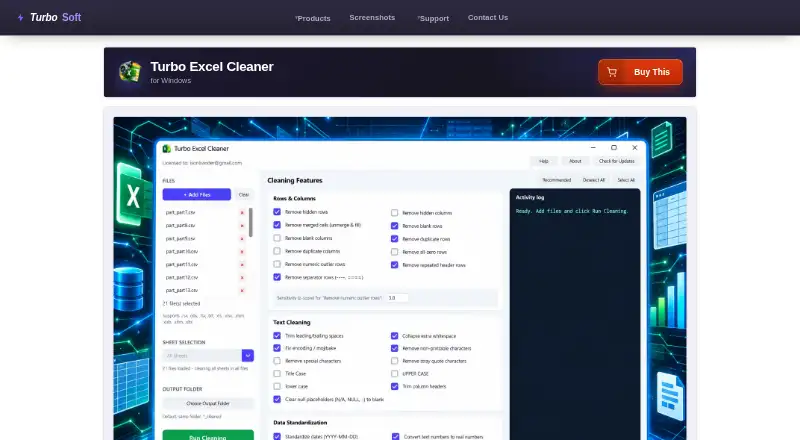
The main strength is the breadth of its cleaning controls. The application provides 43 selectable operations covering whitespace, encoding, dates, phone numbers, numbers, formatting, comments, hyperlinks, workbook structure, and duplicate or blank rows and columns. Users can apply a recommended preset, target a specific sheet or the whole workbook, and follow a real-time activity log. That combination suits repeatable cleanup work where standardization matters more than building a wider data transformation pipeline.
Its local desktop design is also important for teams that prefer files to remain on the computer during processing. Batch handling supports folder-based work, while the Gumroad license activation model keeps the product centered on a single desktop workflow. The trade-off is platform scope: it is available for Windows, and it does not present a broader cloud or cross-platform workspace. Choose Turbo Excel Cleaner for local, batch spreadsheet cleaning and standardization; consider an alternative if you need browser access, multi-platform deployment, or broader pipeline orchestration.
Your product? Our editors can test Turbo Excel Cleaner in depth and publish a review, labelled as paid · from $149/mo →
Turbo Excel Cleaner pricing
All 1 Turbo Excel Cleaner plans and prices →
Turbo Excel Cleaner fact sheet
| Free plan | No |
|---|---|
| Paid from | Not verified |
| Data profiling | Not verified |
| Visual workflows | Not verified |
| Deployment | Desktop |
| Scheduled runs | Not verified |
| Source connectors | Not verified |
| Row limit | Not verified |
| Deployment | Desktop |
| Platforms | Windows |
| Support | |
| Built for | Solo, Small business, Mid-market (editorial estimate) |
| Pricing | Paid (source) |
| Website | turbo-soft.com |
| Facts checked | 20 Sep 2026 |
Alternatives to Turbo Excel Cleaner
- Alteryx DesignerA capable visual preparation suite for enterprises, priced for committed teams.9.2
- Amazon SageMaker Data WranglerA capable AWS-centered workspace for preparing and analyzing machine-learning data.9.1
- AWS Glue DataBrewA capable AWS-native choice for visual preparation, profiling, and scheduled data jobs.9.0



See all Turbo Excel Cleaner alternatives →
Used Turbo Excel Cleaner? Be the first to review it
The editor score above is our own research. What this page doesn't have yet is a reader's view — what you used Turbo Excel Cleaner for, what worked and what didn't. No stars are seeded and no review is paid for; an editor reads every one before it appears.
Write a reviewTwo minutes · verified accounts only · read by an editor before it appears
Featured on iTechGuides

Turbo Excel Cleaner is listed in our Data Preparation Software directory. Add the badge to your site — it links back to this page.
<a href="https://www.itechguides.com/products/turbo-excel-cleaner/"><img src="https://www.itechguides.com/best/badge/turbo-excel-cleaner.svg" alt="Featured on iTechGuides" width="230" height="46"></a>
Reviewed by iTechGuides Editors · Editorial team · Updated Oct 2026
Advertiser disclosure: iTechGuides is reader-supported. Vendors can pay for top positions in our rankings and for a place on other products' pages, and we may earn a commission when you click some links. Bought places stand at the number bought; this page and our disclosure say so. Paying vendors may get a fuller, more detailed review from our editors, and that review can change their score. How we rank.
Last updated · How we research and update