
TranslucentTB
TranslucentTB: A focused, free Windows utility for taskbar transparency and appearance rules. Ranked #5 of 34 in Taskbar Customization Software by our editors (8.2/10); pricing: Free plan; best for free taskbar transparency and appearance rules.
At a glance
- Editor score8.2 / 10
- PricingFree plan
- Best forFree taskbar transparency and appearance rules
- Free planYes
- Paid fromFree
- PlatformWindows
- Facts checked20 Sep 2026
Where it wins
- Opaque, clear, blur, acrylic, and normal taskbar styles
- RGBA color controls with alpha transparency and live preview
- Dynamic rules for windows, Start, Search, and Task View
Where it doesn't
- Windows only
- Focuses on appearance rather than taskbar layout
- Advanced rules may require compatibility with other customization tools
Our verdict on TranslucentTB
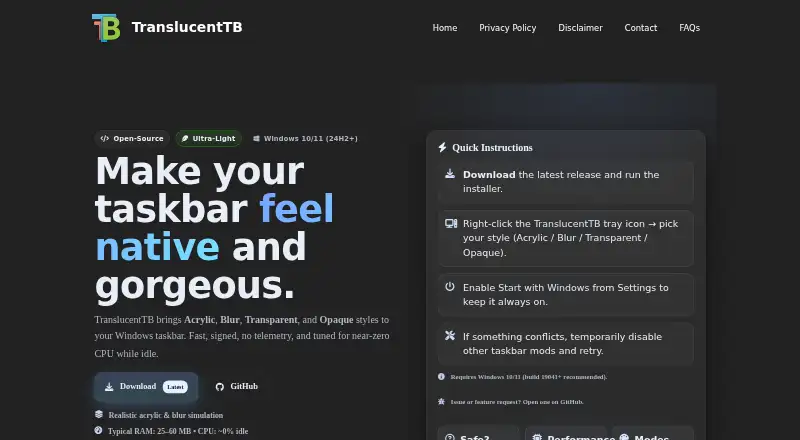
TranslucentTB is a free, open-source Windows utility for changing the appearance of the taskbar on Windows 10 and Windows 11. It suits users who want transparent, blurred, acrylic, clear, or opaque taskbar styles without paying for the software. Its controls focus on visual treatment, including color, transparency, visibility options, and rules that respond to windows and Windows interface elements.
The standout feature is its combination of styling and dynamic appearance rules. Users can choose from opaque, clear, blur, acrylic, and normal styles, then adjust RGBA color values with alpha transparency and a live preview. Rules can respond to visible or maximized windows, as well as Start, Search, and Task View. Windows 10 users also get an Aero Peek button visibility control, while Windows 11 users can control taskbar line visibility. A Start-with-Windows option supports automatic launch.
TranslucentTB is distributed through the Microsoft Store, installer packages, and a portable Windows 11 build. It also lists compatibility with RoundedTB and ExplorerPatcher, which may matter for users combining appearance customization with other taskbar tools. The trade-off is a narrow focus: the product is built around appearance rather than layout changes. Users seeking taskbar repositioning, app grouping, resizing, or multi-monitor customization should choose a different tool. Pick TranslucentTB for free Windows taskbar styling and conditional visual rules; skip it if layout control is the main requirement.
Your product? Our editors can test TranslucentTB in depth and publish a review, labelled as paid · from $149/mo →
TranslucentTB pricing
TranslucentTB fact sheet
| Free plan | Yes |
|---|---|
| Paid from | Free |
| Platform | Windows |
| Taskbar positioning | Not verified |
| Transparency controls | Yes |
| App grouping controls | Not verified |
| Multi-monitor support | Not verified |
| Taskbar sizing | Not verified |
| Portable version | Yes |
| Deployment | Desktop |
| Platforms | Windows |
| Support | Community, Docs |
| Built for | Solo, Small business (editorial estimate) |
| Integrations | 2 integrations: RoundedTB, ExplorerPatcher |
| Pricing | Free plan |
| Website | translucenttb.net |
| Facts checked | 20 Sep 2026 |
TranslucentTB integrations
TranslucentTB lists 2 integrations on its own site.
- RoundedTB
- ExplorerPatcher
Alternatives to TranslucentTB
- ObjectDockA feature-rich Windows dock replacement with strong customization and multi-monitor support.9.2
- TaskbarXA free, portable Windows 10 taskbar customizer with limited modern Windows 11 support.8.8
- YASB RebornA flexible Windows taskbar replacement for users comfortable with deep customization.8.6


See all TranslucentTB alternatives →
TranslucentTB vs the competition
- TranslucentTB vs ObjectDock
- TranslucentTB vs TaskbarX
- TranslucentTB vs YASB Reborn
- TranslucentTB vs ExplorerPatcher
- TranslucentTB vs Start11
- TranslucentTB vs Winstep Nexus Dock
Compare TranslucentTB with any tool side by side →
Used TranslucentTB? Be the first to review it
The editor score above is our own research. What this page doesn't have yet is a reader's view — what you used TranslucentTB for, what worked and what didn't. No stars are seeded and no review is paid for; an editor reads every one before it appears.
Write a reviewTwo minutes · verified accounts only · read by an editor before it appears
Featured on iTechGuides

TranslucentTB is listed in our Taskbar Customization Software directory. Add the badge to your site — it links back to this page.
<a href="https://www.itechguides.com/products/translucenttb/"><img src="https://www.itechguides.com/best/badge/translucenttb.svg" alt="Featured on iTechGuides" width="230" height="46"></a>
Reviewed by iTechGuides Editors · Editorial team · Updated Oct 2026
Advertiser disclosure: iTechGuides is reader-supported. Vendors can pay for top positions in our rankings and for a place on other products' pages, and we may earn a commission when you click some links. Bought places stand at the number bought; this page and our disclosure say so. Paying vendors may get a fuller, more detailed review from our editors, and that review can change their score. How we rank.
Last updated · How we research and update