
Total Uninstaller
Total Uninstaller: A focused Windows cleanup tool with lifetime pricing and forced removal. Ranked #23 of 35 in Software Uninstaller Tools by our editors (6.6/10); pricing: Paid; best for paid basic Windows residue cleanup.
At a glance
- Editor score6.6 / 10
- PricingPaid
- Best forPaid basic Windows residue cleanup
- Free planNo
- Paid from$29.95/device one-time
- Leftover scanYes
- Facts checked23 Sep 2026
Where it wins
- Analyzes applications before uninstalling
- Removes leftover files, folders, Registry entries, and services
- Includes folder, shortcut, and portable-app cleanup tools
Where it doesn't
- No free plan
- Windows-only software
- Batch uninstall and monitoring are not among the described capabilities
Our verdict on Total Uninstaller
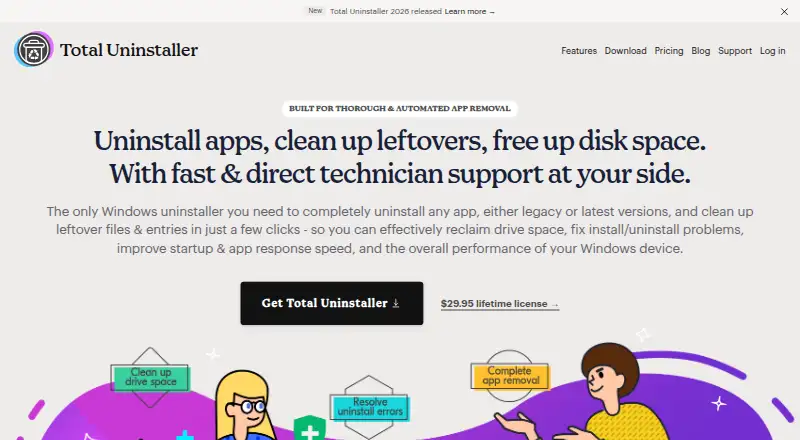
Total Uninstaller is a Windows utility for removing unwanted applications and associated remnants. It analyzes an application before removal, then can clean leftover files and folders, Registry entries, installed services, invalid desktop shortcuts, and standalone or portable app items. Its search and sorting tools organize installed applications by vendor, drive, name, date, and size. This makes it suited to Windows users who want more control over residue cleanup than a basic uninstall workflow provides.
Pricing is based on lifetime licenses rather than a subscription. The 1 Device plan costs $29.95 and includes a perpetual license, free updates, free upgrades, free technical support, and free custom fixes. The 3 Devices plan costs $39.95, while the 5 Devices plan costs $49.95; both retain the same listed benefits. There is no free plan. For users managing more than one Windows device, the multi-device tiers add coverage without changing the included support and update terms.
The standout feature set is its cleanup depth around a single application: forced removal supports applications with missing or nonresponsive uninstallers, while Total Cleanup addresses standalone or portable app items. Folder Cleaner targets empty folders, and Shortcut Cleaner handles invalid desktop shortcuts. The product is distributed as a Windows executable, with Windows 10 identified in the product’s platform specifications. It is a good fit for buyers seeking paid, basic Windows residue cleanup with lifetime access. Buyers who need batch uninstall or monitoring should choose a tool whose published capabilities specifically include those workflows.
Your product? Our editors can test Total Uninstaller in depth and publish a review, labelled as paid · from $149/mo →
Total Uninstaller pricing
All 3 Total Uninstaller plans and prices →
Total Uninstaller fact sheet
| Free plan | No |
|---|---|
| Paid from | $29.95/device one-time |
| Leftover scan | Yes |
| Forced uninstall | Yes |
| Batch uninstall | Not verified |
| Install monitoring | Not verified |
| Platform support | Not verified |
| Portable version | Not verified |
| Money-back guarantee | 30 days |
| Deployment | Desktop |
| Platforms | Windows |
| Support | Tickets |
| Built for | Solo, Small business (editorial estimate) |
| Pricing | Paid (source) |
| Website | totaluninstaller.com |
| Facts checked | 23 Sep 2026 |
Alternatives to Total Uninstaller
- Revo UninstallerA mature Windows cleanup utility with strong removal controls and a capable free edition.9.3
- IObit UninstallerA broad Windows cleanup tool with useful free coverage and optional Pro controls.9.1
- O&O AppBusterA free, portable choice for managing built-in Windows apps with safeguards.8.7

See all Total Uninstaller alternatives →
Used Total Uninstaller? Be the first to review it
The editor score above is our own research. What this page doesn't have yet is a reader's view — what you used Total Uninstaller for, what worked and what didn't. No stars are seeded and no review is paid for; an editor reads every one before it appears.
Write a reviewTwo minutes · verified accounts only · read by an editor before it appears
Featured on iTechGuides

Total Uninstaller is listed in our Software Uninstaller Tools directory. Add the badge to your site — it links back to this page.
<a href="https://www.itechguides.com/products/total-uninstaller/"><img src="https://www.itechguides.com/best/badge/total-uninstaller.svg" alt="Featured on iTechGuides" width="230" height="46"></a>
Reviewed by iTechGuides Editors · Editorial team · Updated Oct 2026
Advertiser disclosure: iTechGuides is reader-supported. Vendors can pay for top positions in our rankings and for a place on other products' pages, and we may earn a commission when you click some links. Bought places stand at the number bought; this page and our disclosure say so. Paying vendors may get a fuller, more detailed review from our editors, and that review can change their score. How we rank.
Last updated · How we research and update