
Tosea
Tosea: A document-first slide maker with outline editing and paid editable PPTX export. Ranked #77 of 109 in AI Presentation Makers by our editors (3.0/10); pricing: Free plan; best for students and researchers turning documents into slides.
At a glance
- Editor score3.0 / 10
- PricingFree plan
- Best forStudents and researchers turning documents into slides
- Free planYes
- Document-to-deck generationYes
- Facts checked24 Sep 2026
Where it wins
- Generates outlines and slides from PDFs and other uploaded documents
- Lets users select source images and edit content, notes and layouts
- Offers PDF and PPTX exports, including editable PPTX on paid plans
Where it doesn't
- Document-focused workflow; prompt-to-deck generation is not listed
- Free exports include a watermark
- No collaboration features are listed
Our verdict on Tosea
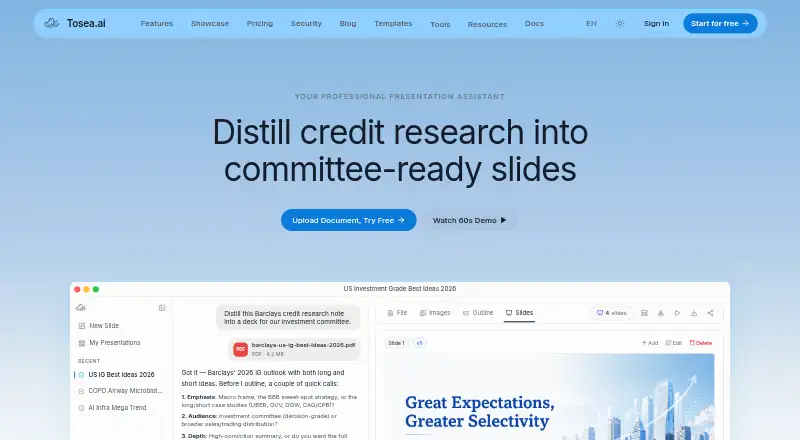
Tosea is a web-based AI presentation maker for turning PDFs and other documents into slides. Its workflow is aimed at students and researchers who need to adapt material from papers, reports, or similar sources, rather than start with a text prompt. Before generation, users can choose a template, academic field, target slide count, and AI model. Tosea can extract images from the source document for selection, then generate an outline and slides for review.
The document workflow includes several points for shaping the result: users can edit outline titles and content, add or revise speaker notes and images, and use AI to edit individual pages or adjust layouts. That makes Tosea more suited to organizing existing source material than to open-ended deck creation. Exports include PDF, image-based PPTX, and speaker notes as PDF; editable PPTX export is available on paid plans. PowerPoint and Google Slides are listed as integrations, and the product runs on the web.
The Free plan includes 200 credits per month, basic templates and models, and exports with a watermark. Pro includes 1,500 + 300 credits per month, premium templates and models, custom logos and templates, no-watermark exports, and editable PPTX export. Max includes 5,000 + 2,000 credits per month, all templates, advanced and flagship models, no-watermark and editable PPTX exports, plus early access to beta features. Choose Tosea if document-based slide generation and source-image selection match your workflow; look elsewhere if you need prompt-to-deck creation or collaboration features.
Your product? Our editors can test Tosea in depth and publish a review, labelled as paid · from $149/mo →
Tosea pricing
All 3 Tosea plans and prices →
Tosea fact sheet
| Free plan | Yes |
|---|---|
| Paid from | Not verified |
| Prompt-to-deck generation | No |
| Document-to-deck generation | Yes |
| PPTX export | Yes |
| PDF export | Yes |
| Brand controls | Yes |
| Collaboration level | Not verified |
| Maximum slides | 40 slides/deck |
| Deployment | Cloud |
| Platforms | Web |
| Built for | Solo, Small business (editorial estimate) |
| Integrations | 2 integrations: PowerPoint, Google Slides |
| Pricing | Free plan (source) |
| Website | tosea.ai |
| Facts checked | 24 Sep 2026 |
Tosea integrations
Tosea lists 2 integrations on its own site.
- PowerPoint
- Google Slides
Alternatives to Tosea
- GammaA free, collaborative AI creator with broad exports, publishing, and automation options.9.3
- PitchA flexible presentation workspace for teams that need AI, brand control, and collaboration.8.8
- OpenChartsA freemium deck builder with presenter coaching, collaboration, and flexible exports.8.7



Used Tosea? Be the first to review it
The editor score above is our own research. What this page doesn't have yet is a reader's view — what you used Tosea for, what worked and what didn't. No stars are seeded and no review is paid for; an editor reads every one before it appears.
Write a reviewTwo minutes · verified accounts only · read by an editor before it appears
Featured on iTechGuides

Tosea is listed in our AI Presentation Makers directory. Add the badge to your site — it links back to this page.
<a href="https://www.itechguides.com/products/tosea/"><img src="https://www.itechguides.com/best/badge/tosea.svg" alt="Featured on iTechGuides" width="230" height="46"></a>
Reviewed by iTechGuides Editors · Editorial team · Updated Oct 2026
Advertiser disclosure: iTechGuides is reader-supported. Vendors can pay for top positions in our rankings and for a place on other products' pages, and we may earn a commission when you click some links. Bought places stand at the number bought; this page and our disclosure say so. Paying vendors may get a fuller, more detailed review from our editors, and that review can change their score. How we rank.
Last updated · How we research and update