
Tool67 Sketch to Image
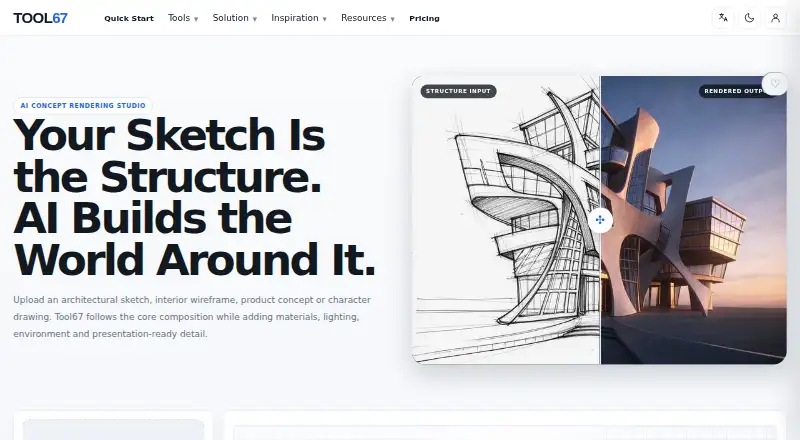
Tool67 Sketch to Image: A flexible sketch-to-concept renderer for exploring architecture, products, interiors and characters. Ranked #18 of 29 in AI Sketch-to-Image Generators by our editors (7.3/10); pricing: Paid; best for exploring multiple design disciplines.
At a glance
- Editor score7.3 / 10
- PricingPaid
- Best forExploring multiple design disciplines
- Free planNo
- Sketch inputYes
- Facts checked22 Sep 2026
Where it wins
- Accepts sketches, wireframes, product concepts and character drawings
- Supports references for palette, materials, lighting and atmosphere
- Offers discipline, style, aspect-ratio and prompt controls
Where it doesn't
- Web-only access limits platform flexibility
- Each image generation uses 4 credits
- Results target concepts and presentations, not technical documentation
Our verdict on Tool67 Sketch to Image
Tool67 Sketch to Image converts architectural sketches, interior wireframes, product concepts and character drawings into rendered visual concepts. It is suited to designers, architects, product teams and creative professionals exploring visual directions across architecture, interiors, products, landscapes and characters. Users can provide a main sketch or wireframe, add an optional reference image, and guide the result with discipline, render-style, aspect-ratio and prompt controls. The published positioning is focused on concept exploration and presentation rather than construction drawings, engineering documentation or manufacturing specifications.
The paid plans are Basic and Pro. Basic includes 300 AI tool uses per day, access to all standard AI tools, writing, SEO and prompt tools, and email-based access. Pro raises the allowance to 2000 AI tool uses per day and is described as better for high-volume content work, while retaining access to the standard AI tools and email-based access. For sketch-to-image work, each generation uses 4 credits, so image-heavy workflows should consider how the broader AI-tool allowance fits their expected rendering volume.
The strongest case for Tool67 is breadth within early-stage visual development: one workflow covers architectural sketches, interior wireframes, product concepts and character drawings, with reference-guided control over visual direction. Discipline and render-style selections add structure, while prompts and aspect ratios support presentation-oriented variations. It is a sensible choice for exploring multiple design disciplines through web-based concept rendering. Teams needing construction-ready, engineering or manufacturing specifications should choose a tool built for technical documentation instead.
Your product? Our editors can test Tool67 Sketch to Image in depth and publish a review, labelled as paid · from $149/mo →
Tool67 Sketch to Image pricing
All 2 Tool67 Sketch to Image plans and prices →
Tool67 Sketch to Image fact sheet
| Free plan | No |
|---|---|
| Paid from | Not verified |
| Sketch input | Yes |
| Wireframe input | Yes |
| Image-to-image | Yes |
| Included image credits | Not verified |
| Output formats | Not verified |
| API access | Not verified |
| Deployment | Cloud |
| Platforms | Web |
| Support | |
| Built for | Solo, Small business (editorial estimate) |
| Pricing | Paid (source) |
| Website | tool67.com |
| Facts checked | 22 Sep 2026 |
Alternatives to Tool67 Sketch to Image
- VizcomA broad sketch-to-3D workflow with collaboration and Autodesk Fusion integration.9.4
- LookX AIA focused sketch-to-render platform with strong architecture tools and flexible paid plans.9.2
- mnml.aiA flexible browser-based renderer for architecture teams working across varied inputs.9.0



See all Tool67 Sketch to Image alternatives →
Used Tool67 Sketch to Image? Be the first to review it
The editor score above is our own research. What this page doesn't have yet is a reader's view — what you used Tool67 Sketch to Image for, what worked and what didn't. No stars are seeded and no review is paid for; an editor reads every one before it appears.
Write a reviewTwo minutes · verified accounts only · read by an editor before it appears
Featured on iTechGuides

Tool67 Sketch to Image is listed in our AI Sketch-to-Image Generators directory. Add the badge to your site — it links back to this page.
<a href="https://www.itechguides.com/products/tool67-sketch-to-image/"><img src="https://www.itechguides.com/best/badge/tool67-sketch-to-image.svg" alt="Featured on iTechGuides" width="230" height="46"></a>
Reviewed by iTechGuides Editors · Editorial team · Updated Oct 2026
Advertiser disclosure: iTechGuides is reader-supported. Vendors can pay for top positions in our rankings and for a place on other products' pages, and we may earn a commission when you click some links. Bought places stand at the number bought; this page and our disclosure say so. Paying vendors may get a fuller, more detailed review from our editors, and that review can change their score. How we rank.
Last updated · How we research and update