TMSU
TMSU: A powerful open-source tagging tool for technical users who prefer the command line. Ranked #88 of 100 in File Manager Software by our editors (3.0/10); pricing: Free plan; best for users needing tag-based file organization.
At a glance
- Editor score3.0 / 10
- PricingFree plan
- Best forUsers needing tag-based file organization
- Free planYes
- Paid fromFree
- Supported platformsLinux, macOS, Windows
- Facts checked21 Sep 2026
Where it wins
- Powerful Boolean queries with and, or, not, and comparison operators
- Keeps original files unchanged while storing metadata separately
- Works on Linux, macOS, and Windows with virtual filesystem views
Where it doesn't
- Command-line focus may not suit users seeking graphical file management
- No listed panes, tabs, archives, renaming, or integrations
- Latest listed release is v0.7.5 from December 2019
Our verdict on TMSU
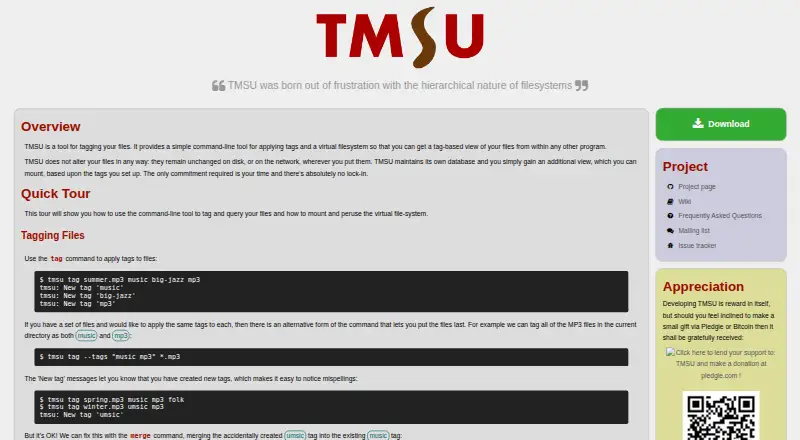
TMSU is an open-source command-line utility for organizing files with tags and tag values. It is aimed at technically oriented individuals and developers who prefer filesystem tools over graphical file managers. Users can apply tags to individual or multiple files, query those tags with Boolean and comparison operators, and access results through a mountable virtual filesystem. TMSU also supports query-based filesystem directories, letting tagged views work with other programs while the original files remain unchanged.
Its strongest capability is the depth of its tagging model. Tag values add structure beyond simple labels, while and, or, not, and comparison operators support targeted file queries. Tags can also be managed through virtual filesystem directories and links. When files move or change, TMSU can repair database references and fingerprints. Shell-integrated command-line help and Zsh completion make the workflow more practical for users already comfortable in a terminal. The separate metadata database is useful when preserving the contents and structure of original files matters.
TMSU is free and open source across Linux, macOS, and Windows, making it a focused option for tag-based organization without a paid tier. Its narrow scope is also its main boundary: the listed feature set does not include graphical panes, tabs, archives, renaming, or integrations. The repository lists v0.7.5 as the latest release from December 2019 and v0.8.0 as in development, so current maintenance activity is uncertain. Choose TMSU if flexible tagging and virtual filesystem access matter more than a conventional file-manager interface; choose another tool if you need broad desktop file-management features or a graphical workflow.
Your product? Our editors can test TMSU in depth and publish a review, labelled as paid · from $149/mo →
TMSU pricing
TMSU fact sheet
| Free plan | Yes |
|---|---|
| Paid from | Free |
| Supported platforms | Linux, macOS, Windows |
| Dual-pane view | Not verified |
| Tabbed interface | Not verified |
| Batch rename | Not verified |
| Archive support | Not verified |
| Cloud storage access | Not verified |
| Portable version | Not verified |
| Deployment | Self-hosted |
| Platforms | Linux, macOS, Windows |
| Support | Community, Docs |
| Built for | Solo, Small business (editorial estimate) |
| Pricing | Free plan |
| Website | tmsu.org |
| Facts checked | 21 Sep 2026 |
Alternatives to TMSU
- Total CommanderA feature-rich file manager for Windows users who want power beyond Explorer.9.3
- DolphinA capable free file manager, especially for Linux and KDE-oriented desktops.9.1
- WinSCPA capable Windows file manager for secure transfers, automation, and synchronization.9.0



Used TMSU? Be the first to review it
The editor score above is our own research. What this page doesn't have yet is a reader's view — what you used TMSU for, what worked and what didn't. No stars are seeded and no review is paid for; an editor reads every one before it appears.
Write a reviewTwo minutes · verified accounts only · read by an editor before it appears
Featured on iTechGuides

TMSU is listed in our File Manager Software directory. Add the badge to your site — it links back to this page.
<a href="https://www.itechguides.com/products/tmsu/"><img src="https://www.itechguides.com/best/badge/tmsu.svg" alt="Featured on iTechGuides" width="230" height="46"></a>
Reviewed by iTechGuides Editors · Editorial team · Updated Oct 2026
Advertiser disclosure: iTechGuides is reader-supported. Vendors can pay for top positions in our rankings and for a place on other products' pages, and we may earn a commission when you click some links. Bought places stand at the number bought; this page and our disclosure say so. Paying vendors may get a fuller, more detailed review from our editors, and that review can change their score. How we rank.
Last updated · How we research and update