
TimeClock Plus
TimeClock Plus: A broad timekeeping suite for complex, hourly, and shift-based organizations. Ranked #14 of 28 in Time Clock Software by our editors (7.7/10); pricing: Pricing on request; best for larger organizations needing mature timekeeping.
At a glance
- Editor score7.7 / 10
- PricingPricing on request
- Best forLarger organizations needing mature timekeeping
- Mobile clock-inYes
- Founded1988 · Plano, Texas, United States
- Facts checked22 Sep 2026
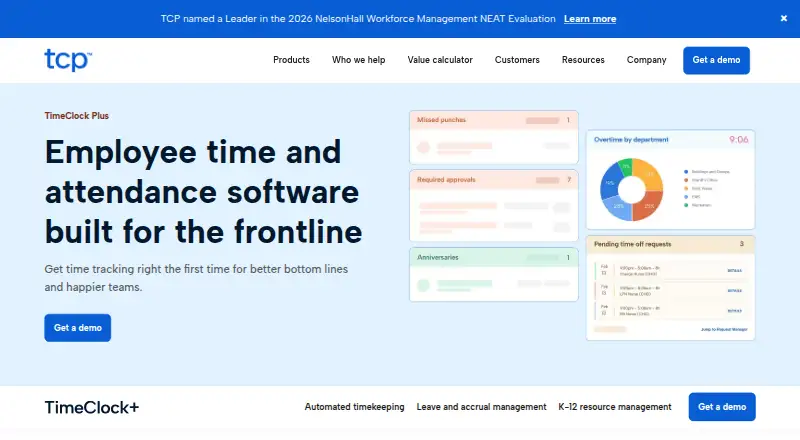
Where it wins
- Supports mobile, web, kiosk, and physical time-clock capture
- Handles overtime, comp time, breaks, leave, approvals, and job costing
- Connects with major payroll, ERP, and HCM platforms
Where it doesn't
- Pricing requires a sales conversation
- Its breadth may exceed the needs of simple clock-in teams
- Physical clock options add deployment considerations
Our verdict on TimeClock Plus
TimeClock Plus is workforce time and attendance software for organizations with hourly, shift-based, and complex-pay-rule workforces. It supports frontline operations across education, healthcare, hospitality, retail, government, manufacturing, and public safety. Employees can record time through a mobile app, browser, kiosk, or physical time clock, while managers review timesheets, approve hours, manage leave, and monitor attendance. The platform is suited to organizations that need more than basic clock-in and clock-out tracking.
Its strongest area is the depth of timekeeping and labor administration. Automated calculations cover multiple positions, pay rates, overtime, and comp time. Break tracking can alert teams to missed breaks and meal-rule requirements, while geofencing and GPS or Wi-Fi validation support location-aware punches. Job codes, project and department labor tracking, and job costing extend the product into workforce allocation. Reporting includes attendance, payroll, exception, and overtime views, giving managers several ways to review labor activity.
TimeClock Plus also fits organizations with established business systems. Integrations include Workday, Oracle, ADP WorkforceNow, PeopleSoft, Ellucian, BambooHR, Paycor, Paychex, Paycom, QuickBooks, Netchex, and Sage. Pricing follows a contact-sales model, so buyers should plan for a sales-led evaluation rather than a self-serve purchase. Choose it when physical clock support, compliance-oriented break tracking, complex pay rules, approvals, and enterprise integrations matter. A smaller team seeking only straightforward clock-ins may find this feature breadth and buying process unnecessary.
Your product? Our editors can test TimeClock Plus in depth and publish a review, labelled as paid · from $149/mo →
TimeClock Plus pricing
TimeClock Plus fact sheet
| Free plan | Not verified |
|---|---|
| Paid from | Not verified |
| Mobile clock-in | Yes |
| Geofencing | Yes |
| Break tracking | Yes |
| Attendance reports | Yes |
| Timesheet approvals | Yes |
| Clock-in methods | physical terminal, mobile app, web browser, badge, biometric scanner |
| Deployment | Cloud, Mobile |
| Platforms | Web, iOS, Android |
| Support | Phone, Community · 24/7 |
| Built for | Small business, Mid-market, Enterprise (editorial estimate) |
| Integrations | 8 integrations: Paycor, Paychex, Paycom, QuickBooks, Netchex, Sage … See all → |
| Pricing | Pricing on request |
| Website | tcpsoftware.com |
| Facts checked | 22 Sep 2026 |
TimeClock Plus integrations
TimeClock Plus lists 8 integrations on its own site.
- Paycor
- Paychex
- Paycom
- QuickBooks
- Netchex
- Sage
- Oracle
- Workday
See all TimeClock Plus integrations →
Alternatives to TimeClock Plus
- QuickBooks TimeA QuickBooks-centered time clock for jobs, projects, approvals, and payroll workflows.9.2
- JibbleA broad time clock platform with a permanent free plan and strong workforce controls.8.9
- SynerionA mature, low-cost attendance platform with broad clocking and payroll options.8.8


See all TimeClock Plus alternatives →
Also Ranked In
TimeClock Plus is ranked in 7 of our directories.
- #5Time and Attendance Software31 tools ranked
- #8Attendance Tracking Software29 tools ranked
- #16Employee Time Tracking Software53 tools ranked
- #21Workforce Management - Midmarket Software28 tools ranked
- #23Workforce Management - Enterprise Software27 tools ranked
- #27Substitute Teacher Management Software28 tools ranked
Used TimeClock Plus? Be the first to review it
The editor score above is our own research. What this page doesn't have yet is a reader's view — what you used TimeClock Plus for, what worked and what didn't. No stars are seeded and no review is paid for; an editor reads every one before it appears.
Write a reviewTwo minutes · verified accounts only · read by an editor before it appears
Featured on iTechGuides

TimeClock Plus is listed in our Time Clock Software directory. Add the badge to your site — it links back to this page.
<a href="https://www.itechguides.com/products/timeclock-plus/"><img src="https://www.itechguides.com/best/badge/timeclock-plus.svg" alt="Featured on iTechGuides" width="230" height="46"></a>
Reviewed by iTechGuides Editors · Editorial team · Updated Oct 2026
Advertiser disclosure: iTechGuides is reader-supported. Vendors can pay for top positions in our rankings and for a place on other products' pages, and we may earn a commission when you click some links. Bought places stand at the number bought; this page and our disclosure say so. Paying vendors may get a fuller, more detailed review from our editors, and that review can change their score. How we rank.
Last updated · How we research and update