The Visual Outliner
The Visual Outliner: A focused Windows outliner with strong organization tools and a one-time license. Ranked #18 of 22 in Outlining Software by our editors (7.7/10); pricing: Paid; best for windows users wanting visual outlining.
At a glance
- Editor score7.7 / 10
- PricingPaid
- Best forWindows users wanting visual outlining
- Paid from$59.95 one-time
- Facts checked21 Sep 2026
Where it wins
- Hierarchical editing with drag-and-drop reorganization
- Bucket, tags, notes, links, formatting, and progress tracking
- OPML storage with TXT, HTML, and Markdown export
Where it doesn't
- Windows desktop coverage only
- No mobile apps
- The feature set is focused on outlining rather than broader workflows
Our verdict on The Visual Outliner
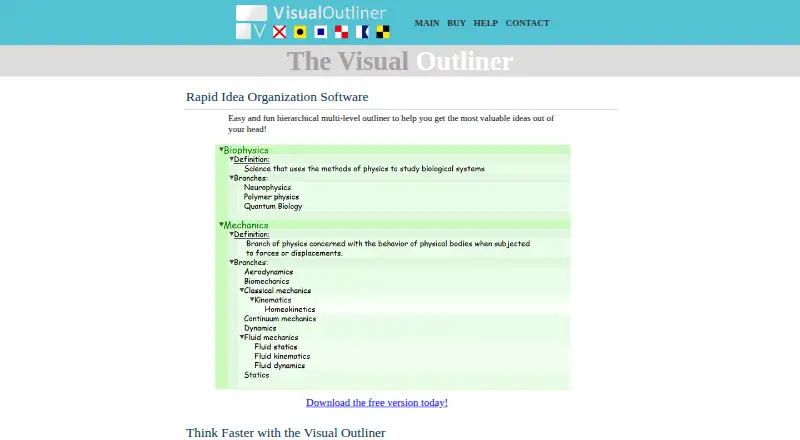
The Visual Outliner is a Windows desktop application for capturing, arranging, and developing ideas in hierarchical outlines. It suits writers, planners, researchers, and other Windows users who want a visual structure for complex information. Its editing model supports multiple outline levels, drag-and-drop reorganization, notes, links, formatting, tags, and progress tracking. A temporary Bucket provides a separate place to hold ideas before organizing them into an outline.
The product’s paid offer is straightforward: the Full Version License costs $59.95 as a one-time purchase. The license includes free minor upgrades, one major upgrade, and a 60-day money-back guarantee. The vendor also lists a free version alongside the paid full version. For buyers who prefer a one-time desktop purchase, this structure is easier to understand than a recurring subscription. The paid license is most relevant to users who expect to keep working in the application and want the additional benefits attached to the full version.
Its strongest fit is visual organization on Windows. Custom theme creation and theme import/export allow users to shape the outline’s presentation, while tag filtering helps narrow attention across larger projects. OPML is the native storage format, and TXT, HTML, and Markdown exports provide several ways to move finished outlines into other workflows. The trade-off is platform scope: the published desktop coverage is Windows, and there are no mobile apps. Users who want a focused Windows outlining environment should consider it; those who need mobile access or broader platform coverage should choose an alternative designed for those needs.
Your product? Our editors can test The Visual Outliner in depth and publish a review, labelled as paid · from $149/mo →
The Visual Outliner pricing
All 1 The Visual Outliner plans and prices →
The Visual Outliner fact sheet
| Free plan | Not verified |
|---|---|
| Paid from | $59.95 one-time |
| Real-time collaboration | Not verified |
| Markdown support | Yes |
| Mobile apps | None |
| Desktop apps | Windows |
| Export formats | TXT, HTML, Markdown |
| Import formats | OPML |
| Templates | Not verified |
| Money-back guarantee | 60 days |
| Deployment | Desktop |
| Platforms | Windows |
| Support | |
| Built for | Solo, Small business (editorial estimate) |
| Pricing | Paid (source) |
| Website | visualoutliner.com |
| Facts checked | 21 Sep 2026 |
Alternatives to The Visual Outliner
- CheckvistA flexible outliner for structured work, collaboration, and connected workflows.9.4
- WorkflowyA flexible outline for notes, tasks, and ideas across nearly every major platform.9.3
- BulletlistA broad, entirely free outliner with Markdown, offline sync, and wide import support.9.2



See all The Visual Outliner alternatives →
Used The Visual Outliner? Be the first to review it
The editor score above is our own research. What this page doesn't have yet is a reader's view — what you used The Visual Outliner for, what worked and what didn't. No stars are seeded and no review is paid for; an editor reads every one before it appears.
Write a reviewTwo minutes · verified accounts only · read by an editor before it appears
Featured on iTechGuides

The Visual Outliner is listed in our Outlining Software directory. Add the badge to your site — it links back to this page.
<a href="https://www.itechguides.com/products/the-visual-outliner/"><img src="https://www.itechguides.com/best/badge/the-visual-outliner.svg" alt="Featured on iTechGuides" width="230" height="46"></a>
Reviewed by iTechGuides Editors · Editorial team · Updated Oct 2026
Advertiser disclosure: iTechGuides is reader-supported. Vendors can pay for top positions in our rankings and for a place on other products' pages, and we may earn a commission when you click some links. Bought places stand at the number bought; this page and our disclosure say so. Paying vendors may get a fuller, more detailed review from our editors, and that review can change their score. How we rank.
Last updated · How we research and update