TextSnatcher
TextSnatcher: A focused, free open-source option for quick image-to-text capture on Linux. Ranked #37 of 40 in OCR Software by our editors (5.0/10); pricing: Free plan; best for linux desktop image-to-text capture.
At a glance
- Editor score5.0 / 10
- PricingFree plan
- Best forLinux desktop image-to-text capture
- Free planYes
- Paid fromFree
- Facts checked23 Sep 2026
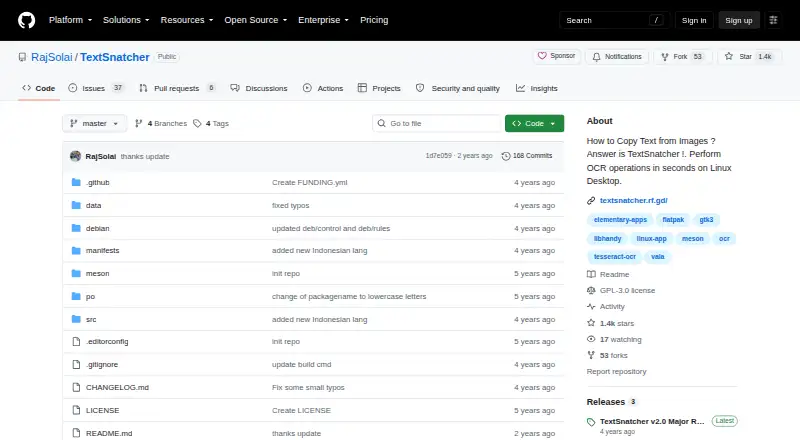
Where it wins
- Free open-source Linux application
- Drag-selects image areas for focused OCR
- Supports multiple languages through Tesseract OCR 4.x
Where it doesn't
- Linux-only platform coverage
- Image input does not provide PDF workflows
- No export or broader integration workflow
Our verdict on TextSnatcher
TextSnatcher is a Linux desktop OCR application for extracting text from images. It suits Linux users who need a direct way to capture text from a selected area of an image, recognize it, and copy the result for pasting elsewhere. The workflow is intentionally narrow: select part of an image by dragging over it, run OCR, and use the recognized text. Multiple-language support and the Tesseract OCR 4.x recognition engine extend its usefulness beyond a single-language capture tool.
Its open-source model keeps the product focused and accessible, with build instructions for Linux environments rather than a tiered commercial plan structure. Tesseract OCR is the key ecosystem component, providing the recognition engine behind the application. That combination fits users who want a lightweight desktop utility and are comfortable with a Linux-centered workflow. It is less suitable for teams that need platform coverage beyond Linux or a larger application ecosystem around OCR.
TextSnatcher’s strongest distinction is its simple selection-based capture flow. It can be practical for copying text from screenshots, images, or selected screen content without requiring a broader document-processing system. The trade-off is limited scope: it does not provide PDF workflows, exports, or integrations beyond Tesseract OCR, and its input is centered on images. Buyers should choose it for straightforward Linux image OCR and copy-paste tasks; those needing searchable documents, Word-oriented output, connected workflows, or wider platform support should choose a broader OCR product instead.
Your product? Our editors can test TextSnatcher in depth and publish a review, labelled as paid · from $149/mo →
TextSnatcher pricing
TextSnatcher fact sheet
| Free plan | Yes |
|---|---|
| Paid from | Free |
| Searchable PDF | No |
| Word export | No |
| Handwriting OCR | Not verified |
| Supported languages | Not verified |
| Monthly page limit | Not verified |
| Primary platform | Desktop |
| Supported inputs | Image |
| Deployment | Desktop |
| Platforms | Linux |
| Built for | Solo, Small business (editorial estimate) |
| Pricing | Free plan |
| Website | github.com |
| Facts checked | 23 Sep 2026 |
Alternatives to TextSnatcher
- PaddleOCRA developer-focused OCR toolkit with multilingual, handwriting, and document parsing workflows.9.3
- Tesseract OCRA mature, developer-focused OCR engine with broad outputs and self-hosting flexibility.9.1
- ABBYY FineReader PDFA broad desktop PDF suite for OCR, editing, conversion, forms, and document control.9.0

See all TextSnatcher alternatives →
Used TextSnatcher? Be the first to review it
The editor score above is our own research. What this page doesn't have yet is a reader's view — what you used TextSnatcher for, what worked and what didn't. No stars are seeded and no review is paid for; an editor reads every one before it appears.
Write a reviewTwo minutes · verified accounts only · read by an editor before it appears
Featured on iTechGuides

TextSnatcher is listed in our OCR Software directory. Add the badge to your site — it links back to this page.
<a href="https://www.itechguides.com/products/textsnatcher/"><img src="https://www.itechguides.com/best/badge/textsnatcher.svg" alt="Featured on iTechGuides" width="230" height="46"></a>
Reviewed by iTechGuides Editors · Editorial team · Updated Oct 2026
Advertiser disclosure: iTechGuides is reader-supported. Vendors can pay for top positions in our rankings and for a place on other products' pages, and we may earn a commission when you click some links. Bought places stand at the number bought; this page and our disclosure say so. Paying vendors may get a fuller, more detailed review from our editors, and that review can change their score. How we rank.
Last updated · How we research and update