Terminalz
Terminalz: A focused self-hosted bridge for browser access to Herdr, tmux, and multiple machines. Ranked #17 of 29 in Terminal Multiplexers by our editors (7.6/10); pricing: Open source; best for browser access to Herdr or tmux.
At a glance
- Editor score7.6 / 10
- PricingOpen source
- Best forBrowser access to Herdr or tmux
- Paid fromFree
- Persistence scopeLocal
- Facts checked20 Sep 2026
Where it wins
- Mirrors Herdr sessions, layouts, panes, tabs, and statuses
- Streams terminal bytes bidirectionally through a web browser
- Supports multiple uniquely named machines under one web account
Where it doesn't
- Requires a lightweight agent on each connected computer
- Self-hosted deployment adds Docker Compose setup responsibilities
- Its focus is limited to Herdr, tmux, and terminal access workflows
Our verdict on Terminalz
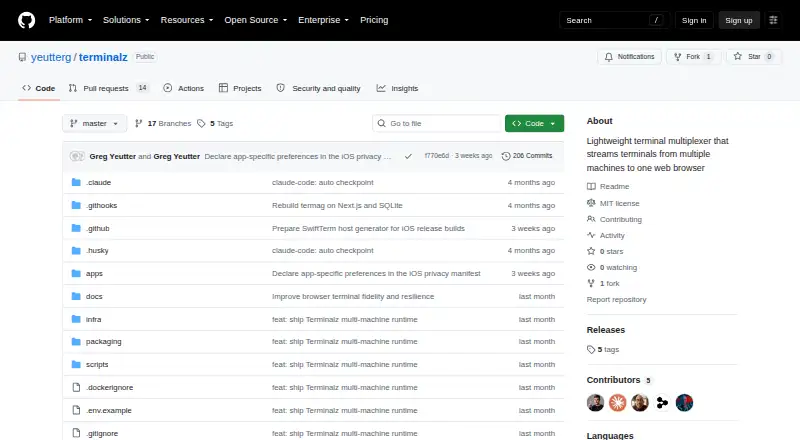
Terminalz is a self-hosted terminal multiplexer for people who want browser access to terminals across multiple machines. A lightweight Rust agent runs on each computer and connects to the web control plane through an outbound authenticated WebSocket, so inbound machine ports are not required. The product supports web, macOS, Linux, and self-hosted environments, with collaboration, local persistence, and access across tmux and Herdr environments. It is a strong fit for users who organize terminal work in Herdr or tmux and want one browser-based view of those sessions.
Its ecosystem fit is the clearest strength. Terminalz supports local tmux sessions and can mirror Herdr spaces, sessions, tabs, panes, layouts, ordering, and statuses. Docker Compose can deploy the web control plane, while Homebrew or GitHub Releases can install the native agent. The browser connection includes reconnect checkpoints and compressed WebSocket frames, and the system provides allowlisted filesystem and runtime operations. These pieces make Terminalz suited to multi-machine terminal access while keeping the workflow centered on established terminal environments rather than replacing them.
Terminalz is more focused than a broad remote workspace platform. Its persistence scope is local, and each connected computer needs its own agent, so setup involves both the self-hosted control plane and machine-level installation. Typed operations can create, rename, and close runtime objects, but the product remains centered on terminal sessions and their organization. Choose Terminalz if browser streaming, Herdr mirroring, tmux support, and collaborative session access are the priorities. Choose an alternative if you need a wider application workspace or a workflow that does not depend on Herdr, tmux, or self-hosted infrastructure.
Your product? Our editors can test Terminalz in depth and publish a review, labelled as paid · from $149/mo →
Terminalz pricing
Terminalz fact sheet
| Free plan | Not verified |
|---|---|
| Paid from | Free |
| Persistence scope | Local |
| Session synchronization | Not verified |
| Collaboration features | Yes |
| Custom pane layouts | Not verified |
| Plugins or extensions | Not verified |
| Access platforms | macOS, Linux, web browsers, tmux and Herdr environments |
| Maximum sessions | Not verified |
| Deployment | Self-hosted, Desktop |
| Platforms | Web, macOS, Linux |
| Support | Docs |
| Built for | Solo, Small business (editorial estimate) |
| Integrations | 4 integrations: Herdr, tmux, Docker Compose, Homebrew |
| Pricing | Open source |
| Website | github.com |
| Facts checked | 20 Sep 2026 |
Terminalz integrations
Terminalz lists 4 integrations on its own site.
- Herdr
- tmux
- Docker Compose
- Homebrew
Alternatives to Terminalz
- ZellijA free, open-source multiplexer with layouts, plugins, persistence, and collaboration.9.4
- tmuxA free, scriptable way to manage persistent local terminal sessions across Unix platforms.9.2
- muxelA free, open-source workspace for managing multiple local and remote coding sessions.9.0


See all Terminalz alternatives →
Used Terminalz? Be the first to review it
The editor score above is our own research. What this page doesn't have yet is a reader's view — what you used Terminalz for, what worked and what didn't. No stars are seeded and no review is paid for; an editor reads every one before it appears.
Write a reviewTwo minutes · verified accounts only · read by an editor before it appears
Featured on iTechGuides

Terminalz is listed in our Terminal Multiplexers directory. Add the badge to your site — it links back to this page.
<a href="https://www.itechguides.com/products/terminalz/"><img src="https://www.itechguides.com/best/badge/terminalz.svg" alt="Featured on iTechGuides" width="230" height="46"></a>
Reviewed by iTechGuides Editors · Editorial team · Updated Oct 2026
Advertiser disclosure: iTechGuides is reader-supported. Vendors can pay for top positions in our rankings and for a place on other products' pages, and we may earn a commission when you click some links. Bought places stand at the number bought; this page and our disclosure say so. Paying vendors may get a fuller, more detailed review from our editors, and that review can change their score. How we rank.
Last updated · How we research and update