TeraCopy
TeraCopy: A focused transfer utility for reliable copying, verification, and recovery. Ranked #91 of 100 in File Manager Software by our editors (3.0/10); pricing: Free plan; best for users focused on reliable file transfers.
At a glance
- Editor score3.0 / 10
- PricingFree plan
- Best forUsers focused on reliable file transfers
- Free planYes
- Paid from$49.95 one-time
- Supported platformswindows, macos
- Facts checked20 Sep 2026
Where it wins
- Checksum verification, generation, and validation help check transfer integrity.
- Retries, queues, history, and reports support repeatable transfer workflows.
- Metadata preservation, scripting, and shell integration extend automation options.
Where it doesn't
- It is a transfer utility rather than a full file manager.
- Commercial use requires TeraCopy Pro.
- Advanced destination and thread controls are reserved for the paid tier.
Our verdict on TeraCopy
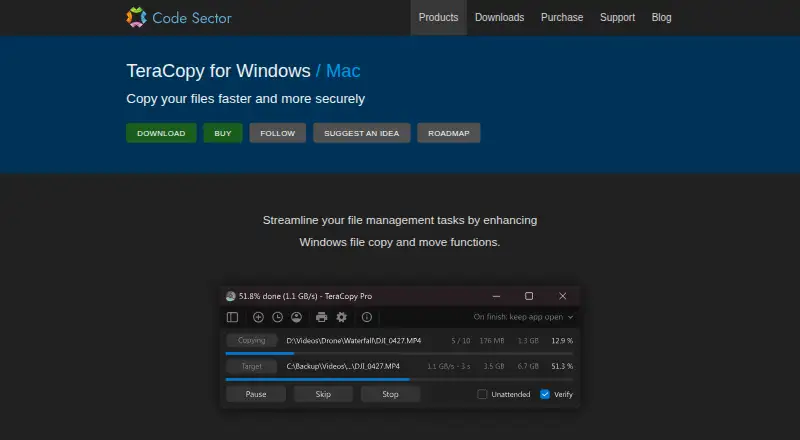
TeraCopy is a desktop utility for copying and moving files on Windows and macOS. Its focus is transfer reliability rather than broad file-management coverage. The feature set suits people who need to verify copied data, recover from failed or skipped transfers, preserve selected metadata, and maintain a record of transfer activity. Windows users also get Explorer shell integration, while command-line, batch-file, scheduled-task, and post-transfer PowerShell support make it relevant to administrators and technically oriented teams.
The published plans show a freemium model. The free version covers private, educational, and nonprofit use and includes core transfer controls such as checksum verification, retries, queues, history, automation, scripting, metadata preservation, and locked-file copying through Windows Service and Volume Shadow Copy. TeraCopy Pro costs $49.95 as a one-time purchase and adds commercial use, multiple destinations, more than two transfer threads, editable file lists, favorite folders, and HTML, CSV, and TXT reports. That makes the licensing distinction important for businesses, while the free tier covers many reliability-oriented requirements for eligible users.
TeraCopy’s main strength is its narrow depth: it adds safeguards and control around file transfers without presenting itself as a complete file manager. Checksum algorithms, checksum files, retry behavior, transfer history, and reporting address workflows where copied files need more than a basic progress dialog. However, buyers seeking broader file organization capabilities should look elsewhere, since TeraCopy is not positioned as a full file manager and does not provide verified panes, tabs, or archive tools. Choose it for dependable transfer operations and automation; consider an alternative for general-purpose file browsing and management.
Your product? Our editors can test TeraCopy in depth and publish a review, labelled as paid · from $149/mo →
TeraCopy pricing
All 1 TeraCopy plans and prices →
TeraCopy fact sheet
| Free plan | Yes |
|---|---|
| Paid from | $49.95 one-time |
| Supported platforms | windows, macos |
| Dual-pane view | Not verified |
| Tabbed interface | Not verified |
| Batch rename | Not verified |
| Archive support | Not verified |
| Cloud storage access | Not verified |
| Portable version | Yes |
| Deployment | Desktop |
| Platforms | Windows, macOS |
| Support | Live chat, Docs |
| Built for | Solo, Small business, Mid-market, Enterprise (editorial estimate) |
| Pricing | Free plan (source) |
| Website | codesector.com |
| Facts checked | 20 Sep 2026 |
Alternatives to TeraCopy
- Total CommanderA feature-rich file manager for Windows users who want power beyond Explorer.9.3
- DolphinA capable free file manager, especially for Linux and KDE-oriented desktops.9.1
- WinSCPA capable Windows file manager for secure transfers, automation, and synchronization.9.0



See all TeraCopy alternatives →
Used TeraCopy? Be the first to review it
The editor score above is our own research. What this page doesn't have yet is a reader's view — what you used TeraCopy for, what worked and what didn't. No stars are seeded and no review is paid for; an editor reads every one before it appears.
Write a reviewTwo minutes · verified accounts only · read by an editor before it appears
Featured on iTechGuides

TeraCopy is listed in our File Manager Software directory. Add the badge to your site — it links back to this page.
<a href="https://www.itechguides.com/products/teracopy/"><img src="https://www.itechguides.com/best/badge/teracopy.svg" alt="Featured on iTechGuides" width="230" height="46"></a>
Reviewed by iTechGuides Editors · Editorial team · Updated Oct 2026
Advertiser disclosure: iTechGuides is reader-supported. Vendors can pay for top positions in our rankings and for a place on other products' pages, and we may earn a commission when you click some links. Bought places stand at the number bought; this page and our disclosure say so. Paying vendors may get a fuller, more detailed review from our editors, and that review can change their score. How we rank.
Last updated · How we research and update