
TeamGraph
TeamGraph: A free, open-source WordPress plugin for accessible org charts and staff directories. Ranked #21 of 21 in Org Chart Software by our editors (6.4/10); pricing: Free plan; best for teams needing a free accessible basic chart.
At a glance
- Editor score6.4 / 10
- PricingFree plan
- Best forTeams needing a free accessible basic chart
- Free planYes
- Paid fromFree
- Facts checked21 Sep 2026
Where it wins
- Accessible charts support keyboard, screen readers, and no-JavaScript rendering
- CSV import/export, filters, profiles, and multiple directory views
- Free and open source, with data kept in the WordPress installation
Where it doesn't
- No listed integrations or directory synchronization
- Focused on charts and directories rather than advanced planning
- Publishing depends on WordPress, Gutenberg blocks, or shortcodes
Our verdict on TeamGraph
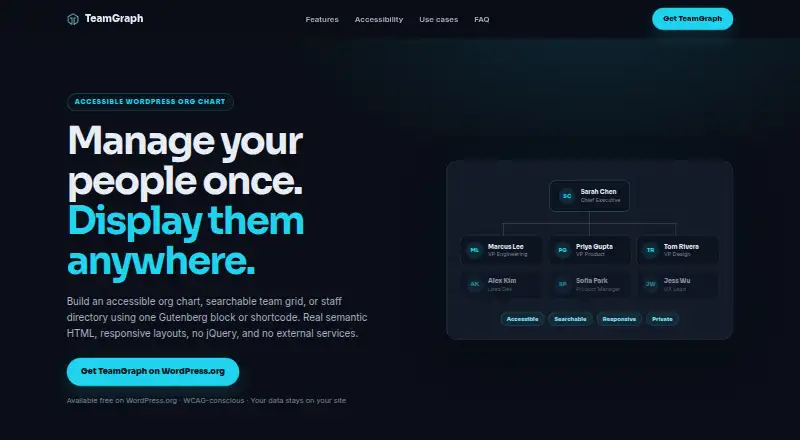
TeamGraph is a free, open-source WordPress plugin for organizations that need an internal org chart, searchable team directory, or staff grid. It stores reusable employee records with reporting relationships, departments, locations, photos, biographies, roles, and contact details. Managers can arrange reporting order with a drag-and-drop builder, then publish the result through a Gutenberg block or shortcode. The product suits teams already operating a WordPress site and looking for a basic, accessible people directory rather than a broader workforce planning system.
The Free plan includes org chart, team grid, and directory views, along with CSV import and export and a downloadable template. Department and location filters help visitors narrow results, while employee profiles add context beyond names and reporting lines. TeamGraph supports web and self-hosted use through its WordPress distribution, and its open-source model keeps the product centered on an organization’s own installation rather than an external service. That makes it a practical fit for teams that want a straightforward publishing workflow and control over where directory data is held.
Accessibility is the standout feature. The charts use semantic structure, expandable reporting branches, keyboard accessibility, screen-reader support, and no-JavaScript rendering. Automatic reparenting and reporting-cycle prevention also address common chart-maintenance problems. The trade-off is a narrow scope: the listed capabilities focus on visualization, directory browsing, employee records, filtering, and CSV handling, without a broader integration or synchronization layer. Choose TeamGraph for an accessible, self-hosted WordPress directory with basic chart-building needs; choose another category tool if HRIS connectivity, advanced planning, or a wider ecosystem is central to the purchase.
Your product? Our editors can test TeamGraph in depth and publish a review, labelled as paid · from $149/mo →
TeamGraph pricing
All 1 TeamGraph plans and prices →
TeamGraph fact sheet
| Free plan | Yes |
|---|---|
| Paid from | Free |
| Employee limit | Not verified |
| CSV import | Yes |
| Directory sync | Not verified |
| HRIS sync | Not verified |
| API access | Not verified |
| Custom employee fields | Not verified |
| Deployment | Self-hosted |
| Platforms | Web |
| Support | Community, Docs |
| Built for | Solo, Small business, Mid-market, Enterprise (editorial estimate) |
| Pricing | Free plan (source) |
| Website | getteamgraph.com |
| Facts checked | 21 Sep 2026 |
Alternatives to TeamGraph
- OrganimiA broad org-chart platform with imports, integrations, scenario planning, and a free entry plan.9.4
- OrgChartBuilderA privacy-focused org chart tool with strong scenario planning and limited live integrations.9.2
- FunctionlyA flexible org-planning workspace with a useful free tier and substantial paid jump.9.0


See all TeamGraph alternatives →
Used TeamGraph? Be the first to review it
The editor score above is our own research. What this page doesn't have yet is a reader's view — what you used TeamGraph for, what worked and what didn't. No stars are seeded and no review is paid for; an editor reads every one before it appears.
Write a reviewTwo minutes · verified accounts only · read by an editor before it appears
Featured on iTechGuides

TeamGraph is listed in our Org Chart Software directory. Add the badge to your site — it links back to this page.
<a href="https://www.itechguides.com/products/teamgraph/"><img src="https://www.itechguides.com/best/badge/teamgraph.svg" alt="Featured on iTechGuides" width="230" height="46"></a>
Reviewed by iTechGuides Editors · Editorial team · Updated Oct 2026
Advertiser disclosure: iTechGuides is reader-supported. Vendors can pay for top positions in our rankings and for a place on other products' pages, and we may earn a commission when you click some links. Bought places stand at the number bought; this page and our disclosure say so. Paying vendors may get a fuller, more detailed review from our editors, and that review can change their score. How we rank.
Last updated · How we research and update