
TeamGantt
TeamGantt: A visual project planner built for dependency-heavy schedules and timeline-focused teams. Ranked #57 of 188 in Project Management Software by our editors (3.9/10); pricing: Free plan · 14-day trial; best for teams centered on visual Gantt scheduling.
At a glance
- Editor score3.9 / 10
- PricingFree plan · 14-day trial
- Best forTeams centered on visual Gantt scheduling
- Free planYes
- Founded2009 · Baltimore, Maryland, United States
- Facts checked20 Sep 2026
Where it wins
- Drag-and-drop Gantt scheduling with dependencies and lead/lag times
- Workload, resource management, time tracking, and timesheet reports
- Portfolio dashboards, public share links, templates, and multiple views
Where it doesn't
- The Personal plan is limited to 1 user, 1 project, and 40 tasks
- The Basic plan includes only 2 projects and 150 tasks per project
- Builder Edition costs $199 per month, making it a costly top tier
Our verdict on TeamGantt
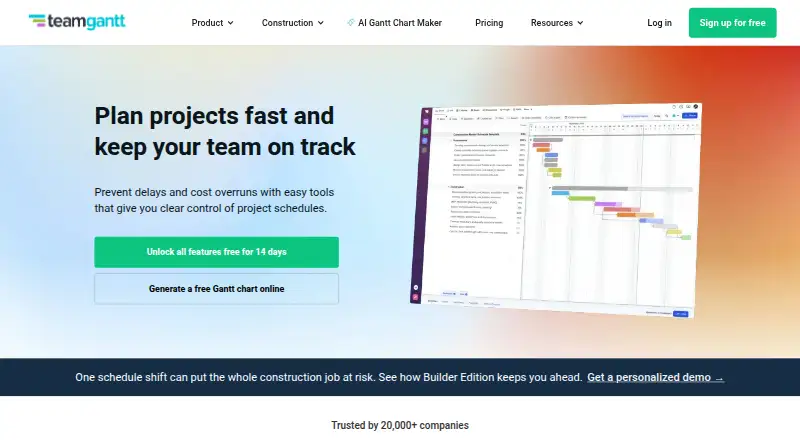
TeamGantt is web-based project management and scheduling software for teams that organize work around timelines. Its core experience centers on collaborative Gantt charts, with drag-and-drop scheduling, milestones, task dependencies, custom lead and lag times, progress tracking, workload management, and resource planning. Teams can also switch among Gantt, board, list, and calendar views, while assignments, checklists, subtasks, comments, discussions, files, and time tracking support day-to-day project coordination. Public share links make it possible to present project information to external stakeholders.
Pricing is structured around project capacity and management needs. The Personal plan supports 1 user, 1 project, 40 tasks, and basic Gantt chart features. The Basic plan costs $24 per month and includes 2 projects, 1 manager, 10 collaborators, and 150 tasks per project. Business costs $120 per month, adding 5 projects, unlimited managers, unlimited collaborators, and 500 tasks per project. Builder Edition costs $199 per month and includes 10 projects, unlimited managers, unlimited collaborators, unlimited tasks per project, and personalized onboarding. A free plan and a 14-day free trial are available. The Basic plan is priced by project rather than per user, which may suit small teams with defined project limits.
TeamGantt’s broader fit comes from its scheduling ecosystem and reporting features. It supports project templates and imports, portfolio dashboards, project health reports, custom workflows, and Zapier automation. Integrations include Trello, Procore, Slack, Basecamp, Zapier, Dropbox, Google Calendar, iCal, Outlook, Microsoft Project, and the TeamGantt API. Construction-focused capabilities are available through Builder Edition. Teams should choose TeamGantt when visual scheduling, dependencies, workload planning, and timeline reporting are central to project work. Teams needing broader project capacity at a lower monthly cost may prefer an alternative.
Your product? Our editors can test TeamGantt in depth and publish a review, labelled as paid · from $149/mo →
TeamGantt pricing
All 5 TeamGantt plans and prices →
TeamGantt fact sheet
| Free plan | Yes |
|---|---|
| Paid from | Not verified |
| Task views | Not verified |
| Automation rules | Yes |
| Time tracking | Yes |
| Guest access | Yes |
| Free-plan user limit | 1 users |
| Native integrations | 8 integrations |
| Free trial | 14 days · card required |
| Deployment | Cloud, Mobile |
| Platforms | Web, iOS, Android |
| Compliance & security | PCI DSS, 2FA |
| Support | Email, Live chat, Phone, Docs |
| Built for | Small business, Mid-market, Enterprise (editorial estimate) |
| Integrations | 2,000+ integrations: Trello, Procore, Slack, Basecamp, Zapier, Dropbox … See all → |
| Pricing | Free plan · 14-day trial (source) |
| Website | teamgantt.com |
| Facts checked | 20 Sep 2026 |
TeamGantt integrations
TeamGantt lists 2,000+ integrations on its own site — the 11 named here are the ones its pages call out.
- Trello
- Procore
- Slack
- Basecamp
- Zapier
- Dropbox
- Google Calendar
- iCal
- Outlook
- Microsoft Project
- TeamGantt API
See all TeamGantt integrations →
Alternatives to TeamGantt
- ClickUpBroad project control with tasks, Docs, automations, reporting, time tracking, and AI.9.4
- JiraA mature choice for agile delivery teams needing boards, backlogs, workflows, and automation.9.3
- AsanaA mature project hub with flexible views, automation, reporting, and AI features.9.2


See all TeamGantt alternatives →
Also Ranked In
TeamGantt is ranked in 10 of our directories; the 6 strongest besides Project Management Software.
Used TeamGantt? Be the first to review it
The editor score above is our own research. What this page doesn't have yet is a reader's view — what you used TeamGantt for, what worked and what didn't. No stars are seeded and no review is paid for; an editor reads every one before it appears.
Write a reviewTwo minutes · verified accounts only · read by an editor before it appears
Featured on iTechGuides

TeamGantt is listed in our Project Management Software directory. Add the badge to your site — it links back to this page.
<a href="https://www.itechguides.com/products/teamgantt/"><img src="https://www.itechguides.com/best/badge/teamgantt.svg" alt="Featured on iTechGuides" width="230" height="46"></a>
Reviewed by iTechGuides Editors · Editorial team · Updated Oct 2026
Advertiser disclosure: iTechGuides is reader-supported. Vendors can pay for top positions in our rankings and for a place on other products' pages, and we may earn a commission when you click some links. Bought places stand at the number bought; this page and our disclosure say so. Paying vendors may get a fuller, more detailed review from our editors, and that review can change their score. How we rank.
Last updated · How we research and update