
TargetFPS
TargetFPS: A free browser optimizer that explains which settings can reach your target FPS. Ranked #5 of 34 in Game Graphics Optimization Software by our editors (8.9/10); pricing: Free plan; best for players planning settings around a target FPS.
At a glance
- Editor score8.9 / 10
- PricingFree plan
- Best forPlayers planning settings around a target FPS
- Free planYes
- Paid fromFree
- Auto recommendationsYes
- Facts checked20 Sep 2026
Where it wins
- Hardware-specific recommendations use GPU, CPU, RAM, and resolution inputs
- Explains FPS cost, visual impact, and the biggest performance wins
- Free browser access includes guides covering 60 games
Where it doesn't
- Web-only access cannot apply graphics settings directly
- No cloud sync for profiles across devices
- Recommendations depend on estimated FPS rather than live measurement
Our verdict on TargetFPS
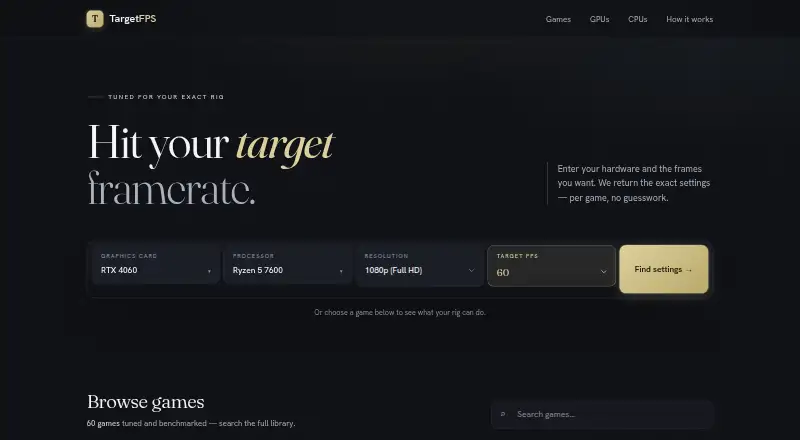
TargetFPS is a free, browser-based PC gaming graphics settings optimizer for players who want to plan around a specific framerate. It accepts a GPU, CPU, RAM, resolution, target framerate, and game, then produces a recommended configuration. The service is especially suited to players comparing visual quality against performance rather than simply applying the lowest settings. Its static guides also cover per-setting recommendations, performance costs, hardware tiers, and data-quality disclosures for 60 games.
The main appeal is the depth of its target-FPS workflow. Recommendations are organized per game and per setting, with estimated average FPS output and explanations of why each setting affects performance. Biggest-wins guidance helps identify changes that can recover frames with limited visual impact, giving players a clearer path than a generic preset. The inputs also make the recommendations more specific to a particular PC configuration, including hardware, resolution, and desired framerate.
TargetFPS is available at no cost and runs in the browser, keeping access straightforward. Selected hardware and custom profiles are stored locally, so the service does not depend on user accounts for those settings. The trade-off is a narrower workflow: it does not directly apply changes, and its web-only format means players must transfer recommendations into each game themselves. There is also no cloud sync for moving profiles between devices. Choose TargetFPS if you want explainable, hardware-specific guidance built around a target FPS; choose another option if automatic setting changes or cross-device profile access is essential.
Your product? Our editors can test TargetFPS in depth and publish a review, labelled as paid · from $149/mo →
TargetFPS pricing
TargetFPS fact sheet
| Free plan | Yes |
|---|---|
| Paid from | Free |
| Auto recommendations | Yes |
| Per-game profiles | Yes |
| In-game overlay | Not verified |
| Game library scanning | Not verified |
| Supported platforms | web |
| Cloud profile sync | No |
| Deployment | Cloud |
| Platforms | Web |
| Support | |
| Built for | Solo (editorial estimate) |
| Pricing | Free plan |
| Website | targetfps.com |
| Facts checked | 20 Sep 2026 |
Alternatives to TargetFPS
- HoneA broad Windows optimizer with presets, overlays, and a usable free tier.9.4
- GameShiftA free, open-source Windows optimizer with broad game detection and system controls.9.3
- PULSEA deep Windows tuning suite with broad free monitoring and paid optimization controls.9.2


See all TargetFPS alternatives →
TargetFPS vs the competition
- TargetFPS vs Hone
- TargetFPS vs GameShift
- TargetFPS vs PULSE
- TargetFPS vs FrameCoach
- TargetFPS vs GameOptimizer
- TargetFPS vs PC Game Booster



Compare TargetFPS with any tool side by side →
Used TargetFPS? Be the first to review it
The editor score above is our own research. What this page doesn't have yet is a reader's view — what you used TargetFPS for, what worked and what didn't. No stars are seeded and no review is paid for; an editor reads every one before it appears.
Write a reviewTwo minutes · verified accounts only · read by an editor before it appears
Featured on iTechGuides

TargetFPS is listed in our Game Graphics Optimization Software directory. Add the badge to your site — it links back to this page.
<a href="https://www.itechguides.com/products/targetfps/"><img src="https://www.itechguides.com/best/badge/targetfps.svg" alt="Featured on iTechGuides" width="230" height="46"></a>
Reviewed by iTechGuides Editors · Editorial team · Updated Oct 2026
Advertiser disclosure: iTechGuides is reader-supported. Vendors can pay for top positions in our rankings and for a place on other products' pages, and we may earn a commission when you click some links. Bought places stand at the number bought; this page and our disclosure say so. Paying vendors may get a fuller, more detailed review from our editors, and that review can change their score. How we rank.
Last updated · How we research and update