
PULSE
PULSE: A deep Windows tuning suite with broad free monitoring and paid optimization controls. Ranked #3 of 34 in Game Graphics Optimization Software by our editors (9.2/10); pricing: Free plan · 7-day trial; best for power users wanting deep Windows tuning.
At a glance
- Editor score9.2 / 10
- PricingFree plan · 7-day trial
- Best forPower users wanting deep Windows tuning
- Free planYes
- Paid from$29.99/yr
- Facts checked20 Sep 2026
Where it wins
- 90+ reversible Windows and system tweaks in Pro
- Per-game profiles with automatic application
- Monitoring integrates with RTSS, MSI Afterburner, and HWiNFO
Where it doesn't
- Windows-only support limits platform coverage
- Advanced tuning features require the Pro plan
- GPU overclocking applies only to supported NVIDIA and AMD hardware
Our verdict on PULSE
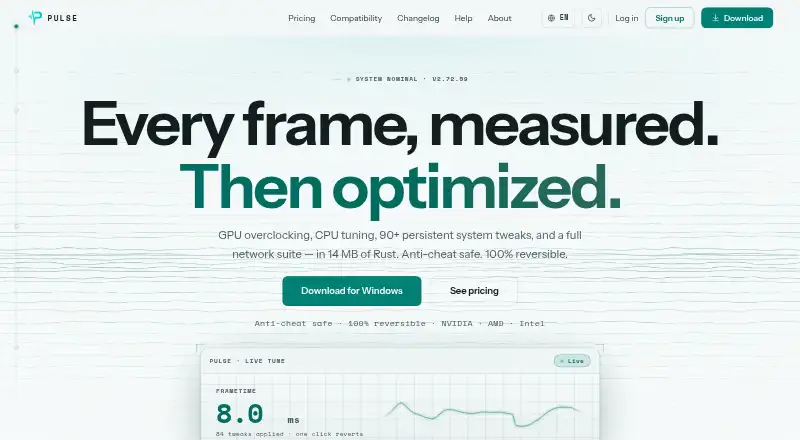
PULSE is a Windows desktop application for gamers who want hardware monitoring and configurable performance tuning in one place. It combines real-time CPU, GPU, RAM, and system monitoring with FPS and frametime tracking through RivaTuner Statistics Server. The product also covers CPU priority, affinity, turbo, EPP, and core-parking controls; GPU overclocking for supported NVIDIA and AMD hardware; network tools; display controls; and per-game profiles that can apply automatically. Its reversible approach suits power users who want detailed control over system and game behavior rather than a narrow monitoring utility.
The free plan provides real-time CPU, GPU, and RAM monitoring, FPS and frametime tracking via RTSS, system information, and session history. Pro costs $29.99 per year and adds GPU overclocking, the CPU tuner, 90+ persistent system tweaks, Live Tune, the network suite, and per-game profiles with auto-apply. Pro also includes features such as per-app firewall controls, QoS, DNS benchmarking, game-server ping, crosshair overlay, display color controls, and optimization profile export and import. A 7-day free trial is available, while the published standard annual rate is $29.99.
PULSE’s strongest fit is for Windows users who value breadth: its controls span CPU, GPU, network, display, drivers, and individual games, with integrations for RTSS, MSI Afterburner, and HWiNFO. The trade-off is scope and platform focus. Users seeking only basic FPS or hardware monitoring may find the Pro feature set unnecessary, while users on other operating systems are outside its supported platform. Choose PULSE for granular, reversible tuning and automatic per-game configuration; choose a simpler monitoring tool if you do not need system-wide optimization controls or supported-hardware overclocking.
Your product? Our editors can test PULSE in depth and publish a review, labelled as paid · from $149/mo →
PULSE pricing
All 2 PULSE plans and prices →
PULSE fact sheet
| Free plan | Yes |
|---|---|
| Paid from | $29.99/yr |
| Auto recommendations | Not verified |
| Per-game profiles | Yes |
| In-game overlay | Yes |
| Game library scanning | Yes |
| Supported platforms | Windows |
| Cloud profile sync | Not verified |
| Free trial | 7 days |
| Money-back guarantee | 14 days |
| Deployment | Desktop |
| Platforms | Windows |
| Support | Email, Community, Docs |
| Built for | Solo, Small business (editorial estimate) |
| Integrations | 3 integrations: RivaTuner Statistics Server (RTSS), MSI Afterburner, HWiNFO |
| Pricing | Free plan · 7-day trial (source) |
| Website | pulse-optimization.com |
| Facts checked | 20 Sep 2026 |
PULSE integrations
PULSE lists 3 integrations on its own site.
- RivaTuner Statistics Server (RTSS)
- MSI Afterburner
- HWiNFO
Alternatives to PULSE
- HoneA broad Windows optimizer with presets, overlays, and a usable free tier.9.4
- GameShiftA free, open-source Windows optimizer with broad game detection and system controls.9.3
- FrameCoachA free optimizer that explains settings trade-offs and helps apply changes on Windows.9.0


PULSE vs the competition
- PULSE vs Hone
- PULSE vs GameShift
- PULSE vs FrameCoach
- PULSE vs TargetFPS
- PULSE vs GameOptimizer
- PULSE vs PC Game Booster



Compare PULSE with any tool side by side →
Used PULSE? Be the first to review it
The editor score above is our own research. What this page doesn't have yet is a reader's view — what you used PULSE for, what worked and what didn't. No stars are seeded and no review is paid for; an editor reads every one before it appears.
Write a reviewTwo minutes · verified accounts only · read by an editor before it appears
Featured on iTechGuides

PULSE is listed in our Game Graphics Optimization Software directory. Add the badge to your site — it links back to this page.
<a href="https://www.itechguides.com/products/pulse-game-graphics-optimizer/"><img src="https://www.itechguides.com/best/badge/pulse-game-graphics-optimizer.svg" alt="Featured on iTechGuides" width="230" height="46"></a>
Reviewed by iTechGuides Editors · Editorial team · Updated Oct 2026
Advertiser disclosure: iTechGuides is reader-supported. Vendors can pay for top positions in our rankings and for a place on other products' pages, and we may earn a commission when you click some links. Bought places stand at the number bought; this page and our disclosure say so. Paying vendors may get a fuller, more detailed review from our editors, and that review can change their score. How we rank.
Last updated · How we research and update