
Tandem Browser
Tandem Browser: A free Chromium browser for teams sharing human-and-agent sessions, with deep inspection tools. Ranked #7 of 23 in AI Browsers by our editors (8.7/10); pricing: Free plan; best for teams sharing secure agent browser sessions.
At a glance
- Editor score8.7 / 10
- PricingFree plan
- Best forTeams sharing secure agent browser sessions
- Free planYes
- Paid fromFree
- Browser agentYes
- Facts checked19 Sep 2026
Where it wins
- Agents and people share tabs, cookies, and logged-in sessions.
- DevTools, network inspection, and DOM-based interaction are built in.
- MCP, HTTP API, multiple agents, and human handoffs support varied workflows.
Where it doesn't
- Linux support is best-effort.
- The browser engine is Chromium, limiting engine choice.
- It is presented as a developer preview rather than a paid, plan-based product.
Our verdict on Tandem Browser
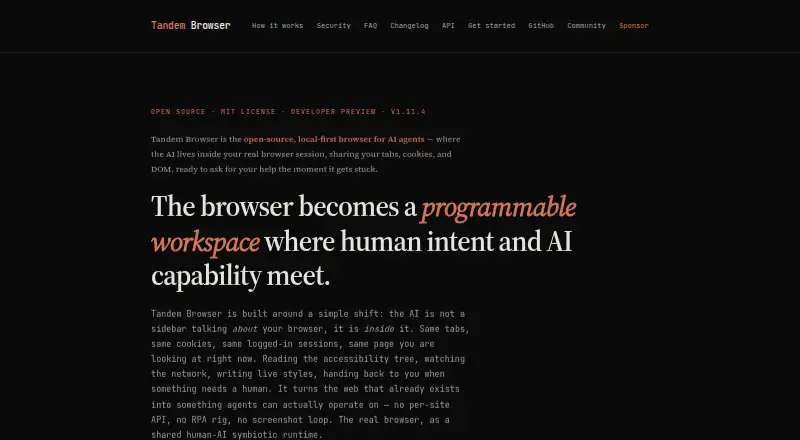
Tandem Browser is an open-source desktop browser that lets AI agents work inside a person’s real browser session. It is aimed at teams that want agents to navigate websites and automate SaaS workflows without separate site APIs, while keeping people in the loop for judgment calls. Shared tabs, cookies, and authentication let human and agent work happen in the same session; the browser’s local privacy model also suits teams that prefer browser activity to remain local.
Its standout strength is how much browser context and control agents can access. Page interaction can use the accessibility tree or DOM, and the feature set includes navigation, clicking, typing, scrolling, form filling, live network inspection, and DevTools access. Agents can also rewrite live interfaces through injected userscripts. Workspaces and tab locks support multiple agents, while human handoffs cover CAPTCHAs, risky actions, and ambiguous tasks. This depth fits developers and teams building browser-agent workflows; people looking for a conventional browser with only lightweight AI assistance may find the focus too specialized.
Tandem is presented as a free developer preview, not as a set of paid plans. Connectivity includes MCP and an HTTP API, with support for Claude, GPT, Gemini, OpenClaw, Ollama, and LM Studio; remote agents can connect over private Tailscale networks. The published platform details specify macOS Apple Silicon and Windows 11 x64, with Linux support best-effort, and identify Chromium as the browser engine. Choose Tandem for shared agent sessions, inspection, and automation across web apps. Teams requiring stronger Linux support or a browser engine other than Chromium should consider an alternative.
Your product? Our editors can test Tandem Browser in depth and publish a review, labelled as paid · from $149/mo →
Tandem Browser pricing
Tandem Browser fact sheet
| Free plan | Yes |
|---|---|
| Paid from | Free |
| Page summaries | Yes |
| AI research mode | Yes |
| Browser agent | Yes |
| Supported platforms | macOS Apple Silicon, Windows 11 x64, Linux (best-effort) |
| Browser engine | Chromium |
| Privacy model | Local |
| Deployment | Desktop |
| Platforms | macOS, Windows, Linux |
| Integrations | 9 integrations: MCP, HTTP API, Tailscale, Claude, GPT, Gemini … |
| Pricing | Free plan |
| Website | tandembrowser.org |
| Facts checked | 19 Sep 2026 |
Tandem Browser integrations
Tandem Browser lists 9 integrations on its own site.
- MCP
- HTTP API
- Tailscale
- Claude
- GPT
- Gemini
- OpenClaw
- Ollama
- LM Studio
Alternatives to Tandem Browser
- Mind BrowserA free desktop browser combining task agents, cited research, and privacy tools.9.4
- Norton NeoAI search and research tools paired with VPN and browser protections, free to download.9.2
- CometA free, cross-device browser that adds Perplexity search and AI help to familiar browsing.9.1



See all Tandem Browser alternatives →
Tandem Browser vs the competition
- Tandem Browser vs Mind Browser
- Tandem Browser vs Norton Neo
- Tandem Browser vs Comet
- Tandem Browser vs Genspark AI Browser
- Tandem Browser vs Arc Search
- Tandem Browser vs BrowserOS



Compare Tandem Browser with any tool side by side →
Also Ranked In
Tandem Browser is ranked in 3 of our directories.
Used Tandem Browser? Be the first to review it
The editor score above is our own research. What this page doesn't have yet is a reader's view — what you used Tandem Browser for, what worked and what didn't. No stars are seeded and no review is paid for; an editor reads every one before it appears.
Write a reviewTwo minutes · verified accounts only · read by an editor before it appears
Featured on iTechGuides

Tandem Browser is listed in our AI Browsers directory. Add the badge to your site — it links back to this page.
<a href="https://www.itechguides.com/products/tandem-browser/"><img src="https://www.itechguides.com/best/badge/tandem-browser.svg" alt="Featured on iTechGuides" width="230" height="46"></a>
Reviewed by iTechGuides Editors · Editorial team · Updated Oct 2026
Advertiser disclosure: iTechGuides is reader-supported. Vendors can pay for top positions in our rankings and for a place on other products' pages, and we may earn a commission when you click some links. Bought places stand at the number bought; this page and our disclosure say so. Paying vendors may get a fuller, more detailed review from our editors, and that review can change their score. How we rank.
Last updated · How we research and update