
System Informer
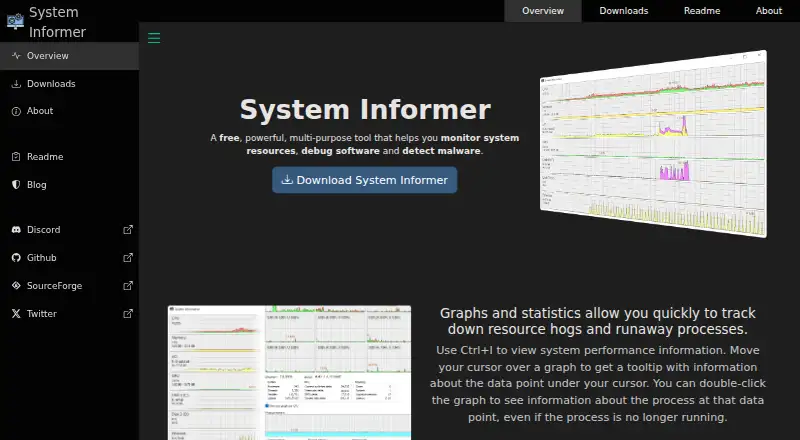
System Informer: A free, open-source Windows utility for detailed process, resource, disk, and network inspection. Ranked #10 of 26 in Process Monitoring Software by our editors (8.4/10); pricing: Free plan; best for windows users needing detailed system inspection.
At a glance
- Editor score8.4 / 10
- PricingFree plan
- Best forWindows users needing detailed system inspection
- Free planYes
- Paid fromFree
- Remote monitoringNo
- Founded2008
- Facts checked23 Sep 2026
Where it wins
- Graphs system performance and process resource use.
- Finds processes tied to files or DLLs and inspects network connections.
- Portable, open-source desktop utility with service controls and plugin support.
Where it doesn't
- Runs only on Windows.
- Does not provide remote monitoring.
- Support is community-based.
Our verdict on System Informer
System Informer is a free, open-source Windows desktop utility for advanced users and developers who need to inspect processes and system activity. It combines resource graphs and statistics with detailed process information, file or DLL lookup, network connection inspection, disk activity, stack traces, and Windows service controls. Its portable operation means it can run without installation, making it a focused option for local system inspection rather than a remote monitoring product.
Its feature depth is the main reason to consider it. Users can find processes that are using a particular file or DLL, see active network connections and close them, and view real-time disk access and usage. Stack traces include kernel-mode, WOW64, and .NET support, while service controls allow users to create, edit, and manage services. These functions suit troubleshooting and software debugging workflows where a basic process list is not enough. Plugins add an extension point, though the product remains centered on Windows system inspection rather than broader infrastructure monitoring.
The published product details describe System Informer as free and open source under the MIT license, with community support. That keeps the entry cost low, but buyers who need vendor-led support should weigh that support model carefully. It is also limited to Windows and does not offer remote monitoring, so teams seeking a cross-platform or centralized monitoring tool should look elsewhere. Choose System Informer for detailed local Windows process and resource analysis; choose an alternative if remote coverage or a different operating system is essential.
Your product? Our editors can test System Informer in depth and publish a review, labelled as paid · from $149/mo →
System Informer pricing
System Informer fact sheet
| Free plan | Yes |
|---|---|
| Paid from | Free |
| Supported platforms | Windows |
| Remote monitoring | No |
| Service monitoring | Yes |
| Process alerting | Not verified |
| History retention | Not verified |
| Process controls | Yes |
| Activity logs | Not verified |
| Deployment | Desktop |
| Platforms | Windows |
| Support | Community |
| Built for | Solo, Small business (editorial estimate) |
| Pricing | Free plan |
| Website | system-informer.com |
| Facts checked | 23 Sep 2026 |
Alternatives to System Informer
- GlancesA broad, free monitoring toolkit for cross-platform and self-hosted infrastructure.9.4
- PM2A capable Node.js process manager with deeper monitoring in paid tiers.9.2
- MonitA focused self-hosted monitor for service health, system checks, and automatic recovery.9.1



See all System Informer alternatives →
Used System Informer? Be the first to review it
The editor score above is our own research. What this page doesn't have yet is a reader's view — what you used System Informer for, what worked and what didn't. No stars are seeded and no review is paid for; an editor reads every one before it appears.
Write a reviewTwo minutes · verified accounts only · read by an editor before it appears
Featured on iTechGuides

System Informer is listed in our Process Monitoring Software directory. Add the badge to your site — it links back to this page.
<a href="https://www.itechguides.com/products/system-informer/"><img src="https://www.itechguides.com/best/badge/system-informer.svg" alt="Featured on iTechGuides" width="230" height="46"></a>
Reviewed by iTechGuides Editors · Editorial team · Updated Oct 2026
Advertiser disclosure: iTechGuides is reader-supported. Vendors can pay for top positions in our rankings and for a place on other products' pages, and we may earn a commission when you click some links. Bought places stand at the number bought; this page and our disclosure say so. Paying vendors may get a fuller, more detailed review from our editors, and that review can change their score. How we rank.
Last updated · How we research and update