
Syder
Syder: Chat-based scheduling for Google Calendar users, with monthly plans starting at $22. Ranked #17 of 25 in AI Scheduling Assistants by our editors (7.6/10); pricing: 7-day trial; best for users preferring chat-based scheduling automation.
At a glance
- Editor score7.6 / 10
- Pricing7-day trial
- Best forUsers preferring chat-based scheduling automation
- Free planNo
- Paid from$22/mo
- Calendar supportGoogle
- Facts checked19 Sep 2026
Where it wins
- Books, cancels, and reschedules meetings through WhatsApp or Slack
- Automatically resolves scheduling conflicts and syncs with Google Calendar
- Adds voice reminders, agenda briefings, and a calendar-actions MCP server
Where it doesn't
- No free plan; the trial lasts seven days
- Starter includes 100 calls per month, while Pro includes 250
- Calendar synchronization is centered on Google Calendar
Our verdict on Syder
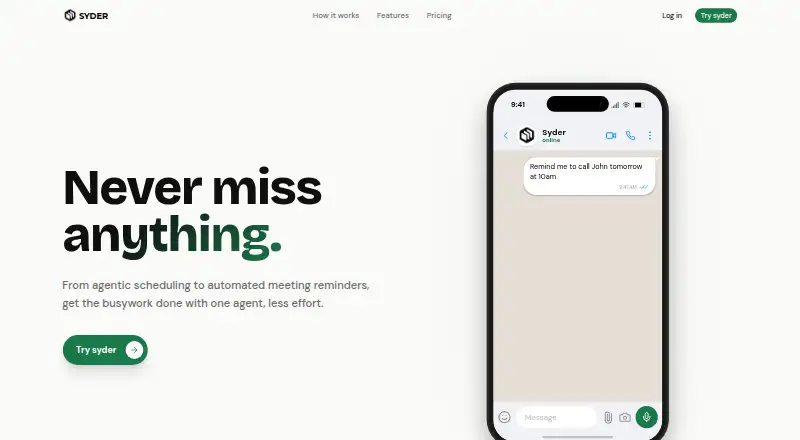
Syder is a web-based AI scheduling agent for professionals, founders, sales representatives, and remote teams who want to manage meetings through chat. It connects with Google Calendar and supports natural-language booking, cancellation, and rescheduling through WhatsApp or Slack. Automatic conflict resolution handles scheduling clashes, while voice-call reminders and meeting briefings add support around the appointment itself. Its chat-first approach suits people who prefer messaging over opening a calendar for every change; it is less suited to buyers who want a free plan or calendar options beyond Google Calendar.
The monthly plans scale by call allowance and team features. Starter costs $22 per month and includes 100 calls per month, a browser extension, Slack, Google Calendar sync, Notion, and WhatsApp. Pro is $29 per month for 250 calls, voice calls and WhatsApp, advanced calendar sync, 90 days of history, and priority support. Team costs $85 per month and includes 1,000 calls, up to 10 team members, team analytics, shared calendars, and an admin dashboard. The listed call allowances are not stated meeting limits. Syder offers a seven-day trial but no free plan, so buyers should consider the monthly allowance against their expected use.
The integrations make Syder a fit for workflows already involving Google Calendar, Slack, WhatsApp, or Notion. The MCP server also supports calendar actions from supported developer environments, while voice reminders and briefings broaden the product beyond booking alone. Its stated calendar support centers on Google Calendar, and the service is delivered on the web. Choose Syder if messaging-based scheduling, rescheduling, and reminders are priorities; look elsewhere if a free ongoing tier or a broader stated calendar ecosystem is essential.
Your product? Our editors can test Syder in depth and publish a review, labelled as paid · from $149/mo →
Syder pricing
All 3 Syder plans and prices →
Syder fact sheet
| Free plan | No |
|---|---|
| Paid from | $22/mo |
| Calendar support | |
| Invitee messaging | Yes |
| Autonomous rescheduling | Yes |
| Team scheduling | Yes |
| Scheduling channels | Chat |
| Monthly meeting limit | Not verified |
| Free trial | 7 days |
| Deployment | Cloud |
| Platforms | Web |
| Integrations | 4 integrations: Google Calendar, Notion, WhatsApp, Slack |
| Pricing | 7-day trial (source) |
| Website | syder.in |
| Facts checked | 19 Sep 2026 |
Syder integrations
Syder lists 4 integrations on its own site.
- Google Calendar
- Notion
- Slack
Alternatives to Syder
- DayOtterFlexible scheduling for individuals and teams, with hosted and self-hosted options.9.4
- AriAri handles email-based scheduling, with free access capped at 10 meetings total.9.2
- CalendarBridge AI Scheduling AssistantEmail-driven scheduling across multiple calendars, with automated proposals, booking and rescheduling.9.1



Used Syder? Be the first to review it
The editor score above is our own research. What this page doesn't have yet is a reader's view — what you used Syder for, what worked and what didn't. No stars are seeded and no review is paid for; an editor reads every one before it appears.
Write a reviewTwo minutes · verified accounts only · read by an editor before it appears
Featured on iTechGuides

Syder is listed in our AI Scheduling Assistants directory. Add the badge to your site — it links back to this page.
<a href="https://www.itechguides.com/products/syder/"><img src="https://www.itechguides.com/best/badge/syder.svg" alt="Featured on iTechGuides" width="230" height="46"></a>
Reviewed by iTechGuides Editors · Editorial team · Updated Oct 2026
Advertiser disclosure: iTechGuides is reader-supported. Vendors can pay for top positions in our rankings and for a place on other products' pages, and we may earn a commission when you click some links. Bought places stand at the number bought; this page and our disclosure say so. Paying vendors may get a fuller, more detailed review from our editors, and that review can change their score. How we rank.
Last updated · How we research and update