SwiftLint
SwiftLint: A focused, free Swift linter with configurable rules, autofix, and CI integrations. Ranked #12 of 33 in Linters by our editors (8.0/10); pricing: Open source; best for swift teams using Xcode.
At a glance
- Editor score8.0 / 10
- PricingOpen source
- Best forSwift teams using Xcode
- Paid fromFree
- CI supportYes
- Facts checked21 Sep 2026
Where it wins
- Built-in and configurable rules for Swift style and conventions
- Autofix, custom rules, and type-checked AST analysis
- Xcode, Swift Package Manager, CI, and workflow integrations
Where it doesn't
- Focused on Swift rather than multiple programming languages
- Automatic correction applies only to certain violations
- Does not provide built-in security rules
Our verdict on SwiftLint
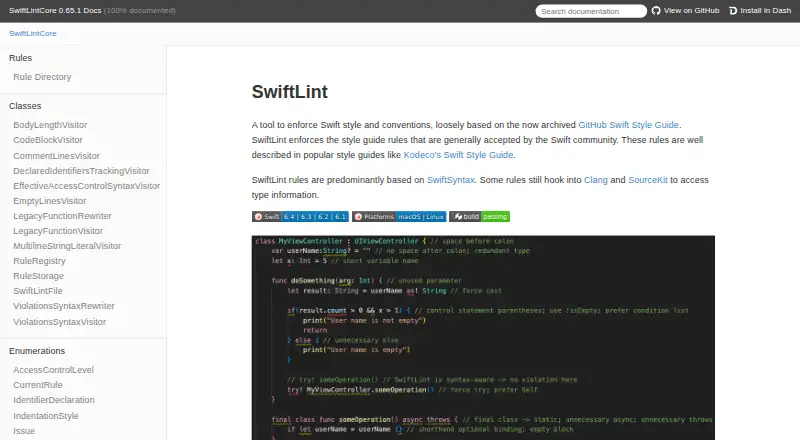
SwiftLint is an open-source command-line linter for Swift code, aimed at teams that want consistent style and convention checks across development and delivery workflows. It includes built-in rules, configurable rule sets, included and excluded paths, severity levels, and support for configuration through .swiftlint.yml. Its free, MIT-licensed model suits Swift teams that want a dedicated linter without paid tiers, particularly those working in Xcode or Swift Package Manager projects.
Its strongest area is the depth of its Swift-focused rule and analysis options. SwiftLint can automatically correct certain violations, while custom Swift and regular-expression rules let teams extend the default checks. The analyze command adds type-checked AST analysis, giving teams a deeper analysis option than basic source-pattern checks. Output can be tailored to different workflows through JSON, SARIF, GitHub Actions logging, and Xcode reporters. These capabilities make it practical for local checks as well as automated review and build environments.
SwiftLint also fits a broad set of Swift development workflows. It supports Xcode and Swift Package Manager build-tool and command plugins, Visual Studio Code integration, pre-commit hooks, Fastlane, Docker, build scripts, and continuous-integration workflows. That breadth helps teams standardize linting across editors and pipelines, while the single-language focus keeps the product narrower than multi-language linters. Swift teams seeking style enforcement, custom rules, and CI reporting should consider it; teams needing cross-language analysis or built-in security rules should choose a tool designed for those requirements instead.
Your product? Our editors can test SwiftLint in depth and publish a review, labelled as paid · from $149/mo →
SwiftLint pricing
SwiftLint fact sheet
| Free plan | Not verified |
|---|---|
| Paid from | Free |
| Languages supported | 1 |
| Autofix | Yes |
| Custom rules | Yes |
| Security rules | No |
| IDE support | Ide |
| CI support | Yes |
| Deployment | Desktop |
| Platforms | Windows, macOS, Linux |
| Support | Docs |
| Built for | Solo, Small business, Mid-market, Enterprise (editorial estimate) |
| Integrations | 9 integrations: Xcode, Swift Package Manager, CocoaPods, Mint, Bazel, Fastlane … |
| Pricing | Open source |
| Website | realm.github.io |
| Facts checked | 21 Sep 2026 |
SwiftLint integrations
SwiftLint lists 9 integrations on its own site.
- Xcode
- Swift Package Manager
- CocoaPods
- Mint
- Bazel
- Fastlane
- Docker
- pre-commit
- Visual Studio Code
Alternatives to SwiftLint
- ESLintA free, extensible JavaScript linter with autofix, plugins, and broad developer-tool integrations.9.4
- RuffFree Python linting and formatting with more than 900 built-in rules.9.2
- ShellCheckA free, open-source linter for shell syntax, portability, robustness and security checks.9.0



See all SwiftLint alternatives →
Used SwiftLint? Be the first to review it
The editor score above is our own research. What this page doesn't have yet is a reader's view — what you used SwiftLint for, what worked and what didn't. No stars are seeded and no review is paid for; an editor reads every one before it appears.
Write a reviewTwo minutes · verified accounts only · read by an editor before it appears
Featured on iTechGuides

SwiftLint is listed in our Linters directory. Add the badge to your site — it links back to this page.
<a href="https://www.itechguides.com/products/swiftlint/"><img src="https://www.itechguides.com/best/badge/swiftlint.svg" alt="Featured on iTechGuides" width="230" height="46"></a>
Reviewed by iTechGuides Editors · Editorial team · Updated Oct 2026
Advertiser disclosure: iTechGuides is reader-supported. Vendors can pay for top positions in our rankings and for a place on other products' pages, and we may earn a commission when you click some links. Bought places stand at the number bought; this page and our disclosure say so. Paying vendors may get a fuller, more detailed review from our editors, and that review can change their score. How we rank.
Last updated · How we research and update