
SVGtoCode
SVGtoCode: A low-cost web toolkit for turning text and images into editable vectors and code. Ranked #4 of 26 in AI Vector Generators by our editors (8.8/10); pricing: Free plan; best for budget users needing broad vector and code exports.
At a glance
- Editor score8.8 / 10
- PricingFree plan
- Best forBudget users needing broad vector and code exports
- Free planYes
- Paid from$24.99/yr
- Editable vector outputYes
- Facts checked21 Sep 2026
Where it wins
- Converts raster images into SVG in the browser
- Exports vectors to code, image, document, and EPS formats
- Pro access starts at $2.99 per month with unlimited batches
Where it doesn't
- AI generation is restricted to Pro plans
- Guest and Free Account batches have file-count and size limits
- Web-only access may not suit desktop-first workflows
Our verdict on SVGtoCode
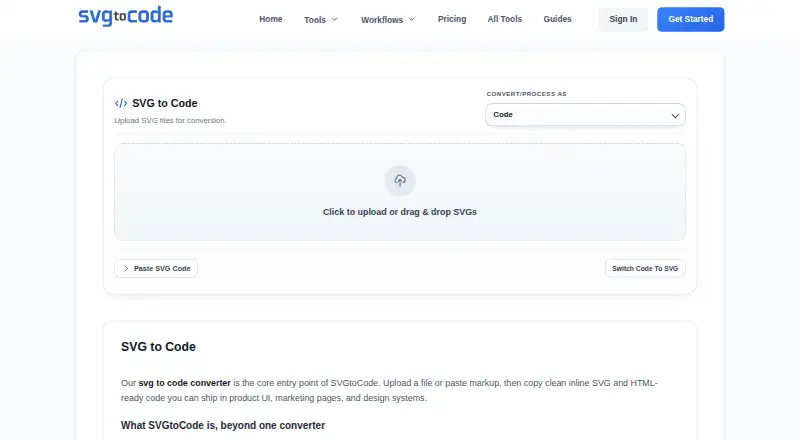
SVGtoCode is a browser-based vector workflow platform for developers, designers, founders, and teams. It combines AI text-to-SVG icon generation with image-to-SVG vectorization for PNG, JPG, GIF, WebP, and BMP files. Users can edit SVGs, compress and optimize them, preview results, and export standard SVG code. The platform also converts SVG files into JSX, TSX, Vue, HTML, and other code formats, making it relevant to both design and front-end workflows.
The plan structure keeps entry costs low. Guest access is available for instant use, with batches of up to 10 files and a 5 MB maximum file size. A Free Account raises those limits to 20 files per batch and 10 MB per file, while adding ZIP downloads; both free options exclude AI generation and priority support. Pro Monthly costs $2.99 per month and adds unlimited batch size, AI generation, priority support, and no ads. Pro Yearly costs $24.99 per year, includes the monthly features, provides 2 months free, and adds early access to beta tools. Lifetime Access costs $39.99 one time and includes forever updates and VIP support.
SVGtoCode’s main strength is breadth within a focused vector workflow. It supports editable SVG output, browser-local processing for image vectorization, and exports to PNG, JPG, WebP, GIF, BMP, ICO, TIFF, PDF, and EPS. Its code-oriented outputs extend that workflow into JSX, TSX, Vue, and HTML. The trade-off is a web-only experience and a clear divide between free vector utilities and paid AI generation. Choose it if low-cost raster conversion, editable vectors, and many export targets matter; choose an alternative if you need AI generation without a Pro plan or a non-web deployment model.
Your product? Our editors can test SVGtoCode in depth and publish a review, labelled as paid · from $149/mo →
SVGtoCode pricing
All 5 SVGtoCode plans and prices →
SVGtoCode fact sheet
| Free plan | Yes |
|---|---|
| Paid from | $24.99/yr |
| Editable vector output | Yes |
| SVG export | Yes |
| Text-to-vector generation | Yes |
| Image-to-vector conversion | Yes |
| Commercial license | Commercial |
| Export formats | SVG, PNG, JPG, WebP, GIF, BMP, ICO, TIFF, PDF, EPS |
| Monthly generations | Not verified |
| Deployment | Cloud |
| Platforms | Web |
| Support | |
| Built for | Solo, Small business, Mid-market (editorial estimate) |
| Pricing | Free plan (source) |
| Website | svgtocode.com |
| Facts checked | 21 Sep 2026 |
Alternatives to SVGtoCode
- AmntFlexible text-to-SVG and image vectorization with editable paths and usage pricing.9.4
- RecraftA broad AI creative suite with editable vectors, image editing, and API access.9.2
- SVG AIA flexible AI vector workflow with editable paths and multi-format exports.8.9



See all SVGtoCode alternatives →
SVGtoCode vs the competition
- SVGtoCode vs Amnt
- SVGtoCode vs Recraft
- SVGtoCode vs SVG AI
- SVGtoCode vs SmartSVG
- SVGtoCode vs AnnoMotion
- SVGtoCode vs SVG.new



Compare SVGtoCode with any tool side by side →
Used SVGtoCode? Be the first to review it
The editor score above is our own research. What this page doesn't have yet is a reader's view — what you used SVGtoCode for, what worked and what didn't. No stars are seeded and no review is paid for; an editor reads every one before it appears.
Write a reviewTwo minutes · verified accounts only · read by an editor before it appears
Featured on iTechGuides

SVGtoCode is listed in our AI Vector Generators directory. Add the badge to your site — it links back to this page.
<a href="https://www.itechguides.com/products/svgtocode/"><img src="https://www.itechguides.com/best/badge/svgtocode.svg" alt="Featured on iTechGuides" width="230" height="46"></a>
Reviewed by iTechGuides Editors · Editorial team · Updated Oct 2026
Advertiser disclosure: iTechGuides is reader-supported. Vendors can pay for top positions in our rankings and for a place on other products' pages, and we may earn a commission when you click some links. Bought places stand at the number bought; this page and our disclosure say so. Paying vendors may get a fuller, more detailed review from our editors, and that review can change their score. How we rank.
Last updated · How we research and update