
SuperOkay
SuperOkay: A flexible client portal for solo service providers, with higher-tier limits on scale and branding. Ranked #16 of 31 in Customer Portal Software by our editors (7.8/10); pricing: Free plan; best for solo professionals wanting a low-cost portal.
At a glance
- Editor score7.8 / 10
- PricingFree plan
- Best forSolo professionals wanting a low-cost portal
- Free planYes
- Paid from$9/mo
- Work trackingYes
- Facts checked23 Sep 2026
Where it wins
- Free plan includes file sharing and task management
- Interactive documents support uploads, questionnaires, and approvals
- Integrates with Airtable, Figma, Miro, Drive, Trello, and Canva
Where it doesn't
- Lower-priced plans limit the number of clients
- Custom domains require Solo+ or Business
- Available on the web rather than across native apps
Our verdict on SuperOkay
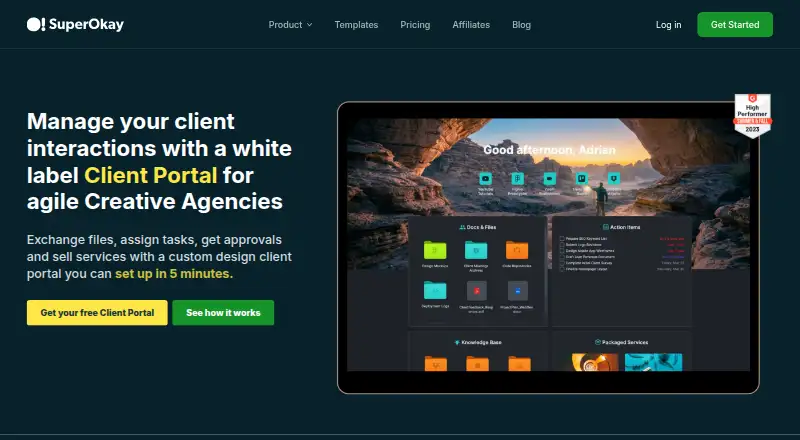
SuperOkay is a client portal platform for agencies, freelancers, and service businesses that need a branded space for client communication and project delivery. Portals can bring together documents, files, links, embedded apps, web pages, tasks, approvals, and client access controls. Interactive documents add file-upload and questionnaire fields, while clients can comment on tasks, upload files, and approve documents. Templates, reusable content blocks, packaged services, and billable services extend its use beyond basic file sharing.
Pricing is structured for gradual expansion. The Free plan supports 1 client, 1 client contact, 1 project, 0.5GB storage, file storage and sharing, and task management. Solo costs $9 per month with annual billing or $12 monthly, and adds 3 clients, 5 client contacts, unlimited projects, unlimited documents, and unlimited tasks. Solo+ costs $29 annually billed or $38 monthly, with 5 clients, 10 client contacts, 3 team members, a custom domain, full white label, and custom project permissions. Business costs $112 annually billed or $146 monthly, adding unlimited clients, contacts, and team members, 1TB storage, a custom domain, and dedicated customer support.
Its strongest fit is a solo professional or small service business that wants structured client handoffs without starting at an enterprise price. Integrations with Airtable, Figma, Miro, Google Data Studio, Google Drive, Trello, Canva, and YouTube support project-specific content and embedded workflows. The main trade-off is scale: the lower-priced tiers cap client volume, while custom domains and full white labeling begin at Solo+. Businesses needing unlimited clients, broader team access, or dedicated support should consider Business; organizations requiring native desktop or mobile coverage should look elsewhere.
Your product? Our editors can test SuperOkay in depth and publish a review, labelled as paid · from $99/mo →
SuperOkay pricing
All 4 SuperOkay plans and prices →
SuperOkay fact sheet
| Free plan | Yes |
|---|---|
| Paid from | $9/mo |
| Client user limit | 5 users |
| Request intake | Yes |
| Work tracking | Yes |
| File sharing | Yes |
| Custom domain | No |
| Single sign-on | Not verified |
| Deployment | Cloud |
| Platforms | Web |
| Support | Email, Live chat, Docs |
| Built for | Solo, Small business, Mid-market (editorial estimate) |
| Integrations | 5 integrations: Figma, Airtable, Trello, Miro, YouTube |
| Pricing | Free plan (source) |
| Website | superokay.com |
| Facts checked | 23 Sep 2026 |
SuperOkay integrations
SuperOkay lists 5 integrations on its own site.
- Figma
- Airtable
- Trello
- Miro
- YouTube
Alternatives to SuperOkay
- AssemblyA broad client portal with onboarding, billing, files, workflows, and a free plan.9.4
- PlutioA broad client portal suite for small firms that want projects, billing, forms, and automation together.9.2
- SuiteDashA broad client-service suite combining portals, CRM, projects, billing, and communication.9.1



See all SuperOkay alternatives →
Also Ranked In
SuperOkay is ranked in 3 of our directories.
Used SuperOkay? Be the first to review it
The editor score above is our own research. What this page doesn't have yet is a reader's view — what you used SuperOkay for, what worked and what didn't. No stars are seeded and no review is paid for; an editor reads every one before it appears.
Write a reviewTwo minutes · verified accounts only · read by an editor before it appears
Featured on iTechGuides

SuperOkay is listed in our Customer Portal Software directory. Add the badge to your site — it links back to this page.
<a href="https://www.itechguides.com/products/superokay/"><img src="https://www.itechguides.com/best/badge/superokay.svg" alt="Featured on iTechGuides" width="230" height="46"></a>
Reviewed by iTechGuides Editors · Editorial team · Updated Oct 2026
Advertiser disclosure: iTechGuides is reader-supported. Vendors can pay for top positions in our rankings and for a place on other products' pages, and we may earn a commission when you click some links. Bought places stand at the number bought; this page and our disclosure say so. Paying vendors may get a fuller, more detailed review from our editors, and that review can change their score. How we rank.
Last updated · How we research and update