Sunflower
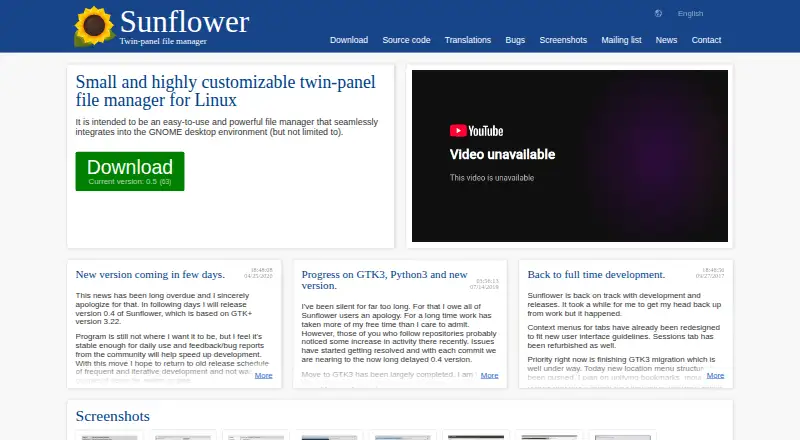
Sunflower: A free, open-source Linux file manager centered on twin panels, tabs and keyboard controls. Ranked #63 of 100 in File Manager Software by our editors (3.0/10); pricing: Free plan; best for linux users seeking a free, keyboard-driven file manager.
At a glance
- Editor score3.0 / 10
- PricingFree plan
- Best forLinux users seeking a free, keyboard-driven file manager
- Free planYes
- Paid fromFree
- Supported platformslinux
- Facts checked24 Sep 2026
Where it wins
- Twin panels, tabs and saved tab sessions support organized browsing.
- Built-in terminal tabs and keyboard-oriented controls aid focused workflows.
- GPL-licensed, with customization and community plugins.
Where it doesn't
- Linux desktop only; no Windows or macOS platform is listed.
- Community support may not suit buyers needing dedicated support.
- Its listed features center on browsing and customization, not broad file operations.
Our verdict on Sunflower
Sunflower is a free, open-source desktop file manager for Linux, developed by Mladen Mijatov and contributors. Its twin-panel workflow, tabbed browsing and keyboard-oriented controls make it a fit for solo users and small teams who prefer managing files from a Linux desktop. The project describes GNOME integration while also supporting other desktop environments, and says it is compatible with Wayland compositors. Its GPL license and community plugins make customization part of the product's appeal.
The workflow is the clearest reason to consider Sunflower. Users can keep separate locations visible in twin panels, organize work with tabs, and save tab sessions for later. File and directory emblems add a way to mark items, while built-in terminal tabs place command-line work alongside browsing. The product also documents multithreaded operation and keyboard controls. Community plugins include options for image manipulation and archive extraction, extending the manager beyond its built-in browsing features. These capabilities may suit users who value a compact, customizable interface more than a broad, polished suite of file operations.
Sunflower is a focused choice rather than a cross-platform manager: Linux is the listed platform, and desktop is the deployment model. Community is its stated support channel, so buyers who need dedicated assistance should look elsewhere. Its GPL licensing and free availability will appeal to users comfortable with community-supported software; prospective users seeking support commitments or a platform beyond Linux should consider alternatives. The published product information identifies version 0.563. Choose Sunflower for a Linux twin-panel workflow with tabs, terminal access and plugins, not for a product whose main draw is wide platform coverage or vendor support.
Your product? Our editors can test Sunflower in depth and publish a review, labelled as paid · from $149/mo →
Sunflower pricing
Sunflower fact sheet
| Free plan | Yes |
|---|---|
| Paid from | Free |
| Supported platforms | linux |
| Dual-pane view | Yes |
| Tabbed interface | Yes |
| Batch rename | Yes |
| Archive support | Yes |
| Cloud storage access | Not verified |
| Portable version | Not verified |
| Deployment | Desktop |
| Platforms | Linux |
| Support | Community |
| Built for | Solo, Small business (editorial estimate) |
| Pricing | Free plan |
| Website | sunflower-fm.org:443 |
| Facts checked | 24 Sep 2026 |
Alternatives to Sunflower
- Total CommanderA feature-rich file manager for Windows users who want power beyond Explorer.9.3
- DolphinA capable free file manager, especially for Linux and KDE-oriented desktops.9.1
- WinSCPA capable Windows file manager for secure transfers, automation, and synchronization.9.0



See all Sunflower alternatives →
Used Sunflower? Be the first to review it
The editor score above is our own research. What this page doesn't have yet is a reader's view — what you used Sunflower for, what worked and what didn't. No stars are seeded and no review is paid for; an editor reads every one before it appears.
Write a reviewTwo minutes · verified accounts only · read by an editor before it appears
Featured on iTechGuides

Sunflower is listed in our File Manager Software directory. Add the badge to your site — it links back to this page.
<a href="https://www.itechguides.com/products/sunflower/"><img src="https://www.itechguides.com/best/badge/sunflower.svg" alt="Featured on iTechGuides" width="230" height="46"></a>
Reviewed by iTechGuides Editors · Editorial team · Updated Oct 2026
Advertiser disclosure: iTechGuides is reader-supported. Vendors can pay for top positions in our rankings and for a place on other products' pages, and we may earn a commission when you click some links. Bought places stand at the number bought; this page and our disclosure say so. Paying vendors may get a fuller, more detailed review from our editors, and that review can change their score. How we rank.
Last updated · How we research and update