
Sublime Merge
Sublime Merge: A paid desktop Git client with detailed staging, diffs, history search and conflict tools. Ranked #12 of 32 in Git GUI Clients by our editors (8.2/10); pricing: Paid; best for developers who want detailed Git control on desktop.
At a glance
- Editor score8.2 / 10
- PricingPaid
- Best forDevelopers who want detailed Git control on desktop
- Free planNo
- Facts checked22 Sep 2026
Where it wins
- Stages individual lines and hunks, and supports commit editing
- Combines side-by-side, syntax-highlighted and character-level diffs
- Includes repository search, conflict resolution, Git LFS and submodule tools
Where it doesn't
- No free plan; continued use requires a license
- Business licensing is an annual subscription with seats assigned to individuals
- Desktop-only deployment may not suit teams seeking a hosted Git interface
Our verdict on Sublime Merge
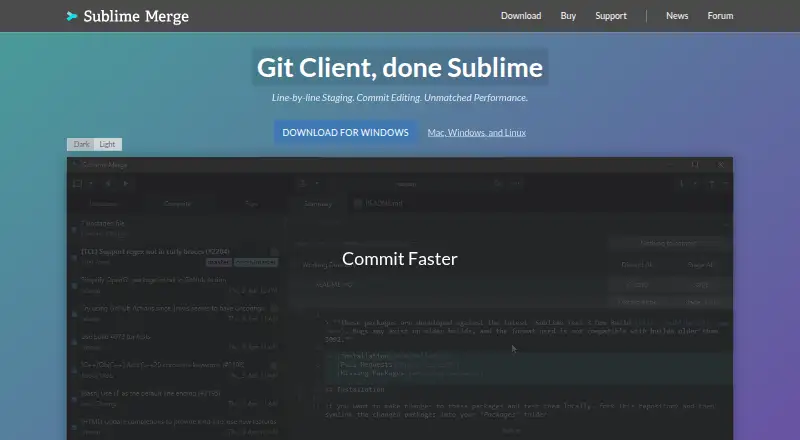
Sublime Merge is a desktop graphical client for working with Git repositories on Windows, macOS and Linux. Its feature set is aimed at developers who want a visual view of repository changes without giving up access to Git commands. It supports cloning, staging files or individual lines and hunks, editing commits, searching repository history, and managing branches and submodules. Developers who regularly review detailed diffs or handle merge conflicts may find its focused Git workflow useful; those looking for a free client or a hosted interface should consider other options.
The staging and review tools are more granular than a simple file list: diffs can be side by side, syntax highlighted and character level, while repository search can filter by commit message, author, path and contents. A built-in merge conflict resolution tool supports conflict work, and Git LFS features include lock and unlock operations. Git Flow integration and the smerge command-line helper connect the graphical interface with established Git workflows. This combination suits people who want to inspect and act on repository state locally, particularly where large files, nested repositories or commit history are part of the work.
Licensing is paid, with a Personal license offered as a one-time purchase that includes three years of updates; a Business license is an annual subscription with seats allocated to individual users. Evaluation has no enforced time limit, but continued use requires a license, and the published terms include a 30-day refund period. Support channels include email, documentation and community resources. Choose Sublime Merge if its fine-grained staging, diff inspection and Git-specific tools match a desktop workflow across the three supported operating systems. Skip it if a free plan, browser-based deployment or a non-subscription business arrangement is essential.
Your product? Our editors can test Sublime Merge in depth and publish a review, labelled as paid · from $149/mo →
Sublime Merge pricing
All 2 Sublime Merge plans and prices →
Sublime Merge fact sheet
| Free plan | No |
|---|---|
| Paid from | Not verified |
| Supported platforms | Not verified |
| Offline mode | Not verified |
| Git LFS support | Not verified |
| Git submodules | Not verified |
| Interactive rebase | Not verified |
| Conflict editor | Not verified |
| Money-back guarantee | 30 days |
| Deployment | Desktop |
| Platforms | Windows, macOS, Linux |
| Support | Email, Docs, Community |
| Built for | Solo, Small business, Mid-market, Enterprise (editorial estimate) |
| Integrations | 3 integrations: Git, Git LFS, Git Flow |
| Pricing | Paid (source) |
| Website | sublimemerge.com |
| Facts checked | 22 Sep 2026 |
Sublime Merge integrations
Sublime Merge lists 3 integrations on its own site.
- Git
- Git LFS
- Git Flow
Alternatives to Sublime Merge
- GitemberA broad, free Git desktop client with history, review, LFS, submodules, and local AI.9.4
- platypusgitDeep Git control across macOS, Windows, and Linux without accounts or telemetry.9.3
- GitKraken DesktopA mature Git GUI with deep repository workflows, hosting integrations, and team tiers.9.1



See all Sublime Merge alternatives →
Also Ranked In
Sublime Merge is ranked in 3 of our directories.
Used Sublime Merge? Be the first to review it
The editor score above is our own research. What this page doesn't have yet is a reader's view — what you used Sublime Merge for, what worked and what didn't. No stars are seeded and no review is paid for; an editor reads every one before it appears.
Write a reviewTwo minutes · verified accounts only · read by an editor before it appears
Featured on iTechGuides

Sublime Merge is listed in our Git GUI Clients directory. Add the badge to your site — it links back to this page.
<a href="https://www.itechguides.com/products/sublime-merge/"><img src="https://www.itechguides.com/best/badge/sublime-merge.svg" alt="Featured on iTechGuides" width="230" height="46"></a>
Reviewed by iTechGuides Editors · Editorial team · Updated Oct 2026
Advertiser disclosure: iTechGuides is reader-supported. Vendors can pay for top positions in our rankings and for a place on other products' pages, and we may earn a commission when you click some links. Bought places stand at the number bought; this page and our disclosure say so. Paying vendors may get a fuller, more detailed review from our editors, and that review can change their score. How we rank.
Last updated · How we research and update