
StreamChum Studio
StreamChum Studio: A paid desktop streamer with 4K output, multistreaming, and AI scene tools. Ranked #19 of 44 in Game Streaming Software by our editors (7.3/10); pricing: 14-day trial; best for paid desktop streaming with AI-assisted setup.
At a glance
- Editor score7.3 / 10
- Pricing14-day trial
- Best forPaid desktop streaming with AI-assisted setup
- Free planYes
- Paid from$8.25/mo
- Max output resolution4k
- Facts checked22 Sep 2026
Where it wins
- Streams to Twitch, YouTube, and Kick from one desktop app
- Supports 4K hardware-accelerated H.264 encoding
- Adds AI scene creation, captions, and audio ducking
Where it doesn't
- Free is limited to one streaming destination and no AI credits
- The desktop app supports only Windows and macOS
- AI credits and history are capped by plan
Our verdict on StreamChum Studio
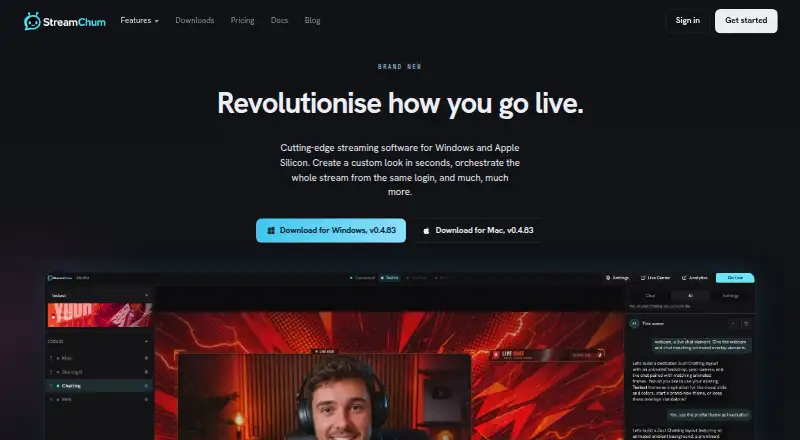
StreamChum Studio is desktop broadcasting software for game streamers who want to capture games, displays, windows, cameras, and microphones in one application. It supports scene and overlay composition, multistreaming to Twitch, YouTube, and Kick, unified chat and stream controls, themed profiles, live captions, and audio ducking when speaking. The software runs on Windows and Apple Silicon Macs, making it suited to creators who prefer a desktop workflow rather than browser-based broadcasting.
There is a free plan: Studio, chat, overlays, and Actions on one streaming destination, with no card required, one seat and 7-day history. Plus costs $8.25 per month or $99 per year and adds all three streaming destinations, Play, AI, 2,000 AI credits per month, five staff seats, and 90-day history. Pro costs $14.08 per month or $169 per year, increasing those allowances to 4,000 AI credits per month, 15 staff seats, and 365-day history. The paid tiers differ mainly in AI capacity, collaboration seats, and retained history, while all three support the core desktop streaming workflow.
Its strongest fit is for streamers who need multistreaming, 4K output, hardware-accelerated H.264 encoding, and scene assistance in the same tool. Integrations with Twitch, YouTube, Kick, Discord, and Ko-fi extend its platform and community connections, while game, display, and window capture cover common broadcast inputs. Choose StreamChum Studio for desktop streaming with a genuine free tier to start, and AI-assisted scene creation as you grow. Streamers seeking a platform outside Windows and macOS should choose another application.
Your product? Our editors can test StreamChum Studio in depth and publish a review, labelled as paid · from $149/mo →
StreamChum Studio pricing
All 3 StreamChum Studio plans and prices →
StreamChum Studio fact sheet
| Free plan | Yes |
|---|---|
| Paid from | $8.25/mo |
| Max output resolution | 4k |
| Multistreaming | Yes |
| Hardware encoding | Yes |
| Alerts and widgets | Yes |
| Custom RTMP output | Not verified |
| Virtual camera | Not verified |
| Supported platforms | Windows, macOS (Apple Silicon) |
| Free trial | 14 days · no card needed |
| Deployment | Cloud, Desktop |
| Platforms | Windows, macOS |
| Support | Email, Community, Docs |
| Built for | Solo, Small business (editorial estimate) |
| Integrations | 7 integrations: Twitch, YouTube, Kick, Discord, Ko-fi, OBS … |
| Pricing | 14-day trial (source) |
| Website | streamchum.com |
| Facts checked | 22 Sep 2026 |
StreamChum Studio integrations
StreamChum Studio lists 7 integrations on its own site.
- Twitch
- YouTube
- Kick
- Discord
- Ko-fi
- OBS
- Stream Deck
Alternatives to StreamChum Studio
- OBS StudioA flexible desktop studio with deep production tools and no software cost.9.4
- PRISM Live StudioA cross-platform encoder with scheduling, interaction tools, and six-channel multistreaming.9.1
- SplitCam MultistreamA free encoder for creators who want broad multistreaming without a cloud relay.9.0



See all StreamChum Studio alternatives →
Used StreamChum Studio? Be the first to review it
The editor score above is our own research. What this page doesn't have yet is a reader's view — what you used StreamChum Studio for, what worked and what didn't. No stars are seeded and no review is paid for; an editor reads every one before it appears.
Write a reviewTwo minutes · verified accounts only · read by an editor before it appears
Featured on iTechGuides

StreamChum Studio is listed in our Game Streaming Software directory. Add the badge to your site — it links back to this page.
<a href="https://www.itechguides.com/products/streamchum-studio/"><img src="https://www.itechguides.com/best/badge/streamchum-studio.svg" alt="Featured on iTechGuides" width="230" height="46"></a>
Reviewed by iTechGuides Editors · Editorial team · Updated Oct 2026
Advertiser disclosure: iTechGuides is reader-supported. Vendors can pay for top positions in our rankings and for a place on other products' pages, and we may earn a commission when you click some links. Bought places stand at the number bought; this page and our disclosure say so. Paying vendors may get a fuller, more detailed review from our editors, and that review can change their score. How we rank.
Last updated · How we research and update