StreamBench
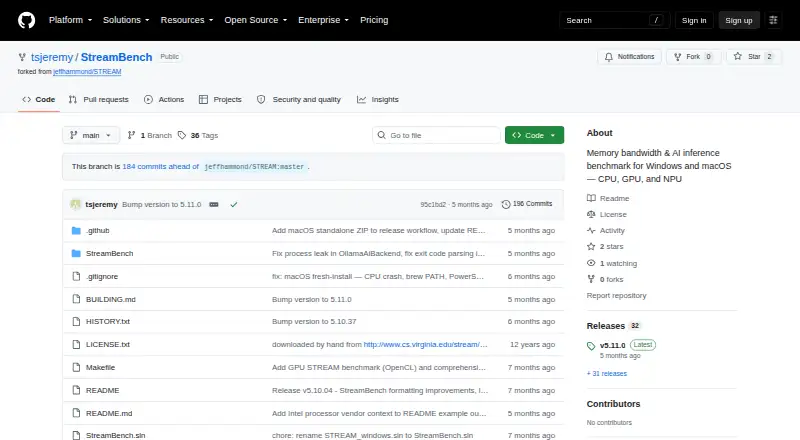
StreamBench: A focused command-line benchmark for memory bandwidth and local AI inference. Ranked #55 of 72 in PC Benchmark Software by our editors (4.2/10); pricing: Open source; best for memory bandwidth and local AI testing.
At a glance
- Editor score4.2 / 10
- PricingOpen source
- Best forMemory bandwidth and local AI testing
- Paid fromFree
- Workload areasCPU memory bandwidth; GPU memory bandwidth; AI inference
- Facts checked22 Sep 2026
Where it wins
- Tests CPU, GPU, and NPU AI inference workloads
- Exports results in JSON or CSV formats
- Supports Windows, macOS, and Linux
Where it doesn't
- Its benchmark scope is narrower than general PC suites
- Linux users need to build from source
- The command-line workflow may not suit GUI-focused users
Our verdict on StreamBench
StreamBench is a command-line PC benchmarking tool for measuring CPU and GPU memory bandwidth alongside local AI inference performance. It suits solo users and small teams that need focused testing across Windows, macOS, or Linux, especially when comparing memory workloads or evaluating AI models on CPU, GPU, and NPU hardware. Its CPU tests use the Copy, Scale, Add, and Triad kernels from the STREAM memory-bandwidth methodology, while GPU testing uses OpenCL.
The strongest distinction is its local AI testing coverage. StreamBench can measure model load time, response latency, and tokens per second across CPU, GPU, and NPU devices. Its integrations with Microsoft AI Foundry Local, LM Studio, and Ollama connect the benchmark to local AI tools, giving users a way to compare inference behavior across supported hardware. Range testing across multiple array sizes adds context to memory-bandwidth results, while automatic hardware and core detection reduces manual configuration.
For repeatable workflows, StreamBench saves results as JSON or CSV and supports custom test profiles and command-line automation. Pre-built binaries and launcher scripts are available for Windows and macOS, while the project also provides source-build instructions for Windows, macOS, and Linux. The open-source, self-hosted model fits users who want inspectable tooling and local execution rather than a commercial benchmarking service. Choose it for memory bandwidth and local AI inference analysis; choose a broader PC suite when you need a wider range of conventional benchmark categories.
Your product? Our editors can test StreamBench in depth and publish a review, labelled as paid · from $149/mo →
StreamBench pricing
StreamBench fact sheet
| Free plan | Not verified |
|---|---|
| Paid from | Free |
| Workload areas | CPU memory bandwidth; GPU memory bandwidth; AI inference |
| Operating systems | Windows; macOS; Linux |
| Comparison database | Not verified |
| Result export formats | JSON; CSV |
| Custom test profiles | Yes |
| CLI or automation | Yes |
| Deployment | Self-hosted |
| Platforms | Windows, macOS, Linux |
| Built for | Solo, Small business (editorial estimate) |
| Integrations | 3 integrations: Microsoft AI Foundry Local, LM Studio, Ollama |
| Pricing | Open source |
| Website | github.com |
| Facts checked | 22 Sep 2026 |
StreamBench integrations
StreamBench lists 3 integrations on its own site.
- Microsoft AI Foundry Local
- LM Studio
- Ollama
Alternatives to StreamBench
- GeekbenchA broad benchmark suite for comparing CPU and GPU performance across five platforms.9.3
- PassMark PerformanceTestA broad benchmark suite with free standard tests and a $39 one-time advanced tier.9.1
- 3DMarkA broad benchmark suite for comparing GPU, CPU, storage, and gaming performance.9.1


See all StreamBench alternatives →
Used StreamBench? Be the first to review it
The editor score above is our own research. What this page doesn't have yet is a reader's view — what you used StreamBench for, what worked and what didn't. No stars are seeded and no review is paid for; an editor reads every one before it appears.
Write a reviewTwo minutes · verified accounts only · read by an editor before it appears
Featured on iTechGuides

StreamBench is listed in our PC Benchmark Software directory. Add the badge to your site — it links back to this page.
<a href="https://www.itechguides.com/products/streambench/"><img src="https://www.itechguides.com/best/badge/streambench.svg" alt="Featured on iTechGuides" width="230" height="46"></a>
Reviewed by iTechGuides Editors · Editorial team · Updated Oct 2026
Advertiser disclosure: iTechGuides is reader-supported. Vendors can pay for top positions in our rankings and for a place on other products' pages, and we may earn a commission when you click some links. Bought places stand at the number bought; this page and our disclosure say so. Paying vendors may get a fuller, more detailed review from our editors, and that review can change their score. How we rank.
Last updated · How we research and update