
Stacks
Stacks: Stacks pairs flexible task views and automation with offline desktop workspaces and team sync. Ranked #132 of 188 in Project Management Software by our editors (3.0/10); pricing: Free plan; best for desktop teams tracking tasks, time, and workflows.
At a glance
- Editor score3.0 / 10
- PricingFree plan
- Best forDesktop teams tracking tasks, time, and workflows
- Free planYes
- Paid from$5/user/mo
- Facts checked23 Sep 2026
Where it wins
- Board, table, Gantt, and calendar views with customizable task fields
- Configurable task automation, reporting, and workload summaries
- Offline workspaces; team plan adds real-time sync and time tracking
Where it doesn't
- Basic is limited to 3 projects, 10 contacts, and 3 notepads
- Individual desktop edition relies on manual syncing
- Major upgrades may require an additional payment
Our verdict on Stacks
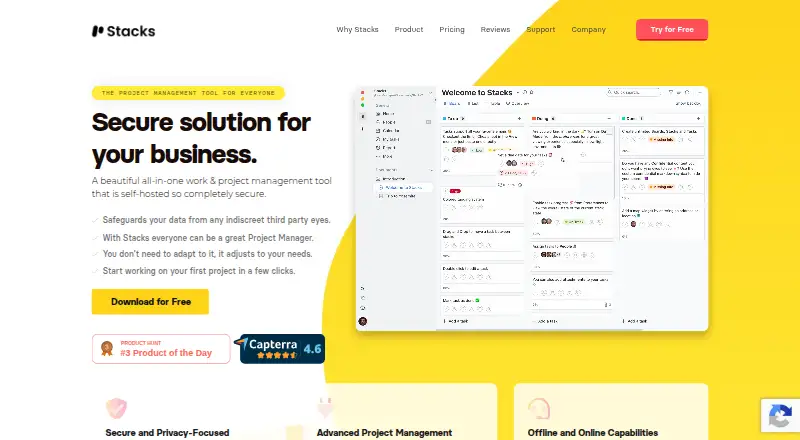
Stacks is project management software for freelancers, agencies, and organizations that want projects, assigned tasks, and multiple ways to organize work. It runs on Windows, macOS, and Linux, and has desktop, cloud, and self-hosted deployment options. Board, list, table, Gantt, and calendar views suit teams that need more than a basic task list, while customizable fields and filtering let them shape task details around their workflow.
The plans separate personal offline work from team collaboration. Basic costs nothing and includes 3 projects, 10 contacts, 3 notepads, 1 offline workspace, all project views, and advanced filtering. Unlimited forever costs $49 one time and raises the limits to unlimited projects, notepads, people, and workspaces, with reports and offline workspaces. Stacks for Team costs $5 per user per month, billed monthly; it adds real-time sync, visibility and privacy options, time tracking, time approvals, and advanced reporting. The pricing page notes that major upgrades may require an additional payment, so buyers should factor that into the one-time plan comparison.
Automation, time tracking, and reporting make Stacks a fit for teams that want project oversight as well as task assignment. Configurable events and actions automate workflows, and reports can summarize workload and time. The individual edition supports offline workspaces but uses manual syncing, which makes it less suited to people expecting live collaboration on that plan. Support channels include email, community, and documentation. Choose Stacks if desktop access, flexible views, and offline work matter; teams prioritizing real-time work can consider the Team plan. It may be a weaker fit for buyers who depend on named integrations, since integrations are not part of the product details described here.
Your product? Our editors can test Stacks in depth and publish a review, labelled as paid · from $149/mo →
Stacks pricing
All 3 Stacks plans and prices →
Stacks fact sheet
| Free plan | Yes |
|---|---|
| Paid from | $5/user/mo |
| Task views | Not verified |
| Automation rules | Yes |
| Time tracking | Yes |
| Guest access | Not verified |
| Free-plan user limit | Not verified |
| Native integrations | Not verified |
| Money-back guarantee | 30 days |
| Deployment | Desktop, Cloud, Self-hosted |
| Platforms | Windows, macOS, Linux |
| Support | Email, Community, Docs |
| Built for | Solo, Small business, Mid-market (editorial estimate) |
| Pricing | Free plan (source) |
| Website | getstacksapp.com |
| Facts checked | 23 Sep 2026 |
Alternatives to Stacks
- ClickUpBroad project control with tasks, Docs, automations, reporting, time tracking, and AI.9.4
- JiraA mature choice for agile delivery teams needing boards, backlogs, workflows, and automation.9.3
- AsanaA mature project hub with flexible views, automation, reporting, and AI features.9.2


Also Ranked In
Stacks is ranked in 2 of our directories.
Used Stacks? Be the first to review it
The editor score above is our own research. What this page doesn't have yet is a reader's view — what you used Stacks for, what worked and what didn't. No stars are seeded and no review is paid for; an editor reads every one before it appears.
Write a reviewTwo minutes · verified accounts only · read by an editor before it appears
Featured on iTechGuides

Stacks is listed in our Project Management Software directory. Add the badge to your site — it links back to this page.
<a href="https://www.itechguides.com/products/stacks/"><img src="https://www.itechguides.com/best/badge/stacks.svg" alt="Featured on iTechGuides" width="230" height="46"></a>
Reviewed by iTechGuides Editors · Editorial team · Updated Oct 2026
Advertiser disclosure: iTechGuides is reader-supported. Vendors can pay for top positions in our rankings and for a place on other products' pages, and we may earn a commission when you click some links. Bought places stand at the number bought; this page and our disclosure say so. Paying vendors may get a fuller, more detailed review from our editors, and that review can change their score. How we rank.
Last updated · How we research and update