
SQL Delta
SQL Delta: A Windows desktop tool for comparing, scripting, reporting, and scheduling database changes. Ranked #14 of 24 in Database Schema Comparison Tools by our editors (7.4/10); pricing: 14-day trial; best for windows users comparing schema and row data.
At a glance
- Editor score7.4 / 10
- Pricing14-day trial
- Best forWindows users comparing schema and row data
- Free planNo
- Paid from$185/user one-time
- Migration scriptsYes
- Founded1991 · Sydney, New South Wales, Australia
- Facts checked21 Sep 2026
Where it wins
- Compares database schemas and row-level data
- Generates synchronization scripts and HTML reports
- Supports command-line execution and Windows scheduling
Where it doesn't
- Windows-only desktop application
- No free plan; perpetual licenses start at $185 per user
- Compares databases only within the same server type
Our verdict on SQL Delta
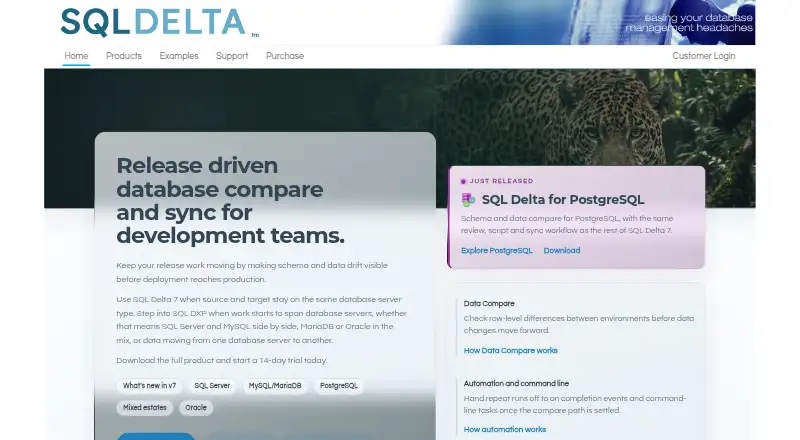
SQL Delta is a Windows desktop application for comparing and synchronizing database schemas and data. It is aimed at development teams managing database changes before deployment, with separate editions for SQL Server, Oracle, and MySQL/MariaDB. Comparisons identify structural and row-level differences between databases of the same server type, making the product a fit for release workflows that need more than schema-only inspection.
Its comparison workflow extends into change delivery and documentation. SQL Delta can generate synchronization scripts, execute scripts directly or export them, and produce HTML comparison reports. XML database-schema snapshots provide a saved representation of database structures, while command-line and silent execution support repeatable operations outside the desktop interface. Scheduled runs through Windows Task Scheduler are also available, which suits teams that want recurring comparison jobs without adding a separate automation platform.
Pricing is based on perpetual licenses with a two-year software update subscription, and a 14-day evaluation period is available. The MySQL single license costs $185 per user one time, while the MySQL site license costs $1,395 per site one time. SQL Server licensing starts at $370 per user one time for a single license, with a site license priced at $2,775 per site one time. SQL Delta should appeal to Windows-based teams comparing same-engine databases and preparing synchronization scripts. Teams needing cross-platform comparison, source control integration, or CI/CD integration should consider a different tool.
Your product? Our editors can test SQL Delta in depth and publish a review, labelled as paid · from $149/mo →
SQL Delta pricing
All 12 SQL Delta plans and prices →
SQL Delta fact sheet
| Free plan | No |
|---|---|
| Paid from | $185/user one-time |
| Migration scripts | Yes |
| Database scope | Single-engine |
| Source control | No |
| CI/CD integration | No |
| Scheduled comparisons | Yes |
| Supported platforms | Windows |
| Free trial | 14 days |
| Deployment | Desktop |
| Platforms | Windows |
| Support | Email, Docs |
| Built for | Small business, Mid-market, Enterprise (editorial estimate) |
| Pricing | 14-day trial (source) |
| Website | sqldelta.com |
| Facts checked | 21 Sep 2026 |
Alternatives to SQL Delta
- DBDiffA free, cross-platform CLI for schema comparison, data comparison, and migration workflows.9.4
- sqldefA free, open-source CLI for declarative, repeatable database schema migrations.9.2
- DBCA focused, cross-platform CLI for comparing schemas across five database systems.9.0
See all SQL Delta alternatives →
Used SQL Delta? Be the first to review it
The editor score above is our own research. What this page doesn't have yet is a reader's view — what you used SQL Delta for, what worked and what didn't. No stars are seeded and no review is paid for; an editor reads every one before it appears.
Write a reviewTwo minutes · verified accounts only · read by an editor before it appears
Featured on iTechGuides

SQL Delta is listed in our Database Schema Comparison Tools directory. Add the badge to your site — it links back to this page.
<a href="https://www.itechguides.com/products/sql-delta/"><img src="https://www.itechguides.com/best/badge/sql-delta.svg" alt="Featured on iTechGuides" width="230" height="46"></a>
Reviewed by iTechGuides Editors · Editorial team · Updated Oct 2026
Advertiser disclosure: iTechGuides is reader-supported. Vendors can pay for top positions in our rankings and for a place on other products' pages, and we may earn a commission when you click some links. Bought places stand at the number bought; this page and our disclosure say so. Paying vendors may get a fuller, more detailed review from our editors, and that review can change their score. How we rank.
Last updated · How we research and update