SPS Browser Pro
SPS Browser Pro: A feature-rich Windows browser with built-in blocking, workspaces, and six AI services. Ranked #82 of 145 in Web Browsers by our editors (3.0/10); pricing: Free plan; best for windows users wanting extensive controls and AI tools.
At a glance
- Editor score3.0 / 10
- PricingFree plan
- Best forWindows users wanting extensive controls and AI tools
- Free planYes
- Paid fromFree
- Browser engineChromium
- Facts checked19 Sep 2026
Where it wins
- Network-level ad blocking, enhanced tracking protection, and DNS over HTTPS
- Workspaces, tab groups, userscripts, CSS injection, and a Command Palette
- AI hub connects to ChatGPT, Gemini, Claude, Meta AI, Perplexity, and Grok
Where it doesn't
- Platform information centers on Windows, limiting its appeal across devices
- Pro pricing is not stated, making the paid tier harder to assess
- The Community plan already includes all features, so tier differences may be unclear
Our verdict on SPS Browser Pro
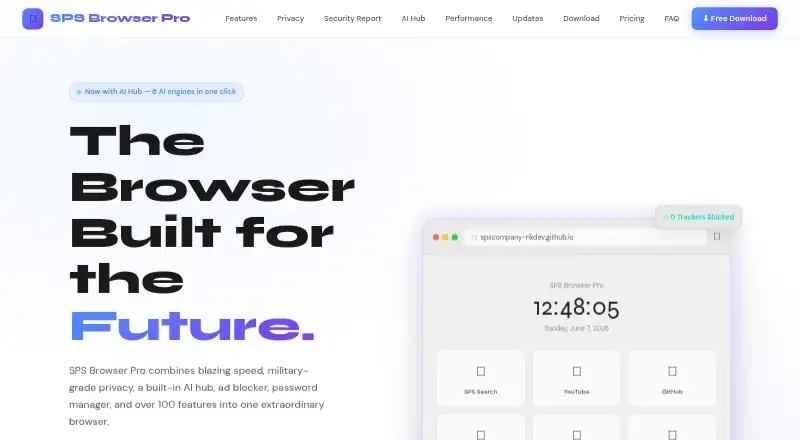
SPS Browser Pro is an open-source Chromium-based browser for Windows users who want privacy controls and productivity features in one desktop app. Its Community plan includes the full browser with an ad and tracker blocker, a local password manager, a speed dial dashboard, and an AI Hub. The feature set extends to network-level ad blocking, enhanced tracking protection, DNS over HTTPS, fingerprint protection, and download management with pause and resume. Windows is the conservative platform choice: the official website presents an installer for Windows 10 and 11, though the FAQ also mentions Ubuntu 20.04+ and macOS 12+ compatibility.
The standout is breadth within a single browser. Workspaces and tab groups organize browsing, while the Command Palette searches tabs, bookmarks, and history and exposes actions. Userscript and CSS injection, screenshot capture, and PDF export add control beyond basic browsing. The AI Hub brings together six services: ChatGPT, Google Gemini, Claude, Meta AI, Perplexity, and Grok. This makes the browser worth considering for users who want these tools available alongside browsing rather than as separate destinations. Buyers should still weigh that feature density against their preference for a browser available across their devices.
The published plans show Community at $0, with all features included. The Pro plan lists multi-profile support, workspaces and tab groups, userscript and CSS extensions, Command Palette, PDF export and screenshots, and an auto-updater, but no price is shown; several of those capabilities also appear in the overall feature list, so the distinction from Community deserves scrutiny. Enterprise adds custom branding, managed deployments, priority support SLA, policy configuration, and a team license. Choose SPS Browser Pro if Windows and extensive built-in controls are the priority; look elsewhere if broad platform availability or clear paid-tier pricing is essential.
Your product? Our editors can test SPS Browser Pro in depth and publish a review, labelled as paid · from $149/mo →
SPS Browser Pro pricing
All 3 SPS Browser Pro plans and prices →
SPS Browser Pro fact sheet
| Free plan | Yes |
|---|---|
| Paid from | Free |
| Supported platforms | Desktop |
| Browser engine | Chromium |
| Built-in ad blocking | Yes |
| Tracking protection | Advanced |
| Extension support | Own_store |
| Cross-device sync | Not verified |
| Open source | Yes |
| Deployment | Desktop |
| Platforms | Windows |
| Integrations | 6 integrations: ChatGPT, Google Gemini, Claude, Meta AI, Perplexity, Grok |
| Pricing | Free plan (source) |
| Website | spscompany-rikdev.github.io |
| Facts checked | 19 Sep 2026 |
SPS Browser Pro integrations
SPS Browser Pro lists 6 integrations on its own site.
- ChatGPT
- Google Gemini
- Claude
- Meta AI
- Perplexity
- Grok
Alternatives to SPS Browser Pro
- Google ChromeA complete free browser with broad platform coverage, sync, extensions, and built-in security.9.3
- Microsoft EdgeA free, cross-platform browser suited to Microsoft users who want broad compatibility.9.2
- Mozilla FirefoxA mature, privacy-focused browser for everyday browsing across desktop and mobile.9.1


See all SPS Browser Pro alternatives →
Used SPS Browser Pro? Be the first to review it
The editor score above is our own research. What this page doesn't have yet is a reader's view — what you used SPS Browser Pro for, what worked and what didn't. No stars are seeded and no review is paid for; an editor reads every one before it appears.
Write a reviewTwo minutes · verified accounts only · read by an editor before it appears
Featured on iTechGuides

SPS Browser Pro is listed in our Web Browsers directory. Add the badge to your site — it links back to this page.
<a href="https://www.itechguides.com/products/sps-browser-pro/"><img src="https://www.itechguides.com/best/badge/sps-browser-pro.svg" alt="Featured on iTechGuides" width="230" height="46"></a>
Reviewed by iTechGuides Editors · Editorial team · Updated Oct 2026
Advertiser disclosure: iTechGuides is reader-supported. Vendors can pay for top positions in our rankings and for a place on other products' pages, and we may earn a commission when you click some links. Bought places stand at the number bought; this page and our disclosure say so. Paying vendors may get a fuller, more detailed review from our editors, and that review can change their score. How we rank.
Last updated · How we research and update