
Spec Layer
Spec Layer: A focused Figma documentation and token workflow with a capable free tier. Ranked #12 of 22 in Design System Software by our editors (6.6/10); pricing: Free plan; best for small teams needing affordable Figma documentation.
At a glance
- Editor score6.6 / 10
- PricingFree plan
- Best forSmall teams needing affordable Figma documentation
- Free planYes
- Paid from$7.99/mo
- Token managementYes
- Facts checked20 Sep 2026
Where it wins
- Documents components, foundations, variables, styles, states, and tokens
- Free plan includes library publishing, exports, tracking, and CLI workflows
- CLI connects published specifications and tokens with repositories
Where it doesn't
- The Free plan publishes only 1 Figma file as a library
- Free usage is limited to 10 publishing updates per calendar month
- Teams pricing uses agreed file and usage limits instead of a fixed public price
Our verdict on Spec Layer
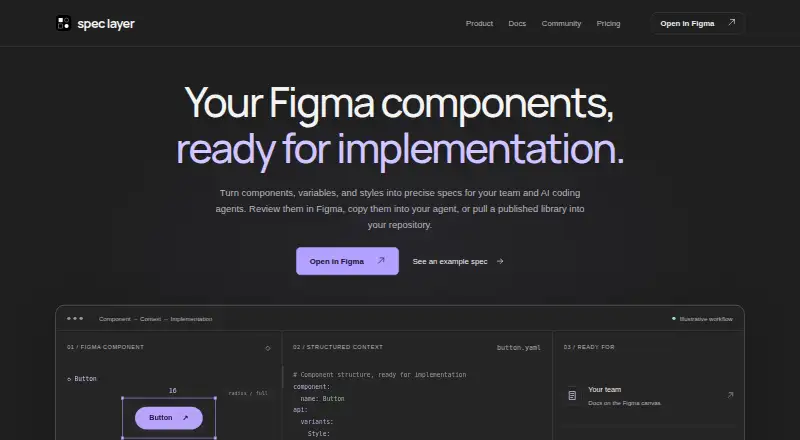
Spec Layer is an open-source Figma plugin and CLI for documenting design-system components, variables, and styles. It is aimed at designers who need structured documentation inside Figma, developers who need specifications and tokens in repositories, and teams sharing design-system context with AI agents. Documentation can cover measurements, variants, anatomy, states, foundation variables, text styles, and token tables. The product also supports optional AI-assisted writing and exports component context as YAML or foundation tokens as DTCG JSON.
Pricing is straightforward for individual users. The Free plan includes component and foundation documentation, source-change tracking, documentation updates, YAML and DTCG JSON exports, publishing 1 Figma file as a library, 10 publishing updates per calendar month, and CLI access for pulling published specifications and tokens. Pro costs $7.99 per month and includes everything in Free, plus publishing for up to 10 Figma files, unlimited updates under fair use, AI writing with no fixed cap for normal individual use, and priority support. Teams licensing adds agreed file and usage limits, onboarding and workflow guidance, custom integration scoping, and support arranged around team needs.
The main fit is a Figma-centered workflow that extends from design documentation to developer repositories. Its CLI provides setup, pull, status, list, and show workflows, while library refresh and source-change tracking help connect published libraries with documentation updates. Figma and Anthropic are listed integrations, and the product offers cloud hosting, versioning, token management, code sync, and governance workflows. Spec Layer should suit small teams that want structured Figma documentation and repository-ready context without starting with a paid plan. Teams publishing across more than 10 Figma files, or those requiring defined limits and support arrangements, should consider the custom Teams offering rather than Pro.
Your product? Our editors can test Spec Layer in depth and publish a review, labelled as paid · from $149/mo →
Spec Layer pricing
All 3 Spec Layer plans and prices →
Spec Layer fact sheet
| Free plan | Yes |
|---|---|
| Paid from | $7.99/mo |
| Token management | Yes |
| Component documentation | Yes |
| Design tool sync | Yes |
| Code sync | Yes |
| Governance workflows | Yes |
| Hosting | Cloud |
| Versioning | Yes |
| Money-back guarantee | 30 days |
| Deployment | Cloud |
| Support | Email, Docs |
| Built for | Solo, Small business, Mid-market (editorial estimate) |
| Integrations | 2 integrations: Figma, Anthropic |
| Pricing | Free plan (source) |
| Website | spec-layer.com |
| Facts checked | 20 Sep 2026 |
Spec Layer integrations
Spec Layer lists 2 integrations on its own site.
- Figma
- Anthropic
Alternatives to Spec Layer
- Carbon Design SystemA free, open-source design system with coded components and multiple framework implementations.9.3
- SupernovaA broad system for connecting design assets, documentation, code, and delivery workflows.8.8
- Tokens StudioA governed token platform linking Figma, code repositories, releases, and documentation.7.8



See all Spec Layer alternatives →
Used Spec Layer? Be the first to review it
The editor score above is our own research. What this page doesn't have yet is a reader's view — what you used Spec Layer for, what worked and what didn't. No stars are seeded and no review is paid for; an editor reads every one before it appears.
Write a reviewTwo minutes · verified accounts only · read by an editor before it appears
Featured on iTechGuides

Spec Layer is listed in our Design System Software directory. Add the badge to your site — it links back to this page.
<a href="https://www.itechguides.com/products/spec-layer/"><img src="https://www.itechguides.com/best/badge/spec-layer.svg" alt="Featured on iTechGuides" width="230" height="46"></a>
Reviewed by iTechGuides Editors · Editorial team · Updated Oct 2026
Advertiser disclosure: iTechGuides is reader-supported. Vendors can pay for top positions in our rankings and for a place on other products' pages, and we may earn a commission when you click some links. Bought places stand at the number bought; this page and our disclosure say so. Paying vendors may get a fuller, more detailed review from our editors, and that review can change their score. How we rank.
Last updated · How we research and update