
Speak AI
Speak AI: Conversation analysis for research teams, not a conventional screen recorder. Ranked #36 of 39 in AI Screen Recorders by our editors (5.2/10); pricing: 7-day trial; best for researchers analyzing meetings and submitted recordings.
At a glance
- Editor score5.2 / 10
- Pricing7-day trial
- Best forResearchers analyzing meetings and submitted recordings
- Free planNo
- Paid from$20/user/mo
- AI transcriptionYes
- Founded2018
- Facts checked25 Sep 2026
Where it wins
- Captures meetings across Zoom, Teams, Google Meet, and Webex
- Searchable transcripts include speaker identification and timestamps
- Analyzes topics, sentiment, keywords, and entities
Where it doesn't
- Focuses on audio and video conversations, not screen-recording workflows
- Pay-as-you-go transcription and AI usage incur separate charges
- Pro starts at $20 per user per month with annual billing
Our verdict on Speak AI
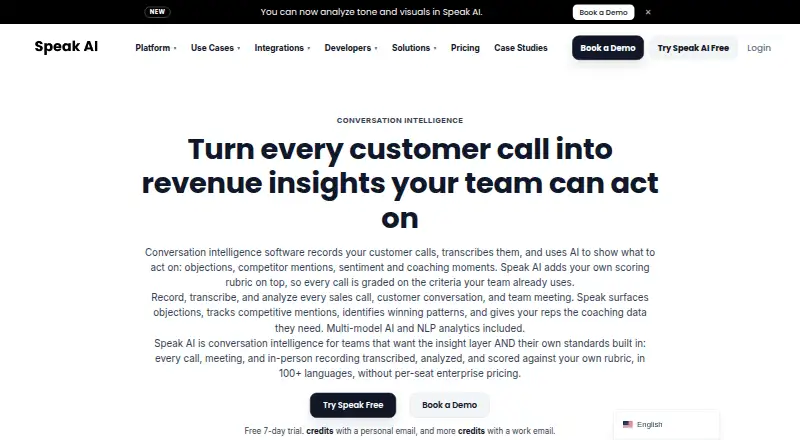
Speak AI records and transcribes meetings, interviews, and other audio or video for researchers, analysts, consultants, and teams working with conversations. It combines speaker-identified transcripts and searchable libraries with AI Chat and analysis of topics, sentiment, keywords, and entities. Meeting capture supports Zoom, Microsoft Teams, Google Meet, and Webex; users can also upload recordings, record on mobile, or collect audio and video submissions through an embeddable recorder. This is a conversation intelligence product rather than a conventional screen recorder, so it fits buyers who need to examine what people say more than how software workflows appear on screen.
Its research-oriented depth is the clearest reason to consider it. AI Chat can query an individual recording or a library, and analytics can surface topics, sentiment, keywords, and entities across material. Transcripts and insights can be exported in multiple formats, while mobile apps support recording, uploads, transcript viewing, and AI Chat. The API, webhooks, Zapier, and integrations such as Google Drive, Slack, and Vimeo provide options for moving recordings and findings into other workflows. That breadth suits teams collecting and comparing interviews or submitted recordings; buyers seeking screen capture and editing as the primary workflow should look elsewhere.
Pricing has a usage-based entry point and a subscription tier. Pay as you go has no subscription, but transcription and AI usage are charged at stated rates; after the seven-day trial, usage charges apply. Pro costs $20 per user per month with annual billing and adds AI Chat, a shared team library, automations and workflows, and priority email support. Enterprise offers custom builds, white-labeling and custom domains, custom fields, scoring and AI agents, plus a dedicated account manager. Choose Speak AI when conversation analysis and searchable transcripts are central; its pricing and feature set are less suited to buyers who mainly need conventional screen recording.
Your product? Our editors can test Speak AI in depth and publish a review, labelled as paid · from $149/mo →
Speak AI pricing
All 3 Speak AI plans and prices →
Speak AI fact sheet
| Free plan | No |
|---|---|
| Paid from | $20/user/mo |
| AI transcription | Yes |
| AI summaries | Yes |
| Documentation output | Not verified |
| Speaker identification | Yes |
| Recording limit | Not verified |
| Platform support | Browser+desktop |
| Export formats | PDF, DOCX, TXT, CSV, SRT, VTT, JSON, HTML, Premiere Pro XML |
| Free trial | 7 days · no card needed |
| Deployment | Cloud, Mobile, Browser extension |
| Platforms | Web, iOS, Android, Chrome extension |
| Compliance & security | HIPAA, SSO/SAML |
| Support | Email, Docs |
| Built for | Solo, Small business, Mid-market, Enterprise (editorial estimate) |
| Integrations | 5,000+ integrations: Zoom, Google Drive, Slack, Google Calendar, Microsoft Outlook Calendar, Vimeo … See all → |
| Pricing | 7-day trial (source) |
| Website | speakai.co |
| Facts checked | 25 Sep 2026 |
Speak AI integrations
Speak AI lists 5,000+ integrations on its own site — the 7 named here are the ones its pages call out.
- Zoom
- Google Drive
- Slack
- Google Calendar
- Microsoft Outlook Calendar
- Vimeo
- Zapier
See all Speak AI integrations →
Alternatives to Speak AI
- LoomA polished screen recorder with broad integrations, AI options, and a higher paid entry point.9.2
- ZightA broad AI capture and administration tool with a useful free tier.9.0
- ScreenPalA feature-rich freemium recorder with 4K capture, AI tools, and broad device coverage.8.8



See all Speak AI alternatives →
Used Speak AI? Be the first to review it
The editor score above is our own research. What this page doesn't have yet is a reader's view — what you used Speak AI for, what worked and what didn't. No stars are seeded and no review is paid for; an editor reads every one before it appears.
Write a reviewTwo minutes · verified accounts only · read by an editor before it appears
Featured on iTechGuides

Speak AI is listed in our AI Screen Recorders directory. Add the badge to your site — it links back to this page.
<a href="https://www.itechguides.com/products/speak-ai/"><img src="https://www.itechguides.com/best/badge/speak-ai.svg" alt="Featured on iTechGuides" width="230" height="46"></a>
Reviewed by iTechGuides Editors · Editorial team · Updated Oct 2026
Advertiser disclosure: iTechGuides is reader-supported. Vendors can pay for top positions in our rankings and for a place on other products' pages, and we may earn a commission when you click some links. Bought places stand at the number bought; this page and our disclosure say so. Paying vendors may get a fuller, more detailed review from our editors, and that review can change their score. How we rank.
Last updated · How we research and update