
SparrowIQ
SparrowIQ: On-premises traffic visibility with drill-down analysis, alerts, reports, and mobile access. Ranked #22 of 25 in Network Traffic Analysis Software by our editors (6.4/10); pricing: Pricing on request · 15-day trial; best for on-premises traffic monitoring with mobile access.
At a glance
- Editor score6.4 / 10
- PricingPricing on request · 15-day trial
- Best forOn-premises traffic monitoring with mobile access
- Free planNo
- Application visibilityYes
- Founded2003 · Nepean, Ontario, Canada
- Facts checked20 Sep 2026
Where it wins
- Real-time and historical traffic analysis with detailed drill-downs
- Custom alerts with email notifications and domain and country views
- Web, Windows, iOS, and Android access for remote monitoring
Where it doesn't
- No free plan
- Pricing requires a quote and has no public starting amount
- Deployment requires a Windows PC with a SPAN port or network tap
Our verdict on SparrowIQ
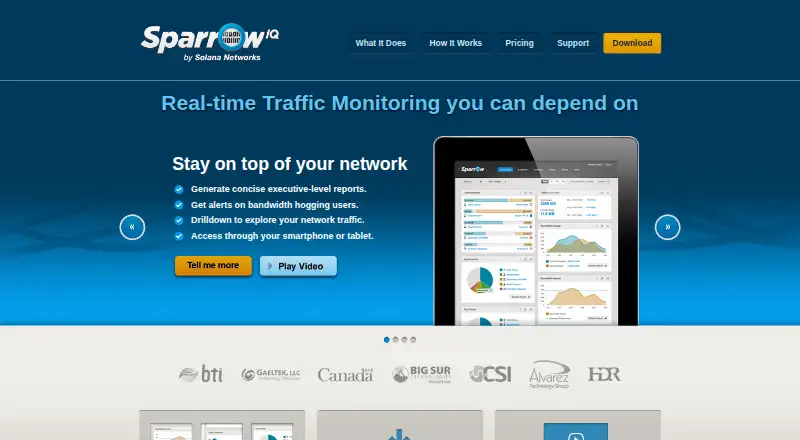
SparrowIQ is a network traffic monitoring and analysis application for small and midsize organizations. It runs on a Windows PC and inspects traffic received through a SPAN port or network tap. The product provides visibility into bandwidth usage, users, applications, conversations, domains, countries, and traffic trends. Dashboards, drill-down analysis, historical reports, configurable alerts, and browser-based access from computers and mobile devices make it suited to teams that need local monitoring with remote visibility.
Its plan structure is organized around network size and feature depth. SparrowIQ 7 provides full monitoring features for smaller networks. SparrowIQ 15 adds multi-user capability plus enhanced alerting and reporting. SparrowIQ 30 adds longer-term reporting and full alerting capability, while SparrowIQ 30+ provides the full feature set for bigger networks. Subscriptions are available monthly and annually, with pricing based on network users and requiring a quote. A 15-day free trial is available, but there is no free plan.
Deployment is focused on on-premises packet inspection rather than flow-export ingestion. That makes SparrowIQ a fit for organizations able to provide the required Windows PC and network access through a SPAN port or network tap. Its web, iOS, and Android access extends monitoring beyond the local workstation, while application, user, conversation, domain, and country views support investigation from several angles. Choose SparrowIQ when local traffic visibility and mobile access are priorities; consider an alternative if you need cloud-native deployment, flow-export ingestion, or publicly listed pricing.
Your product? Our editors can test SparrowIQ in depth and publish a review, labelled as paid · from $149/mo →
SparrowIQ pricing
All 4 SparrowIQ plans and prices →
SparrowIQ fact sheet
| Free plan | No |
|---|---|
| Paid from | Not verified |
| Flow protocols | Not verified |
| Application visibility | Yes |
| Conversation analysis | Yes |
| Bandwidth monitoring | Yes |
| Deployment | On_premises |
| Monitored device limit | Not verified |
| Free trial | 15 days · no card needed |
| Deployment | Self-hosted, Desktop, Mobile |
| Platforms | Web, Windows, iOS, Android |
| Support | Email, Tickets, Docs |
| Built for | Small business, Mid-market (editorial estimate) |
| Pricing | Pricing on request · 15-day trial (source) |
| Website | sparrowiq.com |
| Facts checked | 20 Sep 2026 |
Alternatives to SparrowIQ
- ManageEngine NetFlow AnalyzerA broad traffic-analysis suite with a free edition and paid tiers for growing networks.9.3
- ntopngA broad self-hosted traffic analysis suite with a capable free Community plan.9.2
- SolarWinds NetFlow Traffic AnalyzerA focused choice for multi-vendor flow analysis, drill-downs, and historical reporting.9.0


See all SparrowIQ alternatives →
Also Ranked In
SparrowIQ is ranked in 2 of our directories.
Used SparrowIQ? Be the first to review it
The editor score above is our own research. What this page doesn't have yet is a reader's view — what you used SparrowIQ for, what worked and what didn't. No stars are seeded and no review is paid for; an editor reads every one before it appears.
Write a reviewTwo minutes · verified accounts only · read by an editor before it appears
Featured on iTechGuides

SparrowIQ is listed in our Network Traffic Analysis Software directory. Add the badge to your site — it links back to this page.
<a href="https://www.itechguides.com/products/sparrowiq/"><img src="https://www.itechguides.com/best/badge/sparrowiq.svg" alt="Featured on iTechGuides" width="230" height="46"></a>
Reviewed by iTechGuides Editors · Editorial team · Updated Oct 2026
Advertiser disclosure: iTechGuides is reader-supported. Vendors can pay for top positions in our rankings and for a place on other products' pages, and we may earn a commission when you click some links. Bought places stand at the number bought; this page and our disclosure say so. Paying vendors may get a fuller, more detailed review from our editors, and that review can change their score. How we rank.
Last updated · How we research and update