
Sparkle
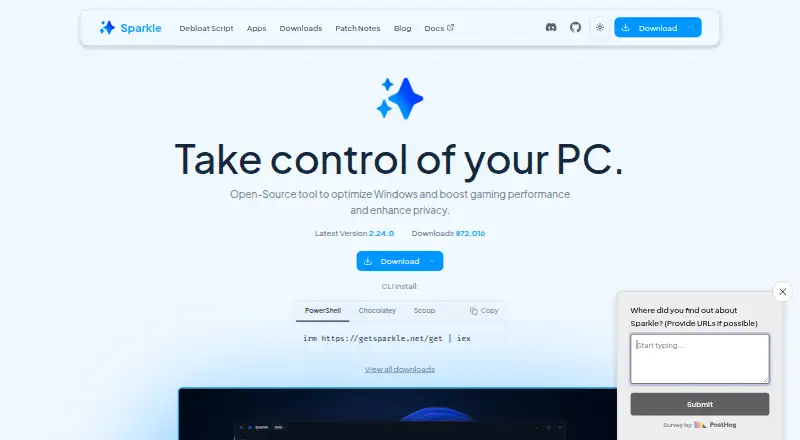
Sparkle: A broad free utility for Windows cleanup, tweaks, repairs, DNS, and app installs. Ranked #20 of 97 in PC Optimization Software by our editors (7.5/10); pricing: Free plan; best for free open-source Windows debloating.
At a glance
- Editor score7.5 / 10
- PricingFree plan
- Best forFree open-source Windows debloating
- Free planYes
- Paid fromFree
- Junk cleanupYes
- Facts checked22 Sep 2026
Where it wins
- Free and open-source with portable and installer distributions
- Combines debloating, cleanup, privacy, gaming, repair, and DNS tools
- Creates restore points and supports tweak reversal
Where it doesn't
- Windows-only, supporting Windows 10 and 11
- Does not provide verified startup management
- Does not provide verified scheduled maintenance
Our verdict on Sparkle
Sparkle is a free, open-source Windows desktop utility for users who want to remove unwanted apps and services, clean unnecessary files, adjust system settings, and manage common maintenance tasks from one place. It is aimed at Windows users focused on debloating, privacy, gaming-related configuration, performance settings, and system repair without manually running separate scripts or utilities. Portable and installer distributions give users two ways to run the software.
The published offering is straightforward: Sparkle is free, with no paid tier described. Its ecosystem fit centers on Windows and includes application installation through Winget or Chocolatey. The tool also includes a DNS manager with preset providers, custom DNS, and latency testing, alongside controls for power plans, Storage Sense, SFC, DISM, and Check Disk. These integrations and utilities make it useful for users who want system configuration and routine repair options alongside cleanup.
Sparkle’s main strength is breadth. It combines Windows debloating, temporary-file cleanup, configurable performance, privacy, gaming, and network tweaks, restore-point creation, and reversal of applied tweaks. That scope will suit users who want a single free utility for several Windows optimization tasks. The trade-off is that it is not a focused startup-management or scheduled-maintenance tool, and the project is labeled beta. Users who prioritize those workflows should choose a product centered on startup control or recurring maintenance instead; users seeking open-source Windows debloating with related repair and configuration tools have a clearer fit here.
Your product? Our editors can test Sparkle in depth and publish a review, labelled as paid · from $149/mo →
Sparkle pricing
Sparkle fact sheet
| Free plan | Yes |
|---|---|
| Paid from | Free |
| Junk cleanup | Yes |
| Startup manager | Not verified |
| Driver updates | Not verified |
| Scheduled maintenance | Not verified |
| Windows support | Windows 10 and 11 |
| Device limit | Not verified |
| Restore-point tools | Yes |
| Deployment | Desktop |
| Platforms | Windows |
| Support | Community, Docs |
| Built for | Solo, Small business (editorial estimate) |
| Integrations | 2 integrations: Winget, Chocolatey |
| Pricing | Free plan |
| Website | getsparkle.net |
| Facts checked | 22 Sep 2026 |
Sparkle integrations
Sparkle lists 2 integrations on its own site.
- Winget
- Chocolatey
Alternatives to Sparkle
- Microsoft PC ManagerA broad free toolkit for routine Windows cleanup, health checks, and maintenance.9.4
- CCleanerA mature PC cleaner with broad maintenance tools and a useful free plan.9.3
- Advanced SystemCareA broad Windows optimizer with a capable free plan and one-device scope.9.2


See all Sparkle alternatives →
Used Sparkle? Be the first to review it
The editor score above is our own research. What this page doesn't have yet is a reader's view — what you used Sparkle for, what worked and what didn't. No stars are seeded and no review is paid for; an editor reads every one before it appears.
Write a reviewTwo minutes · verified accounts only · read by an editor before it appears
Featured on iTechGuides

Sparkle is listed in our PC Optimization Software directory. Add the badge to your site — it links back to this page.
<a href="https://www.itechguides.com/products/sparkle/"><img src="https://www.itechguides.com/best/badge/sparkle.svg" alt="Featured on iTechGuides" width="230" height="46"></a>
Reviewed by iTechGuides Editors · Editorial team · Updated Oct 2026
Advertiser disclosure: iTechGuides is reader-supported. Vendors can pay for top positions in our rankings and for a place on other products' pages, and we may earn a commission when you click some links. Bought places stand at the number bought; this page and our disclosure say so. Paying vendors may get a fuller, more detailed review from our editors, and that review can change their score. How we rank.
Last updated · How we research and update