SOPly
SOPly: A browser-based SOP maker that turns recordings into numbered steps with screenshots. Ranked #37 of 39 in AI Screen Recorders by our editors (5.1/10); pricing: Free plan; best for teams focused on producing SOP documents.
At a glance
- Editor score5.1 / 10
- PricingFree plan
- Best forTeams focused on producing SOP documents
- Free planYes
- Paid from£29/mo
- Facts checked25 Sep 2026
Where it wins
- Generates numbered SOP steps with screenshots from recordings or uploads
- Free plan includes screen recording, video upload and clipboard export
- Pro adds PDF and Word exports, SOP refinement and a procedure library
Where it doesn't
- Focused on SOP creation rather than general-purpose screen recording
- PDF and Word exports require a paid plan
- No integrations are listed
Our verdict on SOPly
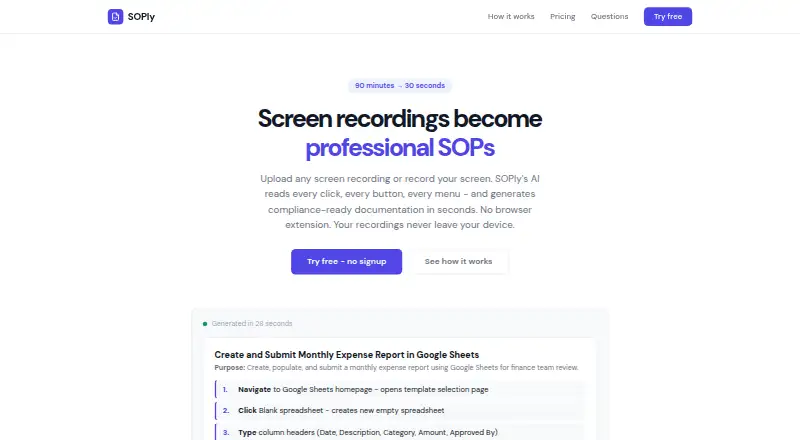
SOPly turns browser screen recordings or uploaded videos into structured standard operating procedures, using AI to interpret visible interface elements and select key screenshots. It is aimed at professionals and teams documenting repeatable workflows, especially those whose main goal is producing SOP documents rather than creating general-purpose screen recordings. Generated procedures use numbered steps and screenshots, and can be refined with additional instructions. The product runs in a browser, with cloud and browser-extension deployment options.
The plan structure centers on how much you need to create and how you want to share it. The Free plan costs £0 per month and includes screen recording and upload, AI-powered SOP generation, screenshots, and copying output to the clipboard; it allows up to three SOPs per month. Pro costs £29 per month and adds unlimited SOPs, PDF and Word export, refinement and regeneration, priority processing, and an SOP library. Team costs £79 per month, adding a shared library, team workspace, admin dashboard, priority support, and custom branding. That makes the free tier useful for limited-volume documentation, while export options and shared team workflows sit behind paid plans.
SOPly’s strongest fit is documentation work where screenshots and ordered instructions matter: it converts a recording into a procedure rather than stopping at video capture. It has a narrow browser-based focus, and integrations are not part of the listed feature set, so teams seeking a broader screen-recording workflow or connected ecosystem may prefer another tool. The vendor says there is no hard recording-length limit and recommends keeping recordings under 10 minutes. Choose SOPly when turning processes into shareable SOPs is the priority; look elsewhere if recording and editing video itself is the main job.
Your product? Our editors can test SOPly in depth and publish a review, labelled as paid · from $149/mo →
SOPly pricing
All 3 SOPly plans and prices →
SOPly fact sheet
| Free plan | Yes |
|---|---|
| Paid from | £29/mo |
| AI transcription | Not verified |
| AI summaries | Not verified |
| Documentation output | Yes |
| Speaker identification | Not verified |
| Recording limit | Not verified |
| Platform support | Browser |
| Export formats | PDF, Word, clipboard copy |
| Deployment | Cloud, Browser extension |
| Platforms | Web |
| Support | |
| Built for | Solo, Small business, Mid-market (editorial estimate) |
| Pricing | Free plan (source) |
| Website | soplyai.com |
| Facts checked | 25 Sep 2026 |
Alternatives to SOPly
- LoomA polished screen recorder with broad integrations, AI options, and a higher paid entry point.9.2
- ZightA broad AI capture and administration tool with a useful free tier.9.0
- ScreenPalA feature-rich freemium recorder with 4K capture, AI tools, and broad device coverage.8.8



Used SOPly? Be the first to review it
The editor score above is our own research. What this page doesn't have yet is a reader's view — what you used SOPly for, what worked and what didn't. No stars are seeded and no review is paid for; an editor reads every one before it appears.
Write a reviewTwo minutes · verified accounts only · read by an editor before it appears
Featured on iTechGuides

SOPly is listed in our AI Screen Recorders directory. Add the badge to your site — it links back to this page.
<a href="https://www.itechguides.com/products/soply/"><img src="https://www.itechguides.com/best/badge/soply.svg" alt="Featured on iTechGuides" width="230" height="46"></a>
Reviewed by iTechGuides Editors · Editorial team · Updated Oct 2026
Advertiser disclosure: iTechGuides is reader-supported. Vendors can pay for top positions in our rankings and for a place on other products' pages, and we may earn a commission when you click some links. Bought places stand at the number bought; this page and our disclosure say so. Paying vendors may get a fuller, more detailed review from our editors, and that review can change their score. How we rank.
Last updated · How we research and update