
SolarWinds Network Performance Monitor
SolarWinds Network Performance Monitor: A mature self-hosted monitor with deep network visibility, but a high entry price. Ranked #5 of 54 in Network Monitoring by our editors (8.9/10); pricing: Pricing on request · 30-day trial; best for established self-hosted enterprise monitoring.
At a glance
- Editor score8.9 / 10
- PricingPricing on request · 30-day trial
- Best forEstablished self-hosted enterprise monitoring
- Free planNo
- Synthetic checksYes
- Founded1999
- Facts checked23 Sep 2026
Where it wins
- Tracks availability, packet loss, bandwidth, and hardware health
- Combines topology maps, NetPath, and PerfStack correlation
- Adds wireless, syslog, SNMP traps, forecasting, and capacity reporting
Where it doesn't
- Starts at $2,829
- Has no free plan
- Self-hosted deployment limits platform coverage
Our verdict on SolarWinds Network Performance Monitor
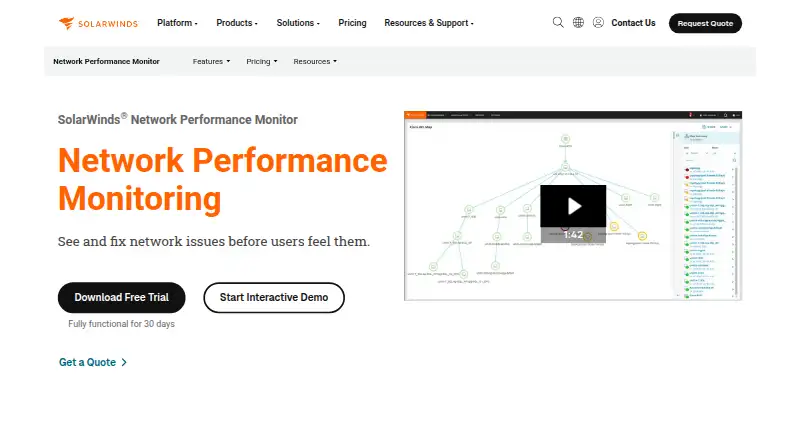
SolarWinds Network Performance Monitor is paid network monitoring software for IT teams managing multi-vendor environments. It discovers routers, switches, firewalls, wireless controllers, access points, and other network devices, then tracks availability, response time, packet loss, bandwidth utilization, errors, and hardware health. The product runs on the self-hosted SolarWinds Platform and supports on-premises, cloud-connected, and hybrid network environments, with web access to monitoring capabilities.
Its strongest area is the breadth of network visibility in one product. Topology and dependency maps show relationships between devices, while NetPath provides hop-by-hop network path visualization. PerfStack correlates metrics across stacks, and configurable alerts can use thresholds, baselines, and dependencies. Historical reporting and capacity forecasting extend the product beyond immediate fault detection. Wireless controller, access point, client, and heat-map monitoring add coverage for wireless environments, while the syslog and SNMP trap server centralize additional network signals.
The product also fits organizations building a wider SolarWinds monitoring environment. It integrates with NetFlow Traffic Analyzer, Network Configuration Manager, Server & Application Monitor, and Virtualization Manager. According to SolarWinds' pricing page, Network Performance Monitor starts at $2,829, and the product has a 30-day free trial but no free plan. That makes it a fit for established enterprise teams that need self-hosted monitoring, topology, path analysis, alerting, and forecasting in a broad network toolkit. Teams seeking a free product or a different deployment model should consider an alternative.
Your product? Our editors can test SolarWinds Network Performance Monitor in depth and publish a review, labelled as paid · from $149/mo →
SolarWinds Network Performance Monitor pricing
SolarWinds Network Performance Monitor fact sheet
| Free plan | No |
|---|---|
| Paid from | Not verified |
| Synthetic checks | Yes |
| Device limit | 100 devices |
| Traffic monitoring | Yes |
| Topology maps | Yes |
| Alert channels | Not verified |
| Deployment | Self_hosted |
| Free trial | 30 days |
| Deployment | Self-hosted |
| Platforms | Web |
| Support | Tickets, Community, Docs |
| Built for | Small business, Mid-market, Enterprise (editorial estimate) |
| Pricing | Pricing on request · 30-day trial (source) |
| Website | solarwinds.com |
| Facts checked | 23 Sep 2026 |
Alternatives to SolarWinds Network Performance Monitor
- ZabbixBroad infrastructure monitoring with a free self-hosted edition and paid cloud options.9.4
- CheckmkA broad hybrid monitoring platform with a capable free edition and costly paid entry.9.3
- ManageEngine OpManagerBroad monitoring, mapping, traffic analysis, automation, and distributed coverage across four editions.9.1



See all SolarWinds Network Performance Monitor alternatives →
SolarWinds Network Performance Monitor vs the competition
- SolarWinds Network Performance Monitor vs Zabbix
- SolarWinds Network Performance Monitor vs ManageEngine OpManager
- SolarWinds Network Performance Monitor vs Paessler PRTG Network Monitor
- SolarWinds Network Performance Monitor vs Broadcom DX NetOps
- SolarWinds Network Performance Monitor vs IBM SevOne Network Performance Management
- SolarWinds Network Performance Monitor vs Progress Flowmon




Compare SolarWinds Network Performance Monitor with any tool side by side →
Also Ranked In
SolarWinds Network Performance Monitor is ranked in 4 of our directories.
Used SolarWinds Network Performance Monitor? Be the first to review it
The editor score above is our own research. What this page doesn't have yet is a reader's view — what you used SolarWinds Network Performance Monitor for, what worked and what didn't. No stars are seeded and no review is paid for; an editor reads every one before it appears.
Write a reviewTwo minutes · verified accounts only · read by an editor before it appears
Featured on iTechGuides

SolarWinds Network Performance Monitor is listed in our Network Monitoring directory. Add the badge to your site — it links back to this page.
<a href="https://www.itechguides.com/products/solarwinds-network-performance-monitor/"><img src="https://www.itechguides.com/best/badge/solarwinds-network-performance-monitor.svg" alt="Featured on iTechGuides" width="230" height="46"></a>
Reviewed by iTechGuides Editors · Editorial team · Updated Oct 2026
Advertiser disclosure: iTechGuides is reader-supported. Vendors can pay for top positions in our rankings and for a place on other products' pages, and we may earn a commission when you click some links. Bought places stand at the number bought; this page and our disclosure say so. Paying vendors may get a fuller, more detailed review from our editors, and that review can change their score. How we rank.
Last updated · How we research and update