
SoftPerfect Bandwidth Manager
SoftPerfect Bandwidth Manager: A Windows-only bandwidth controller with detailed rules, quotas, scheduling, and reporting. Ranked #14 of 33 in Bandwidth Monitoring Software by our editors (7.6/10); pricing: 30-day trial; best for windows bandwidth control administrators.
At a glance
- Editor score7.6 / 10
- Pricing30-day trial
- Best forWindows bandwidth control administrators
- Free planNo
- Application monitoringYes
- Founded2000 · Brisbane, Australia
- Facts checked22 Sep 2026
Where it wins
- Bidirectional rules can target IPs, ports, protocols, and interfaces.
- Quotas, scheduling, reports, live monitoring, and email alerts.
- Centralised configuration and optional deep-packet inspection.
Where it doesn't
- Windows-only deployment limits platform coverage.
- No listed integrations for broader ecosystem workflows.
- Advanced capabilities require higher licence tiers.
Our verdict on SoftPerfect Bandwidth Manager
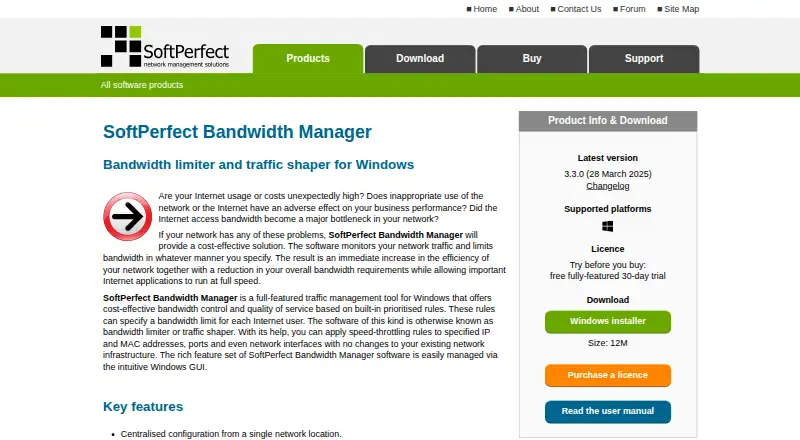
SoftPerfect Bandwidth Manager is Windows software for monitoring and controlling network traffic. It is aimed at administrators who need to manage bandwidth at an Internet gateway or on user computers, with centralised configuration from one network location. Rules can prioritise traffic in both directions and apply to IP and MAC addresses, protocols, ports, and network interfaces. The product also covers application and user monitoring, bandwidth alerts, quotas, scheduling, usage reports, live monitoring, web report access, and email notifications.
Pricing is based on perpetual, one-time licences. The Standard single-device edition costs $49 per device and supports up to 500 rules or streams, download and upload quotas, and web access to usage reports. The Standard site licence costs $499 per site and covers unlimited devices at one site. Professional adds up to 2,000 rules or streams, scheduled rules, port mappings, HTTP redirect, and email notifications for quotas; its single-device price is $99 per device. Enterprise single-device pricing is $149 per device and adds unlimited rules or streams plus deep-packet inspection traffic detection. The published plans also include worldwide licence options and a 30-day trial.
Its strongest fit is controlled Windows environments where administrators need granular traffic policies rather than a lightweight usage dashboard. Deep-packet inspection can categorise traffic such as peer-to-peer sharing and media streaming, while central configuration and web reports support administration across managed devices or locations. The trade-off is focus: the product is Windows-only and does not list integrations, so organisations seeking cross-platform coverage or connected ecosystem workflows should consider alternatives. Choose it for detailed rule control, quotas, scheduling, and reporting in a Windows network; look elsewhere when platform breadth or integrations are central requirements.
Your product? Our editors can test SoftPerfect Bandwidth Manager in depth and publish a review, labelled as paid · from $149/mo →
SoftPerfect Bandwidth Manager pricing
All 10 SoftPerfect Bandwidth Manager plans and prices →
SoftPerfect Bandwidth Manager fact sheet
| Free plan | No |
|---|---|
| Paid from | Not verified |
| Application monitoring | Yes |
| User monitoring | Yes |
| Flow protocol support | Not verified |
| SNMP monitoring | Not verified |
| Monitored device limit | 1 devices |
| Historical data retention | Not verified |
| Bandwidth alerts | Yes |
| Free trial | 30 days |
| Deployment | Desktop |
| Platforms | Windows |
| Support | Email, Community, Docs, Tickets |
| Built for | Solo, Small business, Mid-market (editorial estimate) |
| Pricing | 30-day trial (source) |
| Website | softperfect.com |
| Facts checked | 22 Sep 2026 |
Alternatives to SoftPerfect Bandwidth Manager
- ntopngA broad self-hosted toolkit for real-time, historical, and infrastructure visibility.9.4
- ManageEngine NetFlow AnalyzerA broad flow-monitoring suite for enterprise networks, with free and scalable paid editions.9.2
- Progress FlowmonA broad hybrid monitoring platform for teams needing flow, topology, performance and security analysis.9.0



See all SoftPerfect Bandwidth Manager alternatives →
Used SoftPerfect Bandwidth Manager? Be the first to review it
The editor score above is our own research. What this page doesn't have yet is a reader's view — what you used SoftPerfect Bandwidth Manager for, what worked and what didn't. No stars are seeded and no review is paid for; an editor reads every one before it appears.
Write a reviewTwo minutes · verified accounts only · read by an editor before it appears
Featured on iTechGuides

SoftPerfect Bandwidth Manager is listed in our Bandwidth Monitoring Software directory. Add the badge to your site — it links back to this page.
<a href="https://www.itechguides.com/products/softperfect-bandwidth-manager/"><img src="https://www.itechguides.com/best/badge/softperfect-bandwidth-manager.svg" alt="Featured on iTechGuides" width="230" height="46"></a>
Reviewed by iTechGuides Editors · Editorial team · Updated Oct 2026
Advertiser disclosure: iTechGuides is reader-supported. Vendors can pay for top positions in our rankings and for a place on other products' pages, and we may earn a commission when you click some links. Bought places stand at the number bought; this page and our disclosure say so. Paying vendors may get a fuller, more detailed review from our editors, and that review can change their score. How we rank.
Last updated · How we research and update