
SNS-HDR
SNS-HDR: A free HDR desktop workflow with Lightroom Classic integration and paid licensing options. Ranked #7 of 20 in HDR Software by our editors (7.6/10); pricing: Free plan · paid from €30; best for free desktop HDR with Lightroom.
At a glance
- Editor score7.6 / 10
- PricingFree plan · paid from €30
- Best forFree desktop HDR with Lightroom
- Free planYes
- HDR merge modeBoth
- Facts checked20 Sep 2026
Where it wins
- Free Lite edition with multi-exposure and single-image HDR
- RAW, DNG, OpenEXR and Radiance HDR input support
- Lightroom Classic plug-in, batch processing and command-line tools
Where it doesn't
- Home is limited to non-commercial use
- Professional costs €85 as a one-time license
- Desktop software is available only for Windows and macOS
Our verdict on SNS-HDR
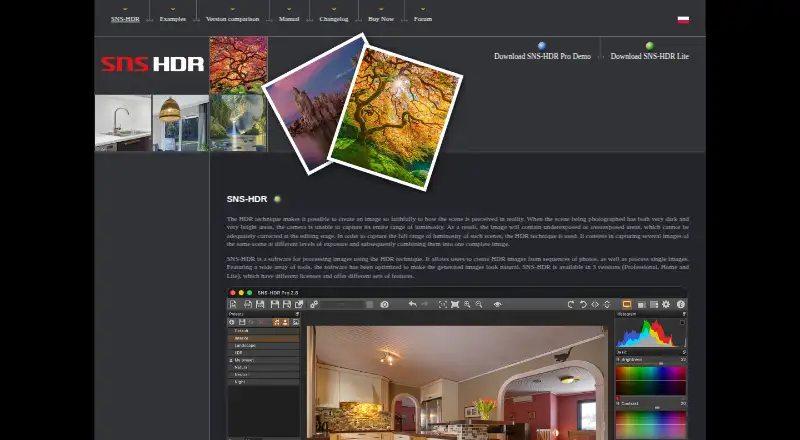
SNS-HDR is desktop software for creating HDR images from differently exposed photo sequences and processing single images. It suits photographers who want a desktop HDR workflow with both multi-exposure merging and single-image processing, including users working with RAW, DNG, JPEG, TIFF, OpenEXR or Radiance HDR files. It is available for Windows and macOS, and its Lightroom Classic plug-in makes it a practical fit for photographers whose existing workflow is centered on Adobe Lightroom Classic.
The product covers the main stages of HDR processing in one application. Image alignment and ghost reduction support multi-exposure merges, while adjustable basic, advanced and color parameters provide control over the resulting image. Masks allow localized adjustments, and batch processing is useful when several images or projects need attention. Output options include JPEG, TIFF, SNSX and macOS HEIC, while project saving supports an ongoing desktop workflow. Command-line processing adds an option for users who need processing outside the graphical interface.
SNS-HDR’s licensing separates free, non-commercial and commercial use. The Lite edition is freeware. Home costs €30 as a one-time license and includes a non-commercial license, while Professional costs €85 as a one-time license and includes a commercial license. The Lightroom Classic plug-in, masks, RAW support and processing tools make it a strong choice for photographers who want more than basic HDR merging without moving away from a desktop workflow. Photographers needing commercial licensing should choose Professional; those working commercially should not rely on Home’s non-commercial terms.
SNS-HDR pricing
All 2 SNS-HDR plans and prices →
SNS-HDR fact sheet
| Free plan | Yes |
|---|---|
| Paid from | Not verified |
| HDR merge mode | Both |
| Tone mapping controls | Multiple |
| Batch processing | Yes |
| RAW file support | Yes |
| HDR output formats | JPEG, TIFF-8, TIFF-16, SNSX, HEIC, HEIC-10 |
| Supported platforms | Windows, macOS |
| Maximum input images | Not verified |
| Deployment | Desktop |
| Platforms | Windows, macOS |
| Support | Community |
| Built for | Solo, Small business, Mid-market (editorial estimate) |
| Integrations | 1 integrations: Adobe Lightroom Classic |
| Pricing | Free plan · paid from €30 (source) |
| Website | sns-hdr.com |
| Facts checked | 20 Sep 2026 |
SNS-HDR integrations
SNS-HDR lists 1 integrations on its own site.
- Adobe Lightroom Classic
Alternatives to SNS-HDR
- Luminance HDRA free, full-featured HDR toolkit for photographers on Windows, macOS, and Linux.9.0
- ColorForgeA free cross-platform HDR editor with strong RAW and bracket-fusion controls.8.6
- Photomatix ProA feature-rich desktop HDR editor for photographers who need advanced control.8.1

See all SNS-HDR alternatives →
SNS-HDR vs the competition
- SNS-HDR vs Luminance HDR
- SNS-HDR vs ColorForge
- SNS-HDR vs Photomatix Pro
- SNS-HDR vs ON1 HDR
- SNS-HDR vs AKVIS HDRFactory
- SNS-HDR vs PhotomatixCL


Compare SNS-HDR with any tool side by side →
Also listed in
Used SNS-HDR? Be the first to review it
The editor score above is our own research. What this page doesn't have yet is a reader's view — what you used SNS-HDR for, what worked and what didn't. No stars are seeded and no review is paid for; an editor reads every one before it appears.
Write a reviewTwo minutes · verified accounts only · read by an editor before it appears
Featured on iTechGuides

SNS-HDR is listed in our HDR Software directory. Add the badge to your site — it links back to this page.
<a href="https://www.itechguides.com/products/sns-hdr/"><img src="https://www.itechguides.com/best/badge/sns-hdr.svg" alt="Featured on iTechGuides" width="230" height="46"></a>
Guides on HDR software
- Here Are the Best Nintendo Switch 2 HDR Settings for TVs and Monitors to Fix Washed-Out VisualsAug 2026
- Best Dolby Atmos TV Boxes for 4K HDR: Choose the Right Streaming BoxAug 2026
- Best HDR Monitor in 2026: Our Top Picks for GamingAug 2026
Reviewed by iTechGuides Editors · Editorial team · Updated Sep 2026
Advertiser disclosure: iTechGuides is reader-supported. We may earn a commission when you click some links. How we rank.
Last updated · How we research and update