SnapURL Extract
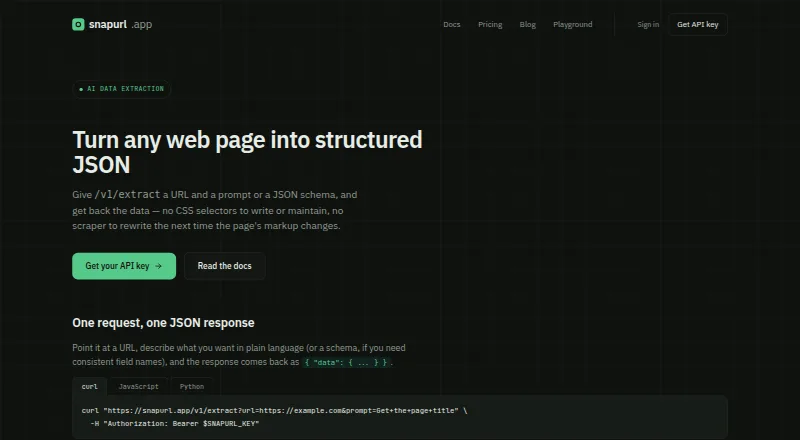
SnapURL Extract: A URL-to-JSON extraction API with screenshots as an optional output. Ranked #29 of 29 in Screenshot APIs by our editors (5.1/10); pricing: Free plan · paid from $9/mo; best for small teams extracting structured data from URLs.
At a glance
- Editor score5.1 / 10
- PricingFree plan · paid from $9/mo
- Best forSmall teams extracting structured data from URLs
- Free planYes
- Paid from$9/mo
- Facts checked28 Sep 2026
Where it wins
- Accepts a plain-language prompt or JSON schema for extraction
- Can return full-page or CSS-selector screenshots with results
- Configurable waits, delays, ad blocking, and cookie-banner blocking
Where it doesn't
- Free plan excludes AI extraction
- Screenshot output is ancillary to the extraction workflow
- Starter limits usage to 2,000 screenshots and 200 extractions monthly
Our verdict on SnapURL Extract
SnapURL Extract is a cloud API for retrieving structured data from public web pages, aimed at solo developers and small teams. Send a URL with a plain-language prompt or JSON schema; the service renders the page and returns extracted data as JSON. Screenshot output can accompany the extraction, making the product most relevant when a workflow needs structured results and an image record rather than a dedicated screenshot endpoint alone.
The plans separate screenshot access from AI extraction. Free includes 25 screenshots per month, but no AI extraction. Starter costs $9 per month and includes 2,000 screenshots, 200 AI extractions, and email support. Growth costs $39 per month and raises those quotas to 15,000 screenshots and 2,000 AI extractions, with priority support. Choose Starter for a modest extraction workload; Growth is the listed step up for higher monthly volume. The published plans make extraction a paid feature, so Free is useful only for screenshot requests.
The API supports full-page screenshots and CSS-selector element capture, with screenshot requests able to return image formats or PDF. Configurable page-load waiting and delays, plus ad and cookie-banner blocking, give developers controls over page rendering before capture or extraction. Calls use standard HTTP requests without an SDK, and a base64-encoded screenshot can be returned alongside the JSON result. Pick SnapURL Extract if prompt- or schema-based URL extraction is the main need and screenshots are a helpful companion. A screenshot-only use case, or one requiring the Free plan's AI extraction, is a poor fit.
SnapURL Extract pricing
All 3 SnapURL Extract plans and prices →
SnapURL Extract fact sheet
| Free plan | Yes |
|---|---|
| Paid from | $9/mo |
| HTML input | Not verified |
| PDF output | Not verified |
| Full-page capture | Not verified |
| Custom viewport | Not verified |
| Wait conditions | Not verified |
| Geo-location | Not verified |
| Deployment | Cloud |
| Platforms | Web |
| Support | |
| Built for | Solo, Small business (editorial estimate) |
| Pricing | Free plan · paid from $9/mo (source) |
| Website | snapurl.app |
| Facts checked | 28 Sep 2026 |
Alternatives to SnapURL Extract
- UrlboxA configurable rendering API with full-page capture, varied outputs, and storage integrations.9.0
- ScrapingBeeA broad scraping API that adds screenshots to browser rendering and extraction tools.8.0
- AddScreenshotsBroad screenshot automation and delivery options with a free starting tier.7.9


See all SnapURL Extract alternatives →
Used SnapURL Extract? Be the first to review it
The editor score above is our own research. What this page doesn't have yet is a reader's view — what you used SnapURL Extract for, what worked and what didn't. No stars are seeded and no review is paid for; an editor reads every one before it appears.
Write a reviewTwo minutes · verified accounts only · read by an editor before it appears
Featured on iTechGuides

SnapURL Extract is listed in our Screenshot APIs directory. Add the badge to your site — it links back to this page.
<a href="https://www.itechguides.com/products/snapurl-extract/"><img src="https://www.itechguides.com/best/badge/snapurl-extract.svg" alt="Featured on iTechGuides" width="230" height="46"></a>
Reviewed by iTechGuides Editors · Editorial team · Updated Sep 2026
Advertiser disclosure: iTechGuides is reader-supported. We may earn a commission when you click some links. It never changes a score or a verdict. How we rank.
Last updated · How we research and update