
SlideOnline
SlideOnline: A straightforward free option for publishing public PowerPoint and PDF presentations online. Ranked #22 of 27 in Presentation Sharing Software by our editors (6.6/10); pricing: Free plan; best for basic free PowerPoint and PDF sharing.
At a glance
- Editor score6.6 / 10
- PricingFree plan
- Best forBasic free PowerPoint and PDF sharing
- Free planYes
- Paid fromFree
- Embeddable playerYes
- Facts checked20 Sep 2026
Where it wins
- Uploads PowerPoint and PDF presentations for browser viewing
- Supports social sharing and website or blog embeds
- Includes WordPress integration and free account registration
Where it doesn't
- Published presentations use public access
- Available on the web rather than as a desktop or mobile app
- No paid feature expansion, AI features, or verified analytics
Our verdict on SlideOnline
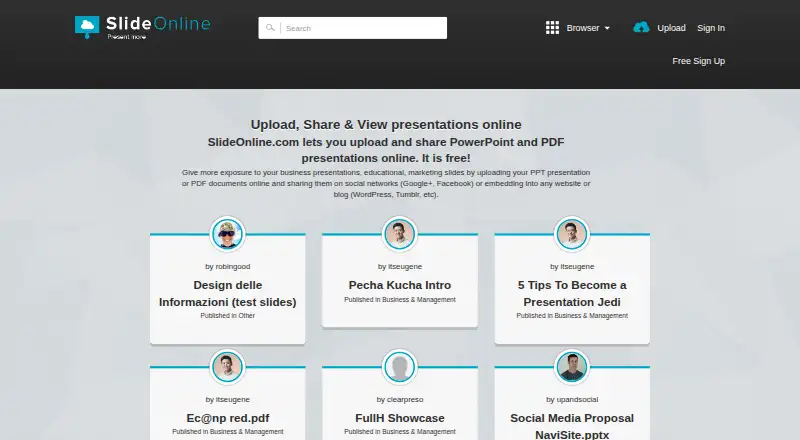
SlideOnline is a web-based service for uploading, publishing, sharing, and viewing PowerPoint presentations and PDF documents online. It is aimed at users who need a simple way to make presentations available in a browser, share them on social networks, or place them in websites and blogs. Business, educational, marketing, and organizational users can create a free account and publish presentations through an iframe player.
The core workflow focuses on distribution rather than presentation creation. Users can upload PowerPoint and PDF files, publish them online, and let viewers access the result in a browser. Social network sharing and embeds extend the presentation beyond SlideOnline itself, while WordPress integration supports publishing within WordPress sites. These features make the service a practical fit for public-facing materials, including presentations intended for broad online access.
SlideOnline is most suitable when free public sharing is the priority. Its category specifications identify access control as public, so it is less appropriate for presentations that require restricted viewing or privacy controls. The product also has no paid feature expansion, AI features, or verified analytics, which limits its fit for teams seeking advanced audience measurement or additional publishing controls. Choose SlideOnline for basic PowerPoint and PDF publication, browser viewing, social sharing, and embeds; consider another presentation-sharing product when private access, analytics, branding, or broader platform capabilities are central requirements.
Your product? Our editors can test SlideOnline in depth and publish a review, labelled as paid · from $149/mo →
SlideOnline pricing
SlideOnline fact sheet
| Free plan | Yes |
|---|---|
| Paid from | Free |
| Embeddable player | Yes |
| Viewer analytics | Not verified |
| Access control | Public |
| Custom branding | Not verified |
| Lead capture | Not verified |
| Deck limit | Not verified |
| Deployment | Cloud |
| Platforms | Web |
| Built for | Solo, Small business, Mid-market (editorial estimate) |
| Integrations | 1 integrations: WordPress |
| Pricing | Free plan |
| Website | slideonline.com |
| Facts checked | 20 Sep 2026 |
SlideOnline integrations
SlideOnline lists 1 integrations on its own site.
- WordPress
Alternatives to SlideOnline
- PowerPoint for the webA capable web PowerPoint workspace for co-authoring, controlled sharing, and embeds.9.3
- SlideShareA public presentation hub with flexible sharing, embeds, analytics, and subscription-based extras.9.1
- Speaker DeckA focused way to host and embed PDF decks, with useful privacy controls on Pro.8.9



See all SlideOnline alternatives →
Used SlideOnline? Be the first to review it
The editor score above is our own research. What this page doesn't have yet is a reader's view — what you used SlideOnline for, what worked and what didn't. No stars are seeded and no review is paid for; an editor reads every one before it appears.
Write a reviewTwo minutes · verified accounts only · read by an editor before it appears
Featured on iTechGuides

SlideOnline is listed in our Presentation Sharing Software directory. Add the badge to your site — it links back to this page.
<a href="https://www.itechguides.com/products/slideonline/"><img src="https://www.itechguides.com/best/badge/slideonline.svg" alt="Featured on iTechGuides" width="230" height="46"></a>
Reviewed by iTechGuides Editors · Editorial team · Updated Oct 2026
Advertiser disclosure: iTechGuides is reader-supported. Vendors can pay for top positions in our rankings and for a place on other products' pages, and we may earn a commission when you click some links. Bought places stand at the number bought; this page and our disclosure say so. Paying vendors may get a fuller, more detailed review from our editors, and that review can change their score. How we rank.
Last updated · How we research and update