
Slidee
Slidee: A low-cost way to turn prompts and documents into editable PPTX or PDF decks. Ranked #59 of 109 in AI Presentation Makers by our editors (3.1/10); pricing: Free plan; best for low-cost simple document-to-deck creation.
At a glance
- Editor score3.1 / 10
- PricingFree plan
- Best forLow-cost simple document-to-deck creation
- Free planYes
- Paid from$9/mo
- Document-to-deck generationYes
- Facts checked22 Sep 2026
Where it wins
- Converts prompts, PDFs, Word files, text files and URLs into decks
- Free plan includes PPTX and PDF export with three AI presentations monthly
- Pro adds branding, AI images, premium templates and unlimited presentations
Where it doesn't
- Free plan is limited to three AI presentations per month
- Browser-centered workflow may not suit users seeking native desktop apps
- Collaboration is centered on comments rather than advanced team controls
Our verdict on Slidee
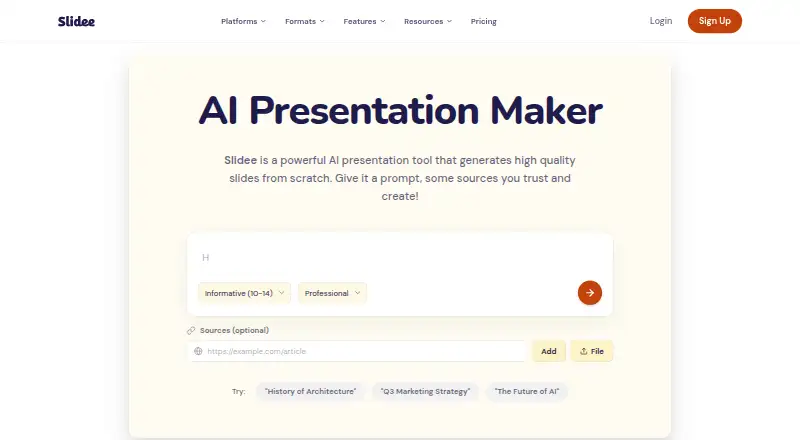
Slidee is a web-based AI presentation maker for students, educators and professionals who need to turn ideas or existing material into editable slide decks. Users can describe a topic, provide a URL, or upload a PDF, Word document or text file for document-to-deck conversion. Generated presentations can be refined in an online slide editor, then shared through presentation links or exported to PPTX and PDF. More than 100 presentation templates and AI-generated slides support a range of basic presentation needs.
The free plan costs $0 per month and includes three AI presentations each month, basic templates, AI-generated slides, and PPTX and PDF export. Pro costs $9 per month with monthly billing. It raises usage to unlimited AI presentations and adds premium templates, custom branding with logos, colors and fonts, AI image generation, and priority support. Both plans include PPTX and PDF export, making the paid tier primarily a choice for higher volume, visual customization and brand consistency rather than different export formats.
Slidee fits browser-based workflows and lists Microsoft PowerPoint, Google Slides and Apple Keynote among its integrations. Cloud and browser-extension deployment, shareable links, team workspaces and shared brand assets support lightweight collaboration, while the stated collaboration level is comments. GDPR compliance and email or ticket support provide baseline operational coverage. Choose Slidee when prompt- or document-driven deck creation, low monthly cost and straightforward exports matter most. Consider another tool if you need a native desktop-first workflow or collaboration controls that extend beyond comments.
Your product? Our editors can test Slidee in depth and publish a review, labelled as paid · from $149/mo →
Slidee pricing
All 2 Slidee plans and prices →
Slidee fact sheet
| Free plan | Yes |
|---|---|
| Paid from | $9/mo |
| Prompt-to-deck generation | Yes |
| Document-to-deck generation | Yes |
| PPTX export | Yes |
| PDF export | Yes |
| Brand controls | Yes |
| Collaboration level | Comments |
| Maximum slides | Not verified |
| Money-back guarantee | 30 days |
| Deployment | Cloud, Browser extension |
| Platforms | Web |
| Compliance & security | GDPR |
| Support | Email, Tickets |
| Built for | Solo, Small business, Mid-market (editorial estimate) |
| Integrations | 3 integrations: Microsoft PowerPoint, Google Slides, Apple Keynote |
| Pricing | Free plan (source) |
| Website | slidee.ai |
| Facts checked | 22 Sep 2026 |
Slidee integrations
Slidee lists 3 integrations on its own site.
- Microsoft PowerPoint
- Google Slides
- Apple Keynote
Alternatives to Slidee
- GammaA free, collaborative AI creator with broad exports, publishing, and automation options.9.3
- PitchA flexible presentation workspace for teams that need AI, brand control, and collaboration.8.8
- OpenChartsA freemium deck builder with presenter coaching, collaboration, and flexible exports.8.7



Used Slidee? Be the first to review it
The editor score above is our own research. What this page doesn't have yet is a reader's view — what you used Slidee for, what worked and what didn't. No stars are seeded and no review is paid for; an editor reads every one before it appears.
Write a reviewTwo minutes · verified accounts only · read by an editor before it appears
Featured on iTechGuides

Slidee is listed in our AI Presentation Makers directory. Add the badge to your site — it links back to this page.
<a href="https://www.itechguides.com/products/slidee/"><img src="https://www.itechguides.com/best/badge/slidee.svg" alt="Featured on iTechGuides" width="230" height="46"></a>
Reviewed by iTechGuides Editors · Editorial team · Updated Oct 2026
Advertiser disclosure: iTechGuides is reader-supported. Vendors can pay for top positions in our rankings and for a place on other products' pages, and we may earn a commission when you click some links. Bought places stand at the number bought; this page and our disclosure say so. Paying vendors may get a fuller, more detailed review from our editors, and that review can change their score. How we rank.
Last updated · How we research and update