SlickRun
SlickRun: A keyboard-driven Windows utility for launching apps, files, websites, and multi-step commands. Ranked #38 of 40 in App Launcher Software by our editors (5.3/10); pricing: Free plan; best for windows users who prefer shortcut-based launching.
At a glance
- Editor score5.3 / 10
- PricingFree plan
- Best forWindows users who prefer shortcut-based launching
- Free planYes
- Paid fromFree
- Supported platformsWindows
- Founded1998
- Facts checked19 Sep 2026
Where it wins
- Custom MagicWords launch applications, documents, folders, and websites.
- MultiWord workflows can execute several MagicWords in sequence.
- Autocomplete, command history, and a configurable system-wide hotkey aid access.
Where it doesn't
- Available for Windows only.
- Launching relies on creating or configuring MagicWords for named shortcuts.
- JOT is a short-notes pad, not a full-featured writing workspace.
Our verdict on SlickRun
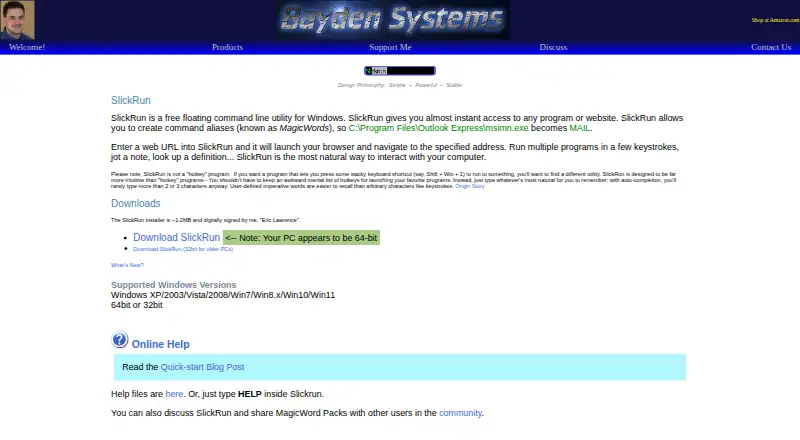
SlickRun is a free Windows command-line utility from Bayden Systems for people who want to launch applications, files, folders, websites, and configured actions from a floating command bar. Its central feature is the MagicWord: a customizable named alias that can launch a target or accept command-line parameters, dynamic input, and clipboard substitution. Autocomplete and command history support quick entry, while a configurable system-wide hotkey opens the launcher. This is a fit for Windows users comfortable with typed shortcuts, rather than people looking for a visual app grid or a launcher for another operating system.
The feature set extends beyond single commands, but remains centered on keyboard-driven launching. MultiWord workflows execute multiple MagicWords, and MagicWords can launch URLs or be used with command parameters and dynamic input. File-system browsing supports finding and launching files, while import and export of MagicWord shortcut packs provide a way to move shortcut configurations. JOT adds a text pad for short notes with incremental search. These are useful additions for a command launcher, though JOT is scoped to short notes and the workflow feature is built around executing MagicWords rather than a broader automation environment.
According to the published plan details, SlickRun has one free plan, described as a Windows command-line utility; there are no paid tiers in the listed offering. Its Windows focus is a clear boundary: the supported platform is Windows, with supported versions listed through Windows 11. The product is distributed directly by Bayden Systems. Choose SlickRun if you want a free, configurable command bar and are willing to organize shortcuts as MagicWords. If you want an Android launcher, a visual-first interface, or a launcher spanning platforms, this product is not suited to that need.
Your product? Our editors can test SlickRun in depth and publish a review, labelled as paid · from $149/mo →
SlickRun pricing
All 1 SlickRun plans and prices →
SlickRun fact sheet
| Free plan | Yes |
|---|---|
| Paid from | Free |
| Supported platforms | Windows |
| File search | Yes |
| Command launching | Yes |
| Workflow support | Yes |
| Plugin support | Not verified |
| Cloud sync | Not verified |
| Shortcut limit | Not verified |
| Deployment | Desktop |
| Platforms | Windows |
| Pricing | Free plan (source) |
| Website | bayden.com |
| Facts checked | 19 Sep 2026 |
Alternatives to SlickRun
- RaycastRaycast combines app and file search with commands, extensions, and optional AI.9.4
- WoxWox combines app launching, search, commands, plugins, and cloud sync in an open-source launcher.9.2
- AlfredA capable Mac launcher whose Powerpack adds automation and productivity tools.8.9



See all SlickRun alternatives →
Used SlickRun? Be the first to review it
The editor score above is our own research. What this page doesn't have yet is a reader's view — what you used SlickRun for, what worked and what didn't. No stars are seeded and no review is paid for; an editor reads every one before it appears.
Write a reviewTwo minutes · verified accounts only · read by an editor before it appears
Featured on iTechGuides

SlickRun is listed in our App Launcher Software directory. Add the badge to your site — it links back to this page.
<a href="https://www.itechguides.com/products/slickrun/"><img src="https://www.itechguides.com/best/badge/slickrun.svg" alt="Featured on iTechGuides" width="230" height="46"></a>
Reviewed by iTechGuides Editors · Editorial team · Updated Oct 2026
Advertiser disclosure: iTechGuides is reader-supported. Vendors can pay for top positions in our rankings and for a place on other products' pages, and we may earn a commission when you click some links. Bought places stand at the number bought; this page and our disclosure say so. Paying vendors may get a fuller, more detailed review from our editors, and that review can change their score. How we rank.
Last updated · How we research and update