
Sketchar
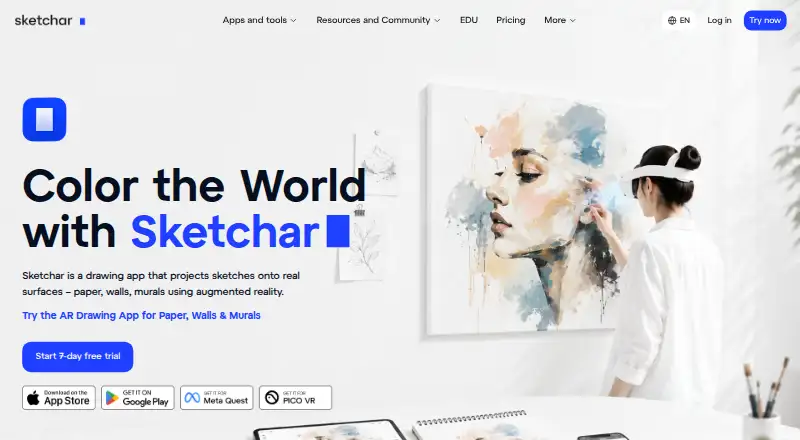
Sketchar: A broad drawing-learning app combining AR practice, structured lessons, and shared canvases. Ranked #6 of 27 in Art Learning Apps by our editors (7.4/10); pricing: Free plan · paid from $1.50/user/mo (annual) · 7-day trial; best for interactive mobile and AR drawing practice.
At a glance
- Editor score7.4 / 10
- PricingFree plan · paid from $1.50/user/mo (annual) · 7-day trial
- Best forInteractive mobile and AR drawing practice
- Free planYes
- Instructor feedbackYes
- Founded2016 · Vilnius, Lithuania
- Facts checked22 Sep 2026
Where it wins
- More than 1,000 guided lessons with personalized growth plans
- AR projection and tracing across paper, canvas, walls, and other surfaces
- Real-time multiplayer drawing with cloud sync across devices
Where it doesn't
- VR access varies between the Monthly and Annually plans
- Education pricing requires annual billing
- Offline access on Meta Quest applies to downloaded images, not lessons
Our verdict on Sketchar
Sketchar is an augmented-reality drawing app for beginners, hobbyists, learners, muralists, and art educators. Its core workflow projects reference sketches onto paper, canvas, walls, and other surfaces, while a digital canvas adds brushes, layers, stroke smoothing, and image imports. The app also includes more than 1,000 step-by-step lessons, personalized growth plans, daily challenges, achievements, rewards, and time-lapse recording. Mobile and web access support individual learning, while Meta Quest and Pico extend the product into VR workflows.
Pricing is structured around a free plan, a 7-day free trial, and three paid options. The Monthly plan costs $5 per month and provides PRO on one platform—mobile or VR—along with multiplayer rooms, 1000+ courses and lessons, advanced drawing tools, and cloud sync. Annually costs $49 per year and includes PRO on both mobile and VR platforms. The For education plan costs $1.50 per seat per month when billed annually, with the same listed PRO access and feature set as Annually. The published plans make Sketchar workable for individual learners as well as classroom or education use.
Its strongest distinction is the combination of physical-surface tracing, structured instruction, and collaborative digital practice. Shared canvases enable real-time multiplayer drawing, and cloud synchronization supports movement across devices. The product is less suited to users who need lessons available offline: offline access on Meta Quest applies to downloaded images, not lessons. Choose Sketchar for guided practice that mixes mobile, web, AR, and VR; consider another option if offline course access is central to the workflow.
Sketchar pricing
All 3 Sketchar plans and prices →
Sketchar fact sheet
| Free plan | Yes |
|---|---|
| Paid from | Not verified |
| Guided projects | Yes |
| Instructor feedback | Yes |
| Live classes | Not verified |
| Progress tracking | Yes |
| Offline access | Not verified |
| Mobile platforms | iOS, Android |
| Art history lessons | Not verified |
| Free trial | 7 days |
| Deployment | Cloud, Mobile |
| Platforms | Web, iOS, Android |
| Support | Email, Docs |
| Built for | Solo, Small business, Mid-market, Enterprise (editorial estimate) |
| Integrations | 2 integrations: Meta Quest, Pico |
| Pricing | Free plan · paid from $1.50/user/mo (annual) · 7-day trial (source) |
| Website | sketchar.io |
| Facts checked | 22 Sep 2026 |
Sketchar integrations
Sketchar lists 2 integrations on its own site.
- Meta Quest
- Pico
Alternatives to Sketchar
- Art ProfA broad art-learning platform combining adaptive study, feedback, and live mentoring.9.3
- DigitalPainting.SchoolA focused learning platform for artists who want guided practice and professional feedback.8.5
- Creature Art TeacherA broad art-learning library with mobile access, workshops, and instructor critique.8.4


See all Sketchar alternatives →
Sketchar vs the competition
- Sketchar vs Art Prof
- Sketchar vs DigitalPainting.School
- Sketchar vs Creature Art Teacher
- Sketchar vs Drawspace
- Sketchar vs Proko
- Sketchar vs Drawabox


Compare Sketchar with any tool side by side →
Used Sketchar? Be the first to review it
The editor score above is our own research. What this page doesn't have yet is a reader's view — what you used Sketchar for, what worked and what didn't. No stars are seeded and no review is paid for; an editor reads every one before it appears.
Write a reviewTwo minutes · verified accounts only · read by an editor before it appears
Featured on iTechGuides

Sketchar is listed in our Art Learning Apps directory. Add the badge to your site — it links back to this page.
<a href="https://www.itechguides.com/products/sketchar/"><img src="https://www.itechguides.com/best/badge/sketchar.svg" alt="Featured on iTechGuides" width="230" height="46"></a>
Reviewed by iTechGuides Editors · Editorial team · Updated Sep 2026
Advertiser disclosure: iTechGuides is reader-supported. We may earn a commission when you click some links. How we rank.
Last updated · How we research and update