SideSlide
SideSlide: A portable Windows organizer with dockable containers, launch tools, notes, and RSS. Ranked #21 of 47 in Desktop Organization Software by our editors (7.4/10); pricing: Free plan; best for windows users wanting a portable desktop workspace.
At a glance
- Editor score7.4 / 10
- PricingFree plan
- Best forWindows users wanting a portable desktop workspace
- Free planYes
- Paid fromFree
- Platform supportWindows_only
- Facts checked20 Sep 2026
Where it wins
- Dockable, detachable containers keep desktop items organized
- Portable installation can run from a USB drive
- Includes encrypted notes, reminders, RSS, and keyboard launching
Where it doesn't
- Windows-only support limits cross-platform use
- No verified automatic sorting for desktop items
- Its many tools may feel broad for simple shortcut management
Our verdict on SideSlide
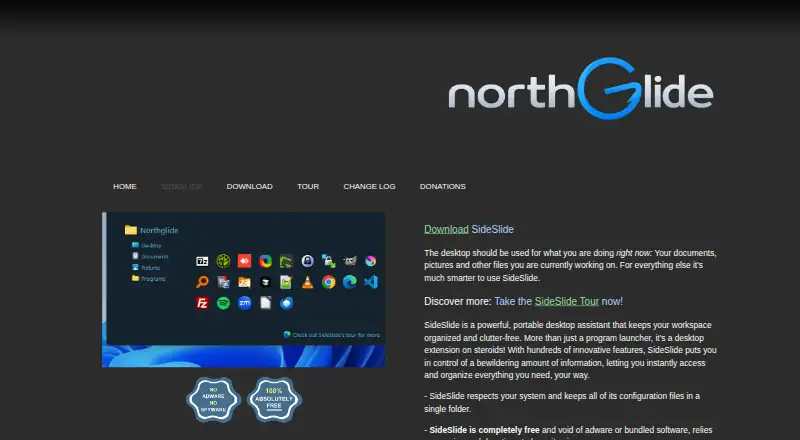
SideSlide is a free Windows desktop workspace for organizing shortcuts, files, folders, URLs, notes, reminders, pictures, and RSS feeds. It is designed for users who want a customizable alternative to a crowded desktop, with virtual containers that dock to screen edges, expand or hide, and can be resized, folded, shrunk, or detached. Multi-monitor support, drag-and-drop handling, tagging, and a portable installation make it suited to users who move between workstations or prefer to keep their workspace on a USB drive.
The Free plan includes the full positioning of the product without advertising, spyware, or bundled software. Its organization model centers on flexible containers rather than automatic classification. Users can place shortcuts for files, folders, URLs, commands, and applications into a workspace, then reach them through a keyboard launcher with a directory navigator and expression calculator. This approach gives users control over layout and access, but it may require more manual organization than a tool that automatically sorts desktop items.
SideSlide also extends beyond shortcut storage with encrypted notes, automatic re-encryption options, reminders, picture slideshows, and an RSS reader with filtering and subject tracking. Those features make it a broader desktop utility for users who want several lightweight tools in one workspace. The trade-off is platform scope: official download documentation lists Windows 11, 10, 8, 7, and XP support, while the published platform details identify Windows as the supported platform. Choose SideSlide if portability, customizable containers, and a wide mix of desktop utilities matter most. Choose an alternative if you need cross-platform support or automatic desktop sorting.
Your product? Our editors can test SideSlide in depth and publish a review, labelled as paid · from $149/mo →
SideSlide pricing
All 1 SideSlide plans and prices →
SideSlide fact sheet
| Free plan | Yes |
|---|---|
| Paid from | Free |
| Platform support | Windows_only |
| Organization model | Virtual_containers |
| Automatic sorting | Not verified |
| Maximum containers | Not verified |
| Saved layouts | Not verified |
| Multi-monitor support | Yes |
| Deployment | Desktop |
| Platforms | Windows |
| Built for | Solo, Small business (editorial estimate) |
| Pricing | Free plan (source) |
| Website | northglide.com |
| Facts checked | 20 Sep 2026 |
Alternatives to SideSlide
- AutoShelfDeep automated file sorting for Mac users who want precise control.9.4
- Desktop Frames+A flexible Windows desktop organizer with frames, profiles, rules, and search.9.3
- DeskBoxDeskBox combines automatic desktop organization with search, widgets, todos, and recovery tools.9.2


See all SideSlide alternatives →
Used SideSlide? Be the first to review it
The editor score above is our own research. What this page doesn't have yet is a reader's view — what you used SideSlide for, what worked and what didn't. No stars are seeded and no review is paid for; an editor reads every one before it appears.
Write a reviewTwo minutes · verified accounts only · read by an editor before it appears
Featured on iTechGuides

SideSlide is listed in our Desktop Organization Software directory. Add the badge to your site — it links back to this page.
<a href="https://www.itechguides.com/products/sideslide/"><img src="https://www.itechguides.com/best/badge/sideslide.svg" alt="Featured on iTechGuides" width="230" height="46"></a>
Reviewed by iTechGuides Editors · Editorial team · Updated Oct 2026
Advertiser disclosure: iTechGuides is reader-supported. Vendors can pay for top positions in our rankings and for a place on other products' pages, and we may earn a commission when you click some links. Bought places stand at the number bought; this page and our disclosure say so. Paying vendors may get a fuller, more detailed review from our editors, and that review can change their score. How we rank.
Last updated · How we research and update