ShellMenuView
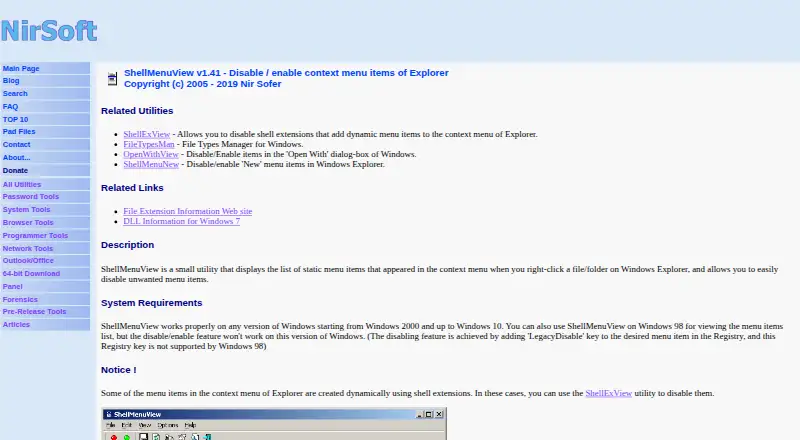
ShellMenuView: A focused freeware tool for inspecting, filtering, and controlling Windows Explorer menus. Ranked #46 of 47 in Desktop Organization Software by our editors (5.7/10); pricing: Free plan; best for inspecting and disabling Windows shell commands.
At a glance
- Editor score5.7 / 10
- PricingFree plan
- Best forInspecting and disabling Windows shell commands
- Free planYes
- Paid fromFree
- Platform supportWindows_only
- Facts checked22 Sep 2026
Where it wins
- Portable freeware with no installation or additional DLLs
- Filters, sorts, and exports Explorer menu-command lists
- Shows registry and file-association details for menu entries
Where it doesn't
- Windows-only desktop support
- Focused on static Explorer context-menu items
- No AI features or broader desktop organization tools
Our verdict on ShellMenuView
ShellMenuView is a portable Windows utility for inspecting static context-menu items shown when users right-click files or folders in Windows Explorer. It is aimed at solo users and small teams that need to identify, disable, or control shell-menu commands without installing a full desktop-organization suite. The Freeware plan includes no-installation portability and Windows Explorer context-menu management, making the product a focused choice for shell-menu cleanup and diagnosis.
Its strongest area is menu inspection and control. Users can enable or disable selected entries, or configure items to appear only when the Shift key is pressed. Text filtering and column sorting help narrow larger lists, while registry and file-association details provide additional context for each command. ShellMenuView also exports menu-command lists to text, CSV, HTML, XML, and other formats, including through the command line. These capabilities suit troubleshooting, documentation, and repeatable administrative review more than general desktop organization.
The trade-off is narrow platform and feature scope. ShellMenuView is designed for Windows Explorer and does not extend to broader desktop organization workflows; it also has no AI features. Users who need precise control over static shell-menu entries should find its focused feature set appropriate, particularly when portability and freeware access matter. Those seeking a cross-platform organizer, a wider workspace-management tool, or capabilities beyond Explorer context menus should choose a different product.
Your product? Our editors can test ShellMenuView in depth and publish a review, labelled as paid · from $149/mo →
ShellMenuView pricing
All 1 ShellMenuView plans and prices →
ShellMenuView fact sheet
| Free plan | Yes |
|---|---|
| Paid from | Free |
| Platform support | Windows_only |
| Organization model | Not verified |
| Automatic sorting | Not verified |
| Maximum containers | Not verified |
| Saved layouts | Not verified |
| Multi-monitor support | Not verified |
| Deployment | Desktop |
| Platforms | Windows |
| Support | Email, Docs |
| Built for | Solo, Small business (editorial estimate) |
| Pricing | Free plan (source) |
| Website | nirsoft.net |
| Facts checked | 22 Sep 2026 |
Alternatives to ShellMenuView
- AutoShelfDeep automated file sorting for Mac users who want precise control.9.4
- Desktop Frames+A flexible Windows desktop organizer with frames, profiles, rules, and search.9.3
- DeskBoxDeskBox combines automatic desktop organization with search, widgets, todos, and recovery tools.9.2


See all ShellMenuView alternatives →
Used ShellMenuView? Be the first to review it
The editor score above is our own research. What this page doesn't have yet is a reader's view — what you used ShellMenuView for, what worked and what didn't. No stars are seeded and no review is paid for; an editor reads every one before it appears.
Write a reviewTwo minutes · verified accounts only · read by an editor before it appears
Featured on iTechGuides

ShellMenuView is listed in our Desktop Organization Software directory. Add the badge to your site — it links back to this page.
<a href="https://www.itechguides.com/products/shellmenuview/"><img src="https://www.itechguides.com/best/badge/shellmenuview.svg" alt="Featured on iTechGuides" width="230" height="46"></a>
Reviewed by iTechGuides Editors · Editorial team · Updated Oct 2026
Advertiser disclosure: iTechGuides is reader-supported. Vendors can pay for top positions in our rankings and for a place on other products' pages, and we may earn a commission when you click some links. Bought places stand at the number bought; this page and our disclosure say so. Paying vendors may get a fuller, more detailed review from our editors, and that review can change their score. How we rank.
Last updated · How we research and update