ShareCAD
ShareCAD: ShareCAD combines browser viewing with project organization and controlled file sharing. Ranked #21 of 32 in CAD Viewer Software by our editors (6.7/10); pricing: Paid; best for teams needing controlled browser sharing.
At a glance
- Editor score6.7 / 10
- PricingPaid
- Best forTeams needing controlled browser sharing
- Free planNo
- Paid from$19.99/mo
- Measurement toolsYes
- Facts checked22 Sep 2026
Where it wins
- Views CAD, BIM, 2D, 3D, and document formats in a browser
- Adds expiring links, passwords, download restrictions, and upload requests
- Supports measurements, section views, layers, permissions, and tenant separation
Where it doesn't
- No $0 subscription plan is listed
- DWG viewing requires a subscription
- Advanced storage and support require the Team plan
Our verdict on ShareCAD
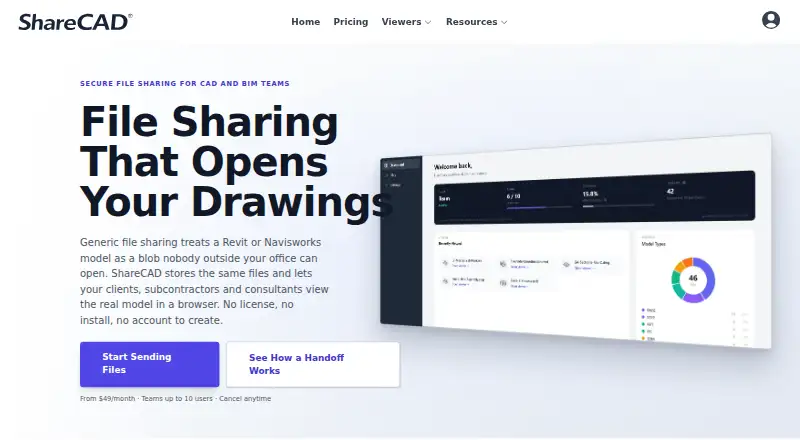
ShareCAD is a cloud platform for storing, viewing, and sharing CAD and BIM files through web, iOS, and Android access. It is aimed at architecture, engineering, construction, manufacturing, and related technical teams that need recipients to review files without installing CAD software or creating an account. Browser viewing covers CAD, BIM, 2D, 3D, and document formats, including DWG and DXF, with proprietary-format viewing handled through Autodesk conversion.
Sharing controls are the product’s clearest strength. Teams can organize files into projects and folders, share files or folders with expiration dates and optional passwords, and create view-only links that restrict downloads. Request Files links provide a way to collect uploads, while user-level permissions and tenant-based project separation support controlled access across projects or organizations. Viewer tools include measurements, section views, and layer or level toggles. Autodesk Platform Services is the listed integration, making the product a focused fit for teams working with Autodesk-related conversion workflows rather than a broad collaboration suite.
The Standard plan costs $19.99 USD per month and includes browser-based CAD and BIM viewing, secure file sharing, project workspaces, cloud storage, file requests, and view-only sharing. Team costs $49 USD per month and adds 3 TB of cloud storage and priority email support. Enterprise adds unlimited users, Single Sign-On, dedicated onboarding, custom agreements and NDAs, priority support, and volume pricing. ShareCAD suits teams prioritizing controlled browser access and file exchange; teams seeking a free subscription, or DWG viewing without a subscription, should look elsewhere.
Your product? Our editors can test ShareCAD in depth and publish a review, labelled as paid · from $149/mo →
ShareCAD pricing
All 3 ShareCAD plans and prices →
ShareCAD fact sheet
| Free plan | No |
|---|---|
| Paid from | $19.99/mo |
| DWG support | Yes |
| Measurement tools | Yes |
| Markup and annotation | Not verified |
| Sharing and collaboration | Yes |
| Platforms | Cross_platform |
| DXF support | Yes |
| Deployment | Cloud, Browser extension |
| Platforms | Web, iOS, Android |
| Support | Email, Docs |
| Built for | Solo, Small business, Mid-market, Enterprise (editorial estimate) |
| Integrations | 1 integrations: Autodesk Platform Services |
| Pricing | Paid (source) |
| Website | sharecad.com |
| Facts checked | 22 Sep 2026 |
ShareCAD integrations
ShareCAD lists 1 integrations on its own site.
- Autodesk Platform Services
Alternatives to ShareCAD
- Autodesk ViewerA capable free viewer for browser-based design review, measurement, markup, and sharing.9.2
- Autodesk Design ReviewA mature free Windows viewer for design review, comparison, measurement, and markups.9.0
- Autodesk DWG TrueViewA capable free Windows viewer for DWG and DXF files, with measurement and conversion tools.8.8


See all ShareCAD alternatives →
Used ShareCAD? Be the first to review it
The editor score above is our own research. What this page doesn't have yet is a reader's view — what you used ShareCAD for, what worked and what didn't. No stars are seeded and no review is paid for; an editor reads every one before it appears.
Write a reviewTwo minutes · verified accounts only · read by an editor before it appears
Featured on iTechGuides

ShareCAD is listed in our CAD Viewer Software directory. Add the badge to your site — it links back to this page.
<a href="https://www.itechguides.com/products/sharecad/"><img src="https://www.itechguides.com/best/badge/sharecad.svg" alt="Featured on iTechGuides" width="230" height="46"></a>
Reviewed by iTechGuides Editors · Editorial team · Updated Oct 2026
Advertiser disclosure: iTechGuides is reader-supported. Vendors can pay for top positions in our rankings and for a place on other products' pages, and we may earn a commission when you click some links. Bought places stand at the number bought; this page and our disclosure say so. Paying vendors may get a fuller, more detailed review from our editors, and that review can change their score. How we rank.
Last updated · How we research and update