
Autodesk Viewer
Autodesk Viewer: A capable free viewer for browser-based design review, measurement, markup, and sharing. Ranked #1 of 32 in CAD Viewer Software by our editors (9.2/10); pricing: Free plan; best for free browser-based design review.
At a glance
- Editor score9.2 / 10
- PricingFree plan
- Best forFree browser-based design review
- Free planYes
- Paid fromFree
- Measurement toolsYes
- Facts checked22 Sep 2026
Where it wins
- Supports more than 80 2D and 3D file types
- Includes measurement, markup, comments, and model inspection
- Shares design views through links without authoring software
Where it doesn't
- Requires an Autodesk Account to start using it
- Web-only access may not suit offline workflows
- Focused on viewing and review rather than design authoring
Our verdict on Autodesk Viewer
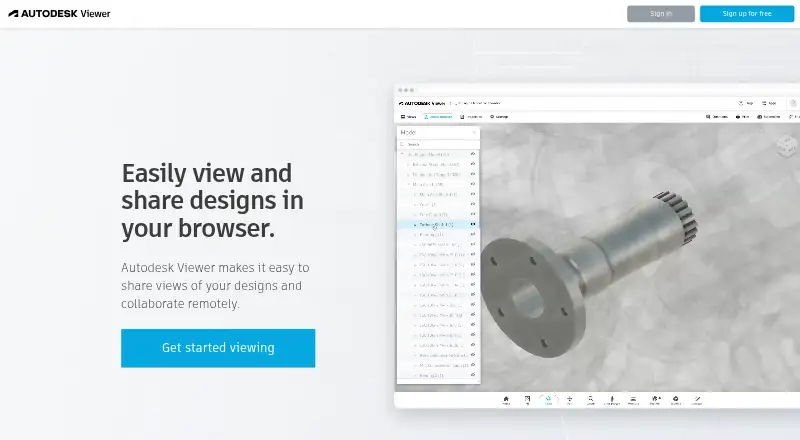
Autodesk Viewer is a free web application for uploading, converting, viewing, measuring, annotating, and sharing 2D and 3D design files. It is aimed at designers, engineers, project teams, colleagues, and stakeholders who need to review CAD and related models in a browser without the original authoring software. Support for more than 80 file types includes DWG, DXF, STEP, DWF, and RVT, giving teams a broad way to open design files from different workflows.
Its strongest area is design review depth. Users can measure distances and angles, add text and drawing markups, comment on review markups, inspect model geometry with the Model Browser, and view metadata and properties. Printing drawings and exporting screenshots support review records and communication, while link sharing makes it practical to distribute design views to colleagues or stakeholders. For teams that need more than simple file preview, the combination of measurements, annotations, model browsing, and metadata inspection covers the core review tasks in one browser-based tool.
The published offering is free, with no paid tiers described, but an Autodesk Account is required to start using the service. Its web-only platform is well suited to accessible design review, but may be less appropriate for users who need offline access or a full authoring environment. Choose Autodesk Viewer when the priority is free browser access to a wide range of 2D and 3D files with review tools. Consider an authoring application instead when the workflow requires creating or editing designs rather than inspecting and sharing them.
Your product? Our editors can test Autodesk Viewer in depth and publish a review, labelled as paid · from $149/mo →
Autodesk Viewer pricing
Autodesk Viewer fact sheet
| Free plan | Yes |
|---|---|
| Paid from | Free |
| DWG support | Yes |
| Measurement tools | Yes |
| Markup and annotation | Yes |
| Sharing and collaboration | Yes |
| Platforms | Web |
| DXF support | Yes |
| Deployment | Cloud, Browser extension |
| Platforms | Web |
| Support | Docs |
| Built for | Solo, Small business, Mid-market, Enterprise (editorial estimate) |
| Pricing | Free plan |
| Website | viewer.autodesk.com |
| Facts checked | 22 Sep 2026 |
Alternatives to Autodesk Viewer
- Autodesk Design ReviewA mature free Windows viewer for design review, comparison, measurement, and markups.9.0
- Autodesk DWG TrueViewA capable free Windows viewer for DWG and DXF files, with measurement and conversion tools.8.8
- Bentley ViewA capable free Windows viewer for complex CAD review, measurement, analysis, and scaled printing.8.7



See all Autodesk Viewer alternatives →
Autodesk Viewer vs the competition
- Autodesk Viewer vs Autodesk Design Review
- Autodesk Viewer vs Autodesk DWG TrueView
- Autodesk Viewer vs Bentley View
- Autodesk Viewer vs ABViewer
- Autodesk Viewer vs ODA Viewer
- Autodesk Viewer vs VariCAD Viewer


Compare Autodesk Viewer with any tool side by side →
Used Autodesk Viewer? Be the first to review it
The editor score above is our own research. What this page doesn't have yet is a reader's view — what you used Autodesk Viewer for, what worked and what didn't. No stars are seeded and no review is paid for; an editor reads every one before it appears.
Write a reviewTwo minutes · verified accounts only · read by an editor before it appears
Featured on iTechGuides

Autodesk Viewer is listed in our CAD Viewer Software directory. Add the badge to your site — it links back to this page.
<a href="https://www.itechguides.com/products/autodesk-viewer/"><img src="https://www.itechguides.com/best/badge/autodesk-viewer.svg" alt="Featured on iTechGuides" width="230" height="46"></a>
Reviewed by iTechGuides Editors · Editorial team · Updated Oct 2026
Advertiser disclosure: iTechGuides is reader-supported. Vendors can pay for top positions in our rankings and for a place on other products' pages, and we may earn a commission when you click some links. Bought places stand at the number bought; this page and our disclosure say so. Paying vendors may get a fuller, more detailed review from our editors, and that review can change their score. How we rank.
Last updated · How we research and update