
ServiceTray
ServiceTray: A free Windows utility for service control, monitoring, alerts, and startup shortcuts. Ranked #23 of 30 in Startup Manager Software by our editors (6.5/10); pricing: Free plan; best for tray-based service monitoring.
At a glance
- Editor score6.5 / 10
- PricingFree plan
- Best forTray-based service monitoring
- Free planYes
- Paid fromFree
- Founded2004 · Oakland, California, USA
- Facts checked20 Sep 2026
Where it wins
- Starts, stops, and restarts services from the system tray
- Reports service state, process ID, CPU, memory, and uptime
- Sends notifications when services stop or start unexpectedly
Where it doesn't
- Windows-only support limits use across other platforms
- Focused on services rather than general startup-item inspection
- Free-only model offers no paid capability tiers
Our verdict on ServiceTray
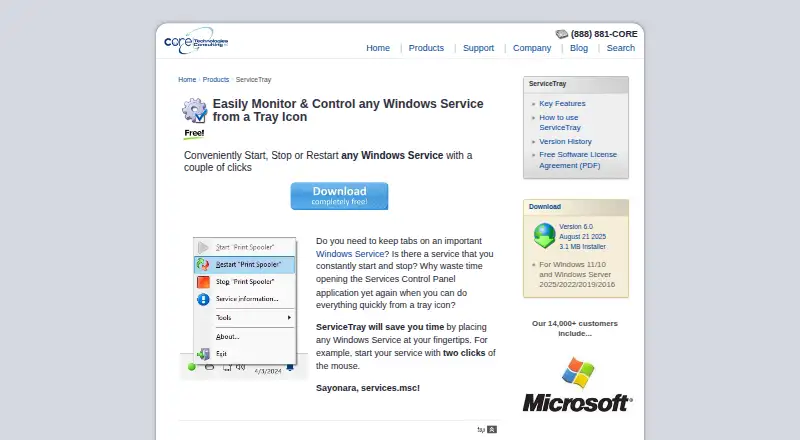
ServiceTray is a free Windows utility for monitoring and controlling Windows services from a system-tray icon. It is suited to people who need quick access to service controls, visible status indicators, and alerts when a service changes state. The product supports Windows 10 and 11, and it can manage multiple services with customizable tray icons. It also creates shortcuts in the Windows Startup folder, making it relevant to users who want ServiceTray available when Windows starts, though its focus is service management rather than broad startup-item administration.
Its main strength is the depth of information and control available for individual services. Users can start, stop, and restart services from the tray, while the product displays the process ID, CPU usage, memory, and uptime. Notifications cover unexpected service stops or starts, and the tray icon indicates service state. ServiceTray also opens Windows Services, Event Viewer, and Task Manager, keeping related administration tools close at hand. The free installer and straightforward service-focused scope make it a practical fit for personal or operational Windows workflows that center on service status.
Platform fit is narrow but clear. ServiceTray is designed for Windows and integrates with AlwaysUp, while its configuration tool can create shortcuts, including entries in the Windows Startup folder. It is a good choice for monitoring several Windows services without opening system administration windows repeatedly. Buyers seeking a general startup manager, cross-platform coverage, or a broader startup-inspection workflow should choose a more expansive tool instead. For Windows users whose priority is tray-based service control, resource visibility, and state-change notifications, ServiceTray keeps its feature set focused.
Your product? Our editors can test ServiceTray in depth and publish a review, labelled as paid · from $149/mo →
ServiceTray pricing
ServiceTray fact sheet
| Free plan | Yes |
|---|---|
| Paid from | Free |
| Startup delay | Not verified |
| Service control | Yes |
| Startup inspection | Not verified |
| Windows support | Windows 10 and 11 |
| Portable edition | Not verified |
| Startup item limit | Not verified |
| Deployment | Desktop |
| Platforms | Windows |
| Support | |
| Built for | Small business, Mid-market, Enterprise (editorial estimate) |
| Integrations | 1 integrations: AlwaysUp |
| Pricing | Free plan |
| Website | coretechnologies.com |
| Facts checked | 20 Sep 2026 |
ServiceTray integrations
ServiceTray lists 1 integrations on its own site.
- AlwaysUp
Alternatives to ServiceTray
- AutorunsA free, detailed Windows tool for auditing and controlling startup activity.9.4
- Autorun OrganizerA broad, free Windows utility for controlling startup entries, delays, services, and scheduled tasks.9.2
- HiBit Startup ManagerA free Windows utility combining startup control, monitoring, delays, and system management.9.0



See all ServiceTray alternatives →
Used ServiceTray? Be the first to review it
The editor score above is our own research. What this page doesn't have yet is a reader's view — what you used ServiceTray for, what worked and what didn't. No stars are seeded and no review is paid for; an editor reads every one before it appears.
Write a reviewTwo minutes · verified accounts only · read by an editor before it appears
Featured on iTechGuides

ServiceTray is listed in our Startup Manager Software directory. Add the badge to your site — it links back to this page.
<a href="https://www.itechguides.com/products/servicetray/"><img src="https://www.itechguides.com/best/badge/servicetray.svg" alt="Featured on iTechGuides" width="230" height="46"></a>
Reviewed by iTechGuides Editors · Editorial team · Updated Oct 2026
Advertiser disclosure: iTechGuides is reader-supported. Vendors can pay for top positions in our rankings and for a place on other products' pages, and we may earn a commission when you click some links. Bought places stand at the number bought; this page and our disclosure say so. Paying vendors may get a fuller, more detailed review from our editors, and that review can change their score. How we rank.
Last updated · How we research and update